
Natec Fury Battler Manual
PDF manual · 12 Pages
English



Quick check
Incorrect answer, please try again.
Chat with your Natec Fury Battler manual using AI
Get instant AI answers from your Natec Fury Battler manual
Ask anything about the Natec Fury Battler. Answers come from this manual, with the pages they are based on.
Ask a Question
Do you recommend Fury Battler?
Yes NoFrequently Asked Questions
The mouse features a precise optical sensor with a maximum resolution of 6400 DPI, allowing for highly customizable sensitivity settings via the included software.
Is this answer helpful?
No installation is required. Simply download the latest version from the website, copy the Battler.exe file to your computer, and double-click the icon to run it.
Is this answer helpful?
The specifications list compatibility with PC or PC-compatible devices running Windows XP, Vista, 7, 8, or 10. Mac compatibility is not explicitly stated.
Is this answer helpful?
The Natec Fury Battler comes with a 2-year limited manufacturer warranty, provided the device has not been damaged by misuse or unauthorized repairs.
Is this answer helpful?
Yes, the gaming software includes a profile editor and macro recording capabilities, allowing you to create and save custom configurations for various games.
Is this answer helpful?
The mouse measures 120mm in length, 63mm in width, and 39mm in height, offering a compact and ergonomic design.
Is this answer helpful?
No, the Natec Fury Battler is powered directly through the USB connection and does not require internal batteries.
Is this answer helpful?
Advantages and Disadvantages
Advantages

- Ultra-lightweight construction reduces hand strain during long gaming sessions.
- High-precision optical sensor offers up to 6400 DPI for accurate tracking.
- Durable main switches rated for 5 million clicks ensure long-term reliability.
- Portable software requires no installation, just copy and run the executable file.
- Compatible with a wide range of Windows operating systems from XP to 10.
Disadvantages

- Requires downloading external software for full button and DPI customization.
- Ventilation slots must remain unblocked to prevent potential overheating issues.
- Not suitable for use in extremely hot, cold, or humid environments.
- Warranty is voided if the device is disassembled by unauthorized personnel.
- Limited color options available primarily in gray and black finishes.
Product Specification
Suitability
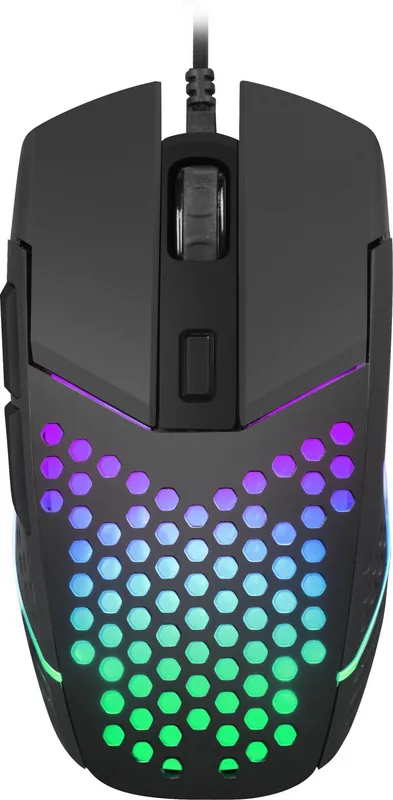
right hand
Keys
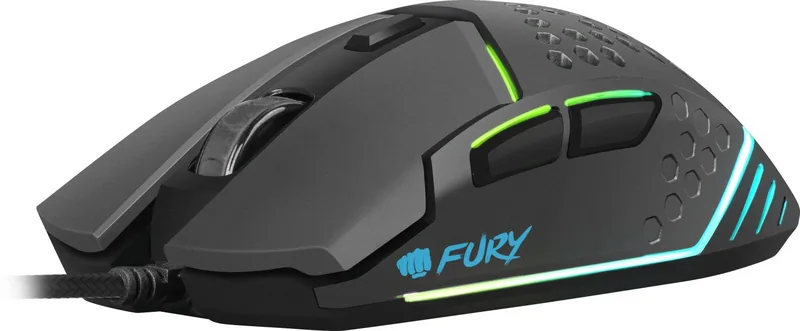
6 (total), 2 (main), 1 (top), 2 (left), 1 (scroll wheel click)
Scroll Wheel
1x 2-way
Tracking
LED-red/IR
Resolution
6400dpi, reducible to 500dpi
Lighting
RGB
Connection
wired (61.02in), USB-A 2.0
Power Supply
USB
Dimensions (WxDxH)
2.48x1.54x4.72in
Approximate Volume
4.70cu in (approximate shape)
Weight
2.29oz (without cable)
Color
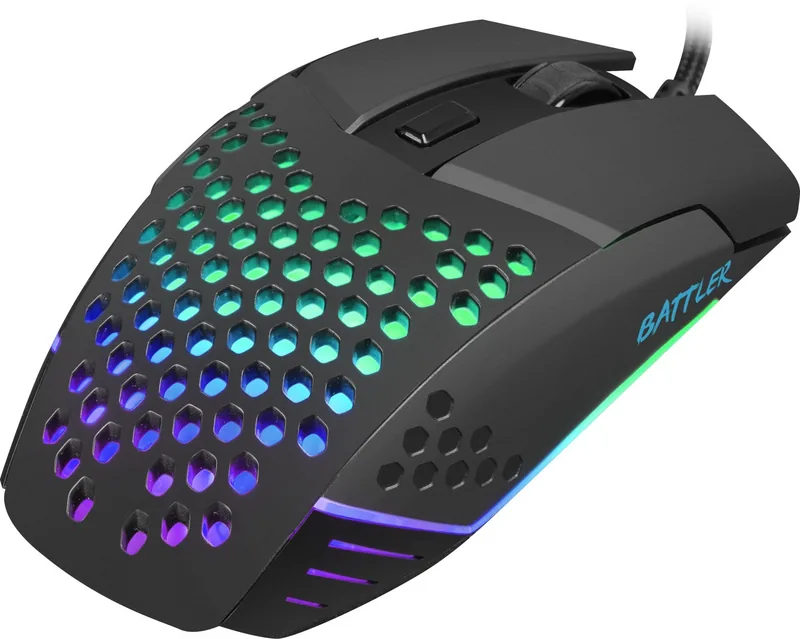
multicolor, gray/black, logo
Features
perforated surface, fabric cable
Product Description
Natec Fury Battler Gaming Mouse: Precision Meets Lightweight Design
The Natec Fury Battler Gaming Mouse in a striking gray and black finish is engineered for gamers who demand speed, accuracy, and comfort. This optical gaming mouse features an ultra-lightweight construction that reduces hand fatigue during extended gaming sessions, allowing for swift and precise movements across any surface. With a high-resolution optical sensor capable of up to 6400 DPI, users can customize their sensitivity to match their specific playstyle, whether they are engaging in fast-paced shooters or strategic role-playing games.
Setting up the Natec Fury Battler is incredibly straightforward. Simply connect the device to a USB port on your PC or compatible device running Windows XP through Windows 10. The system will automatically recognize the mouse, and after about 15 seconds, the necessary drivers are ready for use. For those looking to maximize performance, the included software allows for deep customization without requiring installation. Users just need to copy the Battler.exe file to their computer, run it, and configure programmable buttons and DPI settings instantly. The main button switches are built to last with a lifespan of 5 million clicks, ensuring durability even under intense pressure.
Safety and compliance are paramount in the design of this device. It adheres to EU safety requirements and the RoHS European standard, ensuring that no harmful substances are used in its production. The product includes ventilation slots to prevent overheating, so it is important not to block these openings. Additionally, the WEEE symbol indicates that this device should be recycled properly rather than disposed of as regular household waste, promoting environmental responsibility.
Important Notes
- Always avoid dropping or shaking the device to prevent hardware damage.
- Do not use the mouse in extreme temperatures or dusty environments.
- Unauthorized repairs will void the two-year limited manufacturer warranty.
Pros and Cons
Pros
- Ultra-lightweight construction reduces hand strain during long gaming sessions.
- High-precision optical sensor offers up to 6400 DPI for accurate tracking.
- Durable main switches rated for 5 million clicks ensure long-term reliability.
- Portable software requires no installation, just copy and run the executable file.
- Compatible with a wide range of Windows operating systems from XP to 10.
Cons
- Requires downloading external software for full button and DPI customization.
- Ventilation slots must remain unblocked to prevent potential overheating issues.
- Not suitable for use in extremely hot, cold, or humid environments.
- Warranty is voided if the device is disassembled by unauthorized personnel.
- Limited color options available primarily in gray and black finishes.
Frequently Asked Questions
Q: What is the maximum DPI resolution of the Natec Fury Battler? A: The mouse features a precise optical sensor with a maximum resolution of 6400 DPI, allowing for highly customizable sensitivity settings via the included software.
Q: How do I install the configuration software? A: No installation is required. Simply download the latest version from the website, copy the Battler.exe file to your computer, and double-click the icon to run it.
Q: Is the mouse compatible with Mac computers? A: The specifications list compatibility with PC or PC-compatible devices running Windows XP, Vista, 7, 8, or 10. Mac compatibility is not explicitly stated.
Q: What is the warranty period for this product? A: The Natec Fury Battler comes with a 2-year limited manufacturer warranty, provided the device has not been damaged by misuse or unauthorized repairs.
Q: Can I program multiple profiles for different games? A: Yes, the gaming software includes a profile editor and macro recording capabilities, allowing you to create and save custom configurations for various games.
Q: What are the dimensions of the mouse? A: The mouse measures 120mm in length, 63mm in width, and 39mm in height, offering a compact and ergonomic design.
Q: Does the mouse require batteries? A: No, the Natec Fury Battler is powered directly through the USB connection and does not require internal batteries.
Search for 67,732 Manuals online


Type-in Brand or Model