
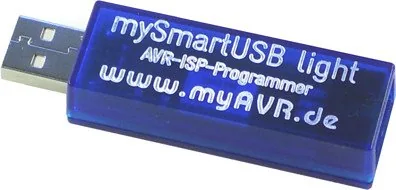

myAVR mySmartUSB light Manual
PDF manual · 16 Pages
English



Quick check
Incorrect answer, please try again.
Chat with your myAVR mySmartUSB light manual using AI
Get instant AI answers from your myAVR mySmartUSB light manual
Ask anything about the myAVR mySmartUSB light. Answers come from this manual, with the pages they are based on.
Ask a Question
Do you recommend mySmartUSB light?
Yes NoFrequently Asked Questions
The mySmartUSB light uses the Silicon Labs CP2102 USB controller and requires the CP210x VCP driver. Download it from myAVR’s download area or directly from silabs.com. Install the driver before connecting the device and you need administrator rights.
Is this answer helpful?
Use the myAVR ProgTool (also bundled with SiSy and Workpad) to detect the device, then select the desired voltage in the pop-up control. You can also enable or disable target power from that interface. Changes are applied dynamically during programming.
Is this answer helpful?
The mySmartUSB light supports AVR910/AVR911 and STK500v2 compatible firmware protocols. Select the matching protocol in your programming tool (e.g., choose 'Atmel STK500/AVRISP' or 'stk500v2' for AVRDUDE) to ensure proper communication.
Is this answer helpful?
If an IDE fails to detect the device, open the OS Device Manager, locate 'CP210x USB to UART Bridge Controller (COMx)', and change the COM port number (Advanced Port Settings). Use a low COM number such as COM3 or COM4 to maximize compatibility; admin rights are required.
Is this answer helpful?
Yes, the mySmartUSB light can supply target power at 5 V or 3.3 V from the USB bus, with typical current draw 10–50 mA and a maximum available current of about 100 mA. Larger target systems may require an external power supply.
Is this answer helpful?
Yes, the device supports firmware updates via a bootloader. Use the provided update procedures and files available in the myAVR download area to flash updated firmware versions and switch between supported programmer protocols if needed.
Is this answer helpful?
The mySmartUSB light is intended for educational and lab environments. Ensure correct wiring, observe general electronic safety practices, and avoid using it to control critical or industrial processes. The manufacturer disclaims liability for misuse or improper operation.
Is this answer helpful?
Advantages and Disadvantages
Advantages

- Compact USB-stick form factor enables easy use with laptops and desktops.
- Supports both 5 V and 3.3 V target voltages with software-controlled switching.
- Automatic ISP clock adapts to slow target clocks, improving device compatibility.
- Uses CP2102 USB-UART bridge to present a virtual COM port for broad tool support.
- Compatible with many toolchains: myAVR ProgTool, BASCOM, AVR Studio, AVRDUDE, CodeVision.
Disadvantages

- Requires installation of CP210x VCP drivers and admin rights on host system.
- Some IDEs only scan COM1–COM4; virtual port may need manual reassignment.
- Max USB-supplied current limited to 100 mA, may not power larger target systems.
- Designed for educational/lab use—not certified for industrial control or critical systems.
- Firmware choice (AVR910/AVR911 or STK500v2) may require selecting correct protocol in tools.
Product Specification
Manufacturer
myAVR
Type
Programmer-Interface (Atmel AVR)
Platform
Universal
Interfaces
USB 2.0, 1x 6-Pin Socket, AVR911/910/109, STK500
Special Features
USB Stick Design
Number of Parts
2
Package Contents
1x Programmer-Interface, 1x Cable
Product Description
myAVR mySmartUSB light - AVR ISP USB Programmer Manual
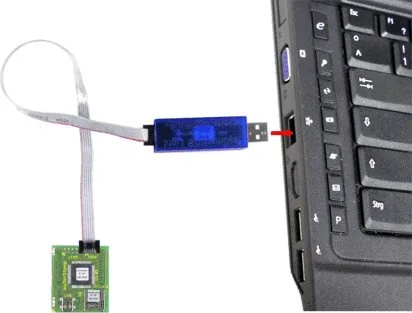
The myAVR mySmartUSB light is a compact USB-stick AVR ISP programmer designed to program and communicate with a wide range of Atmel AVR microcontrollers. Built around the CP2102 USB-to-UART bridge, it exposes a virtual COM port for host software and supports both AVR910/AVR911 and STK500v2 firmware protocols. The device supplies target systems with either 5 V or 3.3 V and allows dynamic, software-controlled switching of the programming voltage. An intelligent automatic ISP clock/step-down mode adjusts the ISP frequency to match slow target clock rates, improving compatibility with many devices.
Small and portable, the mySmartUSB light connects via a standard 6-pin ISP connector (with optional 10-pin adapter) so microcontrollers can be programmed in-system without removal. It requires the Silicon Labs CP210x VCP driver to be installed on the PC, after which a virtual COM port appears in the OS device manager. The unit draws power from the USB bus (typical 10–50 mA, max 100 mA) and provides status LEDs for power and activity. Firmware updates are possible via a bootloader.
The mySmartUSB light integrates with common AVR toolchains and IDEs: myAVR ProgTool, SiSy, myAVR Workpad, BASCOM (from v2.0.7.9), AVR Studio, AVRDUDE, and CodeVision (from v1.25.5). Each tool requires selecting the virtual COM port and appropriate programmer type (STK500/AVRISP or AVR911/AVR910). For AVR Studio, ensure the CP2102 driver is installed and set a COM port (commonly COM3 or COM4) if auto-detection fails. AVRDUDE usage follows typical command-line syntax, specifying -c stk500v2 and -P COMx.
The myAVR ProgTool facilitates port detection, voltage selection (3.3 V / 5 V), and enabling/disabling target power. Use the tool’s query/search feature to detect the device and correct COM port; if the assigned virtual COM number is too high for some IDEs, reassign a lower COM number through the OS device manager (requires admin rights). The device’s mechanical footprint is compact (approx. 60×30×12 mm, ~12 g) and its PCB is a double-sided FR8 board.
Designed primarily for educational and laboratory use, the mySmartUSB light is not intended for controlling industrial installations. Users must follow general safety guidelines for electronic equipment and ensure correct connections. Drivers, ProgTool, and documentation are available from myAVR’s download area.
Notes
- Requires CP210x VCP driver from Silicon Labs or myAVR download area.
- Supports dynamic target voltage switching and firmware updates via bootloader.
- Recommended COM ports: COM3 or COM4 for broad IDE compatibility.
- Designed for learning and lab use; not suitable for controlling critical industrial systems.
Search for 67,706 Manuals online


Type-in Brand or Model
Mary Morgan
10 months ago
Does the mySmartUSB need extra software or the SupportBox? My PC detects the device but programming/upload fails - what should I check first?
Manual.ly
10 months ago
For basic AVR programming (for example Atmega32), the mySmartUSB should work once the required drivers are installed and the device is correctly recognized in Windows. If you need to change the microcontroller supply voltage, the SupportBox is required for that feature; without it the programmer may not operate correctly even though it appears in the Device Manager. Also verify you have the proper programming software (such as myAVR ProTool) or the correct command settings if you use avrdude, and confirm the correct COM port and wiring. If uploads still fail after installing drivers, recheck the connections and then contact support with your setup details.