
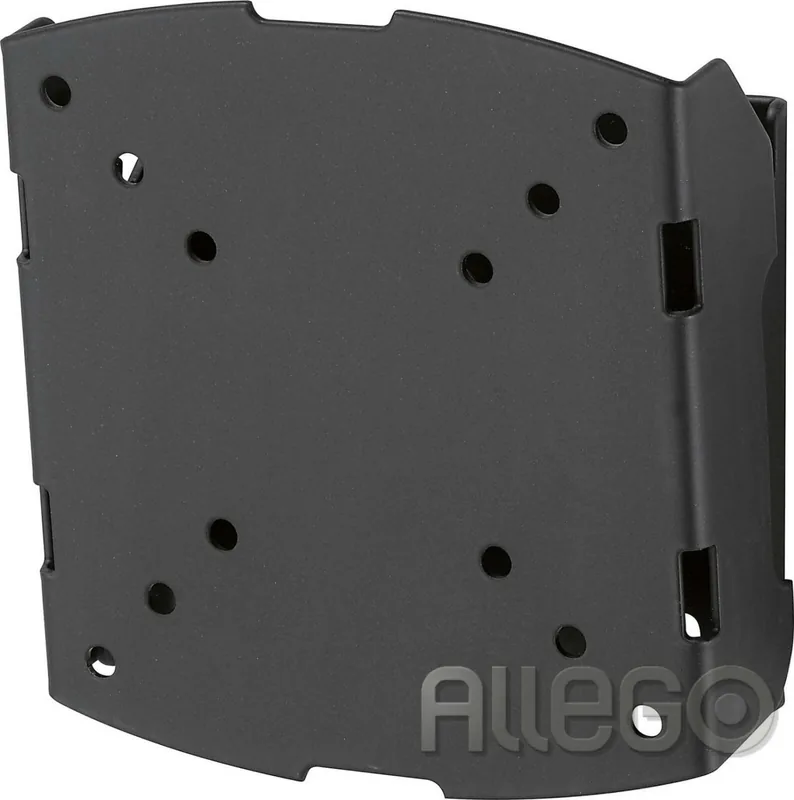

Mount Massive MNT 52 Manual
PDF manual · 2 Pages
English



Quick check
Incorrect answer, please try again.
Chat with your Mount Massive MNT 52 manual using AI
Get instant AI answers from your Mount Massive MNT 52 manual
Ask anything about the Mount Massive MNT 52. Answers come from this manual, with the pages they are based on.
Ask a Question
Do you recommend MNT 52?
Yes NoFrequently Asked Questions
The maximum weight support is fifty kilograms or one hundred ten pounds.
Is this answer helpful?
The VESA pattern size is 100 by 100 millimeters exactly.
Is this answer helpful?
Yes it is compatible with LCD and plasma screens universally.
Is this answer helpful?
Angles adjust from zero to fifteen degrees tilt for comfort.
Is this answer helpful?
M6 and M4 screws are included for all assembly needs.
Is this answer helpful?
Instructions available in German French and Spanish.
Is this answer helpful?
Check packaging for warranty dates and specific details.
Is this answer helpful?
Advantages and Disadvantages
Advantages

- Supports up to 50kg load capacity for stability.
- Compatible with VESA 100x100 standard pattern.
- Includes multi-language instructions for users.
- Adjustable viewing angles for reduced glare.
- Secure mounting hardware provided in kit.
Disadvantages

- Limited to smaller VESA sizes only.
- Weight limit too low for large screens.
- No swivel function beyond tilting action.
- Requires wall for installation only.
- Manual only in standard languages available.
Product Specification
Type
Wall Mount
Number of Monitors
1
Screen Size
10-26 inches
Mobility
Tiltable (0 deg, +15 deg)
Distance to Wall
1.57 inches
Max Load
110.23 lbs
VESA
min. 50x50, max. 100x100
Color
Black
Weight
1.15 lbs
Product Description
Discover the Mount Massive MNT 52 Wall Bracket
Finding the right mounting solution for your display can be quite challenging for many homeowners. The Mount Massive MNT 52 Manual provides essential guidance for installing a universal LCD or plasma wall bracket effectively without issues. This hardware allows you to securely attach monitors or TVs to your wall, freeing up valuable desk space while ensuring complete stability during daily use. Whether you are setting up a modern home office or a commercial display for retail, this bracket offers reliable performance and durability for years of consistent operation. It represents a solid choice for anyone looking to upgrade their visual setup without cluttering the environment around you.
Key Specifications Overview
The Mount Massive MNT 52 is designed with very specific technical requirements in mind for maximum utility and safety. According to the installation guide, this unit supports a maximum VESA pattern of 100 x 100 millimeters. This ensures compatibility with a wide range of smaller screens often found in retail settings or small offices. It also handles a maximum load of fifty kilograms or one hundred ten pounds safely. This capacity makes it suitable for many standard flat panel screens found in offices or large entertainment rooms. The assembly process includes necessary hardware like M6 and M4 screws. You will also find components measuring eighty millimeters and seventy millimeters in diameter where required for stability. These specific numbers help users prepare their spaces correctly before beginning work.
Installation and Usability Guide
Using the Mount Massive MNT 52 Manual helps ensure a safe setup every single time. The guide is available in multiple languages, including German, French, and Spanish. This international support indicates a focus on global usability and customer safety standards. The bracket features adjustable angles for optimal viewing comfort throughout the day easily. Angles range from zero to fifteen degrees to reduce glare effectively during usage. Proper installation prevents damage to both the wall and the screen itself. Always follow the provided steps to secure VESA 100x100 plates correctly without hesitation. The design prioritizes user experience while maintaining structural integrity under pressure.
Important Notes for Safety
Always check your equipment weights before finalizing the mount position on your wall. The forty millimeter holes require precise alignment to function as intended by the design. Ensure the wall can support the static load of the device fully. Regular maintenance checks keep the bracket sturdy over time without wear. For more details, consult the official manual included with every kit. This guide helps prevent accidents and ensures long lasting satisfaction with your new setup. Enjoy your enhanced workspace without clutter or unnecessary distractions in your view.
Search for 67,732 Manuals online


Type-in Brand or Model