

Motorola VerveCam+ Manual
PDF manual · 39 Pages
English


Quick check
Incorrect answer, please try again.
Chat with your Motorola VerveCam+ manual using AI
Get instant AI answers from your Motorola VerveCam+ manual
Ask anything about the Motorola VerveCam+. Answers come from this manual, with the pages they are based on.
Ask a Question
Do you recommend VerveCam+?
Yes NoVideo Manual
Vervebuds fra Motorola
Frequently Asked Questions
The VerveCam+ supports QHD 2.5K (2560x1440 @30fps), Full HD 1080p at multiple frame rates (including 60fps), and HD 720p options (including 120fps for slow motion). Resolution and frame rate are selectable via the Hubble Connect app.
Is this answer helpful?
With the included IP68 waterproof case, the VerveCam+ can be used down to 25 meters. Do not immerse the camera without the waterproof case and avoid high-pressure water conditions (rapids, waterfalls) that can compromise waterproofing.
Is this answer helpful?
The camera supports microSD cards up to 32GB (SDHC). Insert the card with the gold contacts facing down and ensure the waterproof cover is properly closed before using in wet conditions.
Is this answer helpful?
Battery life is approximately 1.5 hours when not connected to Wi‑Fi and about 1 hour when connected to Wi‑Fi. Initial full charge takes around 6 hours using a 5V 1A adapter via the micro‑USB port.
Is this answer helpful?
Yes. Using the Hubble Connect app, you can livestream to YouTube via Wi‑Fi or a mobile hotspot. The app guides you through network selection and Google account sign-in. Note that mobile hotspot streaming will consume significant mobile data.
Is this answer helpful?
Use the Reset button next to the microSD slot: hold it down for 3 seconds. The mode indicator LEDs will light for about 30 seconds. This restores default settings but does not erase photos or videos stored on the microSD card.
Is this answer helpful?
Update the Hubble Connect app via the App Store or Google Play. For firmware, connect the camera to Wi‑Fi and follow Settings > Camera Settings > Camera Information > Update Firmware in the app. Firmware upgrades require manual confirmation and a Wi‑Fi connection.
Is this answer helpful?
Advantages and Disadvantages
Advantages

- High-resolution 2.5K (2560x1440 @30fps) video with 135° field of view for immersive footage.
- IP68 waterproof case included for use up to 25 meters, plus multiple mounts for versatile mounting.
- Hubble Connect app enables live streaming, remote control, editing, and direct sharing to YouTube.
- Loop recording, time-lapse intervals, slow motion and wide dynamic range expand creative options.
- Mass storage USB transfer and wireless connectivity (Wi‑Fi and BLE) simplify file management and firmware updates.
Disadvantages

- Battery life is limited (~1.5 hours offline, ~1 hour with Wi‑Fi), requiring frequent charging for long sessions.
- microSD support only up to 32GB, which restricts continuous high-resolution recording time.
- Charging via micro‑USB and 6-hour initial charge time may be slow compared with modern fast-charge standards.
- App-dependent advanced functions (time-lapse, loop, firmware updates) require smartphone compatibility and reliable Wi‑Fi.
- Not supported on tablets; default Wi‑Fi password (00000000) must be changed for secure use.
Product Specification
Effective Megapixels
4.0 Megapixels
Sensor
CMOS 1/3"
Video Function
H.264, 2560x1440@30p (16:9), 1920x1080@60p (16:9)
Photo Resolution
JPEG (max. 2688x1512 Pixels)
Digital Zoom
no
Removable Storage
microSD/microSDHC
Connections
USB 2.0
Wireless
Wi-Fi 4 (WLAN 802.11b/g/n)
Power Supply
Li-Ion Battery (640 mAh)
Special Features
Live-Streaming
Color
white
Product Description
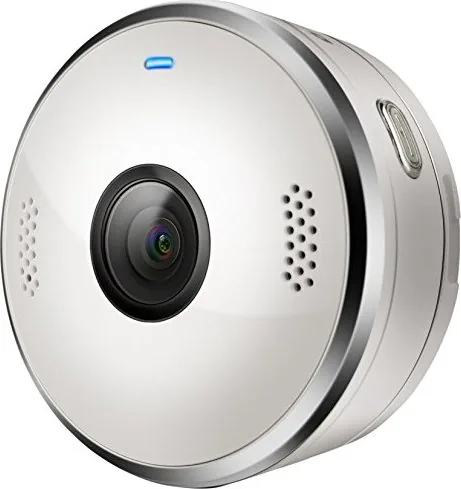
Motorola VerveCam+
The Motorola VerveCam+ is a compact, action-ready lifestyle camera designed for everyday adventures and social sharing. Lightweight and portable, it captures crisp 2.5K video at 30 fps with a wide 135° field of view, making it ideal for travel, sports, vlogging and on-the-move content creation. The camera pairs with the free Hubble Connect for VerveCam app to control settings, preview footage, and handle editing, sharing and live streaming directly to YouTube.
Featuring an IP68 waterproof case that enables use down to 25 meters, the VerveCam+ includes practical mounts and accessories — clip mount, bumper and lanyard, and a universal tripod mount — so you can secure it to helmets, bikes or tripods. Its loop recording and time-lapse modes expand creative possibilities: time-lapse intervals from 1 to 60 seconds and loop segments from 5 to 60 minutes make capturing long events or continuous recording easy. Built-in Wi‑Fi and BLE simplify pairing to smartphones (iOS 8.3+ or Android 4.3+), and the camera appears as a mass storage device for direct file transfer to a PC.
Battery life runs around 1.5 hours without Wi‑Fi and about 1 hour with Wi‑Fi active; the battery charges via micro‑USB (5V 1A) and typically reaches full charge in roughly six hours. The VerveCam+ supports microSD cards up to 32GB for storage and offers a variety of photo resolutions and video modes, including slow motion and wide dynamic range settings. Voice prompts and LED indicators provide simple status feedback, while the factory reset and firmware updates can be managed through the app for smooth maintenance.
Whether you want quick social clips, immersive POV footage, or steady time-lapse sequences, the VerveCam+ balances ruggedness and connected features to fit an active lifestyle.
Notes
- Compatible smartphone apps: Hubble Connect for VerveCam (App Store, Google Play).
- Default Wi‑Fi password: 00000000. Change after setup for security.
- Supports microSD up to 32GB; internal memory is limited.
- Avoid charging or opening ports when wet; waterproof performance requires the case.
Search for 67,706 Manuals online


Type-in Brand or Model