спроба вилучити чи замінити акумулятор призведе до
пошкодження пристрою та призведе до припинення дії
гарантії.
Обережно: ІСНУЄ РИЗИК ВИБУХУ, ЯКЩО БУДЕ
ЗДІЙСНЕНА ЗАМІНА НА НЕПРАВИЛЬНИЙ ТИП
АКУМУЛЯТОРУ. УТИЛІЗУЙТЕ ПРИСТРІЙ НАЛЕЖНИМ
ЧИНОМ.
4. Buttons Operation
Music
Play/Pause
Press
Volume Down/Up Press - / +
Next Track Long press + for 2s
Previous TrackLong press - for 2s
ANC on / offSlide ANC switch button
Calls
Answer/ end call
Press
Reject a call/Long Press - / + for 2s
Call waiting
Receive incoming call and
end ongoing call
Press
Mute during call Press - and +
Pair
Enter pairing mode (first
time)
Press and hold
for 4s
Enter pairing mode
Press and hold
for 2s
Voice
To issue a voice command
during idle mode, then say
the command
Double Press
ES Funcionamiento de los botones
Musica
Reproducir/Pausar
Presione
Volumen abajo/arriba Presione - / +
Siguiente PistaMantenga pulsado por 2s
Pista AnteriosMantenga pulsado por 2s
ANC Encendido/ApagadoDeslice el botón de interruptor ANC
Llamadas
Contestar/Finalizar
Presione
Colgar llamadaMantenga pulsado por 2s - / +
Llamada en espera
Reciba una llamada entrante
y finalice la llamada en curso
Presione
Silenciar durante llamadaPresione - y +
Emparejamiento
Ingrese modo de
emparejamiento (por primera
vez)
Mantenga presionado durante 4
segundos
Ingrese el modo de
emparejamiento
Mantenga presionado durante 2
segundos
Voz
Para emitir un comando de
voz durante el modo inactivo,
diga el comando
Pulse dos veces
NL Knopfuncties
Muziek
Afspelen/onderbreken
Druk op
Volume omlaag/omhoogDruk op -/+
Volgende track Druk 2 sec. op +
Vorige trackDruk 2 sec. op +
ANC aan/uitVerschuif ANC-schakelaar
Oproepen
Oproep beantwoorden/
beëindigen
Druk op
Een oproep weigerenDruk 2 sec. op -/+
Gesprek te wachten
Inkomende oproep
ontvangen en huidige
oproep beëindigen
Druk op
Dempen tijdens het gesprekDruk op - en +
Koppelen
De koppelingsmodus
invoeren (eerste keer)
Houd
4 sec. ingedrukt
De koppelingsmodus invoeren
Houd
2 sec. ingedrukt
Stem
Als u een spraakopdracht
tijdens de inactieve modus wilt
uitgeven, zegt u de opdracht
Druk tweemaal op
PT Botões operacionais
Música
Play/Pause
Pressione
Volume Down/Up Pressione - / +
Next Track (Próxima faixa)Pressione + por 2s
Previous TrackPressione - por 2s
ANC on / offDeslize o botão interruptor ANC
Realização de chamadas
Atender/ desligar chamadas
Pressione
Rejeitar chamada/Long Press - / + for 2s
Chamada em espera
Receber chamada e finalizar
chamada em andamento
Pressione
Mudo durante a chamadaPressione - e +
Pareamento
Selecione modo de
pareamento (primeira vez)
Pressione e segure
por 4s
/2
%
Quick check
I'm not a robot
Incorrect answer, please try again.
Chat with your Motorola Escape 800 ANC manual using AI
Get instant AI answers from your Motorola Escape 800 ANC manual
Ask anything about the Motorola Escape 800 ANC. Answers come from this manual, with the pages they are based on.
Ask a Question
0/1000
Do you recommend Escape 800 ANC?
YesNo
0/1000
Do you recommend Escape 800 ANC?
YesNo
Frequently Asked
Questions
A
Long press the button for 4 seconds until the LED flashes blue rapidly. Go to Bluetooth settings and select Escape 800 ANC.
Is this answer helpful?
A
Yes, there is an AUX-IN port for wired connections when needed.
Is this answer helpful?
A
Charge the headphones for 5 seconds before using with the included cable to continue listening.
Is this answer helpful?
A
Yes, the app is available for free on App Store and Google Play for advanced functions.
Is this answer helpful?
A
Attempting to remove or replace the battery will damage the product and void the warranty.
Is this answer helpful?
A
The status light will turn off when the device is fully charged. Red means charging or low battery.
Is this answer helpful?
A
The manual includes content available in multiple languages such as English, Spanish, and German.
Is this answer helpful?
M: QW-35-FL
Advantagesand
Disadvantages
Advantages
Active noise cancellation reduces external distractions effectively for focused listening sessions
Multi-language support in instructions provides wider accessibility for global users
AUX option allows wired connection when battery is low or Bluetooth fails
Companion app provides map tracking for locating lost earbuds easily
LED indicators clearly show charging, pairing, and low battery status
VS
Disadvantages
Wall charger is not included in the box requiring separate purchase
Non-removable battery design means voids warranty if opened by user
Battery requires 5 seconds charge to function with cable immediately
Manual must be downloaded for specific button combinations and pairings
Charging time is not explicitly stated in the provided text sections
M: QW-35-FL
Product
Specification
Type
Headphones (Over-Ear)
Design
Headband
Acoustic Design
Closed-back
Microphone
No
Connection
3.5mm Jack
Wireless
Bluetooth 4.0, Multipoint
Controls
3-button remote
Battery Life
12 hours
Battery
USB Micro-B Charging Port
Features
Active Noise Cancellation (ANC), Swiveling ear cups, Water Resistant (IPX4)
Software Features
Voice Assistant (Amazon Alexa, Apple Siri, Google Assistant)
Color
Black
M: QW-35-FL
Product
Description
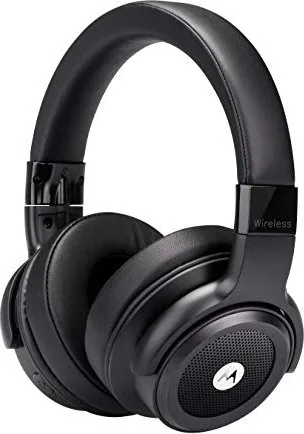
Discovering the Motorola Escape 800 ANC
If you are looking for premium audio experiences, the Motorola Escape 800 ANC is designed to meet your needs. This product brings advanced technology combined with ergonomic design. Users will enjoy immersive soundscapes whether commuting, working from home, or traveling.
Active Noise Cancellation
The primary feature is the Active Noise Cancellation mode. You can toggle this on and off using the sliding switch button located on the device. It helps block out external distractions significantly. You can adjust volume up or down using the designated keys for music control effectively.
Controls and Functionality
Mastering the controls is easy. The buttons handle music playback, volume, and calls. A long press of the plus button skips to the next track. To reject a call, press the minus and plus buttons together for two seconds. These functions are detailed in every Motorola Escape 800 ANC Manual download. You can also issue voice commands during idle mode by double pressing. LED indicators show pairing, standby, charging, and battery status.
Connectivity Options
Wireless freedom is ensured via Bluetooth technology. You simply need to long press for four seconds to start pairing. A blue flash indicates the pairing mode. The device works seamlessly with Android and iOS devices. Alternatively, use the AUX input for a wired connection when Bluetooth is unavailable or for backup listening. This provides flexibility in various environments for different users.
Battery Management
Power management is critical for daily use. Charge the units fully before the first operation. The status light turns red steadily when charging and turns off when fully charged. A red flash warns of low battery levels. If the battery runs out, charge for five seconds to use with the cable. Never attempt to open the battery pack as this voids the warranty and risks explosion if replaced incorrectly. The working temperature ranges from 0 to 45 degrees Celsius.
Companion Application
For enhanced functionality, download the Hubble Connect app. You can locate your last connected device on a map. Updates may add future features to improve the user experience. The app is available in the App Store or Google Play.
Important Notice
Always dispose of the product correctly at a recycling facility. Do not replace the battery yourself. This ensures safety and longevity. The product comes with a Micro USB cable for charging. Ensure wall charger is not included if purchasing separately. Enjoy your music with confidence using these excellent headphones for all day use. The manual is available in multiple languages to assist users globally.