
Moon 680D Manual
PDF manual · 19 Pages
English



Quick check
Incorrect answer, please try again.
Ask a Question
Do you recommend 680D?
Yes NoFrequently Asked Questions
Navigate to the system menu and select the reset option. Confirm the action to restore factory defaults safely.
Is this answer helpful?
No, pairing is straightforward following on-screen prompts. Ensure devices are in pairing mode and close proximity.
Is this answer helpful?
Yes, updates are available through system settings. Backup current data first to ensure safety during updates.
Is this answer helpful?
Use the customization menu to rename inputs like USB or DVD easily to match your layout preferences.
Is this answer helpful?
Reprogram the codes in the IR menu or check for signal compatibility issues between devices and receivers.
Is this answer helpful?
These adjust specific hardware overrides for different models and ensure correct signal path processing.
Is this answer helpful?
Yes, settings allow enabling or disabling inputs like Blu-ray or USB to prevent accidental switching.
Is this answer helpful?
Advantages and Disadvantages
Advantages

- Customizable input labels for user preference
- Robust Bluetooth pairing with proximity support
- Comprehensive system settings for integration
- IR code flexibility for universal control
- Reset function ensures safety and recovery
Disadvantages

- Complex menu navigation for new users
- Requires technical knowledge for advanced setup
- Firmware updates need scheduled downtime
- Specific system codes limit some devices
- Manual setup steps can be verbose
Product Specification
Type
Streaming Player
D/A Converter
32-bit/384kHz
Tuner
No
Audio Formats
DSD256, MQA
Streaming Clients
Apple AirPlay 2, Deezer, Qobuz, Roon, Spotify, Tidal
Audio Connections
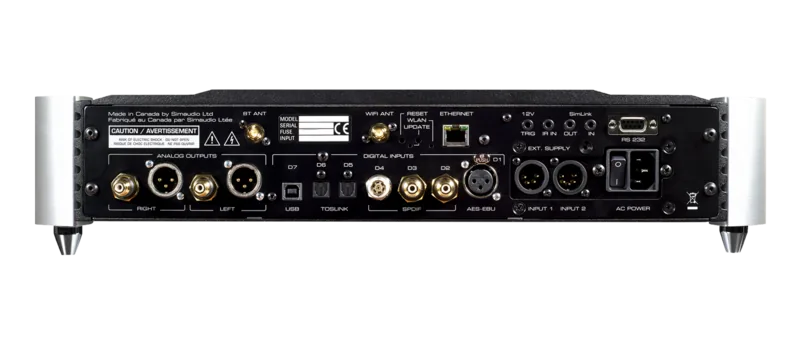
2x Digital Audio In (Coaxial), 2x Digital Audio In (Optical), Digital Audio In (AES/EBU), Pre Out (RCA), Pre Out (XLR)
Additional Connections
USB-B, RJ-45, RS-232
Wireless
Bluetooth, aptX, Wi-Fi 4 (802.11a/b/g/n)
Special Features
Remote Control
Dimensions
18.74 x 4.02 x 16.81 inches (WxHxD)
Weight
39.68 lbs
Product Description
Discover the Moon 680D Multimedia Experience
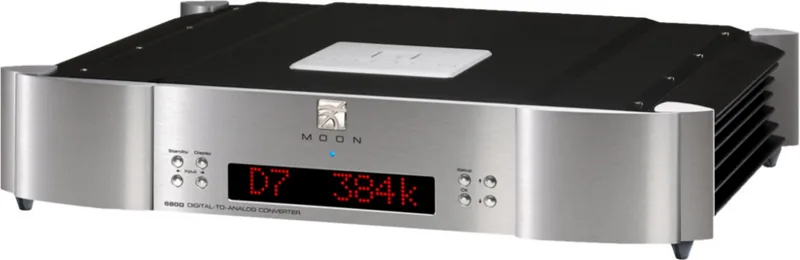
Welcome to the comprehensive guide for the Moon 680D. The Moon 680D Manual provides essential insights into configuring your device for optimal performance. This receiver serves as a central hub for multimedia integration, allowing users to manage various audio and video inputs with precision. Setting up the system is intuitive once you understand options. The interface allows for granular control over how signals are processed.
One of the standout features is the customizable setup menus. Users can access Bluetooth connectivity directly from the front panel. Configuring Bluetooth requires navigating to specific settings where you can pair devices effortlessly. The manual details the steps for enabling and disabling signals. This ensures your audio flows seamlessly without interference. Manage USB and Blu-ray inputs through similar protocols.
Input selection is another critical area covered in the Moon 680D Manual. You can control labels for inputs like DVD. Each input offers unique configuration options that tailor the device to needs. System settings allow for deep customization including phase adjustments and infrared code mapping. These settings help integrate the device with existing remote control environments.
Firmware management is straightforward according to the documentation. The system allows for updates to keep the software current. A reset function is available if errors occur. This safety net ensures you can return to factory defaults. D1 through D9 settings provide specific overrides for compatibility.
Custom menu labels let you rename inputs to match layout. Options are flexible for sorting or functional names. Status indicators provide visual feedback on connected devices. OSD settings allow you to adjust how information appears.
The Moon 680D represents a versatile solution for home entertainment. It balances technical flexibility with user-friendly navigation. Refer to the official guide for accurate information regarding updates. This ensures a stable and reliable experience for years.
Review the notes at the end for critical warnings. Avoid changing critical parameters without understanding impact. Regular checks ensure your setup remains secure and efficient. The IR code section is useful for universal control systems. Ensure your codes match the specific sub-units setup.
Additionally, the manual highlights the importance of proper labeling. Clear labels prevent confusion when switching between sources. Phase adjustment feature ensures audio synchronization across multiple channels. Firmware updates often address minor bugs or add compatibility. Pairing processes require proximity to ensure signals are captured correctly.
Keep the software updated regularly to maintain peak performance. Regular maintenance ensures inputs remain responsive and clear throughout daily use. The Moon 680D Manual serves as your primary reference for all configuration tasks. If issues arise, the reset function allows for a clean restart. Enjoy your enhanced media experience with reliable hardware performance and intuitive controls throughout the system.
Search for 67,706 Manuals online


Type-in Brand or Model