
Moon 240i Manual
PDF manual · 26 Pages
English



Quick check
Incorrect answer, please try again.
Chat with your Moon 240i manual using AI
Get instant AI answers from your Moon 240i manual
Ask anything about the Moon 240i. Answers come from this manual, with the pages they are based on.
240i Maintenance Schedule
Clean only with a dry cloth. Never use flammable or combustible chemicals for cleaning audio components.
If the unit does not power up and the fuse appears blown, replace it with a fuse of the same size and rating (4A for 120V, 2A for 230V).
Ask a Question
Do you recommend 240i?
Yes NoFrequently Asked Questions
The performance continues to improve during the first 400 hours of listening. This break-in period is required for the numerous high-quality electronic parts used throughout the component to settle in.
Is this answer helpful?
No. You cannot connect a USB flash drive or external hard drive to the USB input. It is designed strictly for receiving digital data from computers or players.
Is this answer helpful?
The maximum volume can be adjusted anywhere from 20dB to 80dB. This setting applies to all nine inputs and helps prevent accidental damage to loudspeakers.
Is this answer helpful?
Yes, it is equipped with one analog phono input specifically for turntables equipped with a moving magnet cartridge. Do not use other types of cartridges.
Is this answer helpful?
SimLink allows communication between Moon components. You can control various functions like input switching or standby status with a single button press across the chain.
Is this answer helpful?
Power down the unit immediately. This indicates DC from your source. Disconnect cables, power down sources, then check the fuse or contact the dealer.
Is this answer helpful?
Yes. You can access the blue LED settings in the setup menu and select disable to turn off the light for darker room environments.
Is this answer helpful?
Advantages and Disadvantages
Advantages

- Fully asynchronous DAC supports native DSD256 and PCM up to 384kHz via USB input for superior digital resolution.
- Five digital inputs plus phono stage allow versatile connectivity for turntables and digital sources without extra components.
- OLED display provides clear visual feedback on input and volume while rigid chassis minimizes vibration interference.
- SimLink protocol enables one-touch control and automated input switching between connected Moon brand audio devices.
- Configurable safety features include maximum volume limits and power settings to prevent speaker damage or reduce consumption.
Disadvantages

- Windows computers require a specific USB HD DSD driver installation for high-res audio support unlike Mac systems.
- USB port accepts digital data only and cannot interface with external flash drives or hard drive music storage devices.
- Turntable grounding screw is located on the rear panel requiring careful cable management during setup phase.
- Power cord replacement requires accessing fuse on rear panel which may be inconvenient for permanent installations.
- Maximum volume adjustment limited to 80dB cap which might restrict usage with very sensitive speaker configurations.
Product Specification
Channels
2
Power per Channel
50W (8 ohm), 85W (4 ohm)
Audio Connections
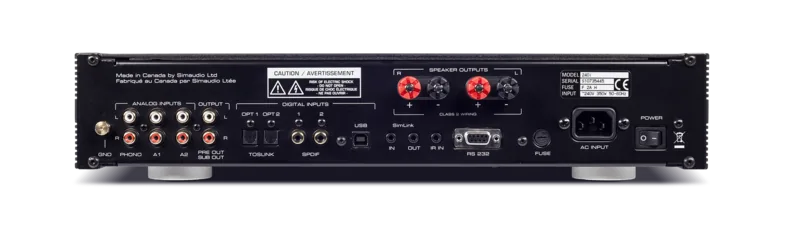
2x Digital Audio In (coaxial), 2x Digital Audio In (optical), 2x Stereo Line In (RCA), Phono In (RCA), AUX In (3.5mm Jack), Pre Out (RCA), Sub Out (RCA), Headphones (6.35mm Jack)
Additional Connections
USB-B
D/A Converter
32bit/384kHz (USB)
Power Consumption
44W Mute, 11W Standby
Features
DSD256
Dimensions
16.89 x 3.50 x 14.41 in (WxHxD)
Weight
24.25 lbs
Product Description
Experience High Fidelity with the Moon 240i
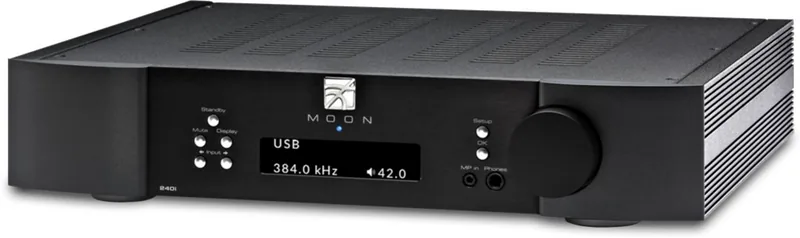
Welcome to the world of high-end audio with the Moon 240i integrated amplifier. This component from Simaudio represents a pinnacle of engineering designed to deliver state-of-the-art performance within an elegant package. Whether you are building a new music system or upgrading an existing setup, this unit promises to capture the elusive emotions of music faithfully. The Moon 240i manual is essential for unlocking its full potential right from the start.
Core Performance and Connectivity
At the heart of this amplifier lies a fully asynchronous DAC supporting native DSD and PCM formats. You will enjoy deep resolution through USB inputs capable of handling DSD256. Digital flexibility is unmatched with five total digital inputs including optical and SPDIF connections. For vinyl enthusiasts, the built-in moving magnet phono input ensures your turntable sounds pristine. Analog sources connect easily via three line-level inputs including a convenient front-mounted jack for portable media players.
Design and Usability
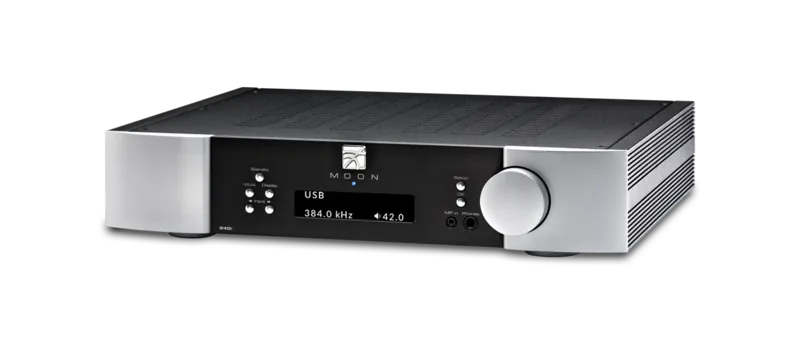
Visual appeal meets functionality with a large OLED display. It provides clear information on input selection and volume levels. The rigid chassis minimizes external vibrations, contributing to stability during operation. Front panel controls allow for intuitive volume adjustments and input switching. The blue LED indicates status, though you can disable it for nighttime listening via the software settings menu.
Smart Features and Integration
SimLink technology stands out as a key feature, enabling seamless communication between compatible Moon components. Pressing play on your CD player can automatically switch inputs on your amplifier. The software setup allows customization of input labels, volume offsets, and maximum volume limits to protect your speakers. This prevents damage from accidental loud bursts. Screen savers prevent OLED burn-in during long periods of inactivity.
Safety and Maintenance
Protecting your investment is paramount. Always disconnect the system from the mains before connecting cables. Ensure proper placement with adequate ventilation to maintain optimal operating temperatures. Do not block the ventilation slots or place heavy objects on top of the unit. Regularly check the power cord and keep batteries away from children. The Moon 240i manual guides you through these important safety precautions.
Conclusion
Listening to your favorite tracks never felt this natural. After a break-in period of 400 hours, the electronics settle for optimal sound quality. This amplifier combines power and grace effortlessly. It remains a top choice for audiophiles seeking reliability and sonic excellence in an integrated design. Enjoy music like never before with this integrated solution.
Search for 67,706 Manuals online


Type-in Brand or Model