

Montech MKey Manual
PDF manual · 42 Pages
English



Quick check
Incorrect answer, please try again.
Chat with your Montech MKey manual using AI
Get instant AI answers from your Montech MKey manual
Ask anything about the Montech MKey. Answers come from this manual, with the pages they are based on.
Ask a Question
Do you recommend MKey?
Yes NoFrequently Asked Questions
The MKey Fullsize ships with hot-swappable Gateron G Pro 2.0 switches, allowing you to change switches without soldering for tailored feel and performance.
Is this answer helpful?
Use Fn+Alt+0~9 (hold 3 seconds) to start macro recording, press Fn+Alt+End (hold 1 second) to finish or continue recording other keys, and Fn+Alt+Space (hold 3 seconds) to reset macros to factory defaults.
Is this answer helpful?
Yes. Lighting brightness, speed, color, and modes are adjustable via Fn hotkeys and Fn+C, while the rotary knob cycles through volume, lighting mode, and zoom control for on-device management.
Is this answer helpful?
No. The MKey is not waterproof. If a spill occurs, immediately power off, disconnect the keyboard, invert it to drain, clean surfaces, and allow at least 48 hours to fully dry before reuse.
Is this answer helpful?
The package includes the keyboard (MKey87 or MKey105), a manual, and a USB-A to USB-C cable. A Windows PC with a USB-A host is recommended for installation.
Is this answer helpful?
No drivers are required for core functions; the keyboard is plug-and-play and should be automatically detected by Windows when connected to a USB-A port.
Is this answer helpful?
Use Fn+Shift+Esc (long press 3 seconds) for a full factory reset of onboard settings and Fn+Alt+Space (hold 3 seconds) to reset macro recordings.
Is this answer helpful?
Advantages and Disadvantages
Advantages

- Hot-swappable Gateron G Pro 2.0 switches allow easy switch customization without soldering.
- Durable PBT keycaps with dye-sublimation printing resist wear and maintain legends.
- Onboard macro recording and profile switching require no external software.
- Integrated rotary knob provides tactile control for volume, lighting modes, and zoom.
- Comprehensive Fn hotkeys enable direct control of lighting, media, and system functions.
Disadvantages

- Requires Windows and a USB-A host for full out-of-box compatibility (may need adapter for USB-C-only hosts).
- Keyboard is not waterproof—spills require lengthy drying and careful handling.
- No mention of dedicated software for advanced customization or macro management.
- Relatively heavy full-size variant (approx. 1563g) may be less portable.
- Onboard-only controls can be less convenient for complex macro editing compared with software-based solutions.
Product Specification
Layout
US
Type
mechanical
Lighting
RGB, per-key customizable
Keycap level
regular, with frame
Keycap format
regular
Keycap shape
concave
Numpad
Standard
Arrow keys
Standard
Control keys
Standard
F-keys
Standard (top row, spaced downwards, in groups of 4)
Enter key
shortened
Delete key
Standard
Status indicator
Capslock, Num, Scroll lock
Wrist rest
N/A
Housing
Plastic
Connection
wired (74.80in), USB-C, detachable cable (USB-C female)
Power supply
USB
Dimensions (WxHxD)
17.44x1.61x5.35in
Weight
3.44lb
Special features
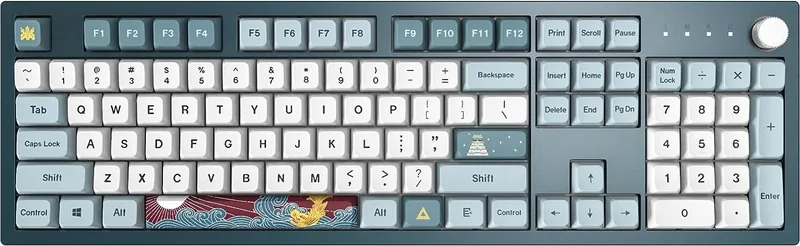
1x volume rotary knob (right top), Anti-Ghosting (N-Key-Rollover), 4x additional keycaps included, switch changeable (Hot-Swap), FN key, sound damped (foam), switches pre-lubed
Switch manufacturer
Gateron
Tactile feedback
none
Damping
none
Key travel
0.16in (+/-0.02in tolerance)
Pre-travel
0.08in (+/-0.02in tolerance)
Product Description
Montech MKey Fullsize — US Manual Overview
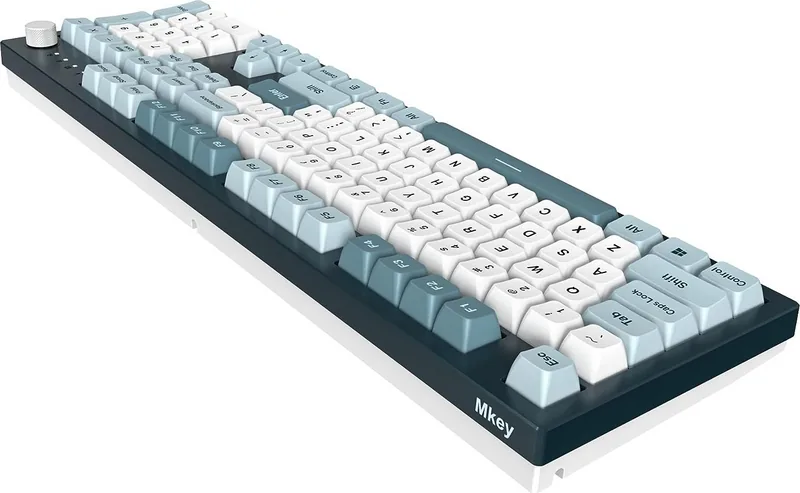
The Montech MKey Fullsize is a feature-packed mechanical keyboard available in full-size (MKey105) and TKL (MKey87) layouts. Built with hot-swappable Gateron G Pro 2.0 switches and durable PBT keycaps using dye-sublimation printing, it targets gamers, creators, and heavy typists seeking a robust, customizable typing experience. The keyboard pairs a solid ABS case and steel switch frame with an FRP PCB for stability and longevity.
Design and Build
The MKey Fullsize showcases a practical, sturdy design: PBT keycaps resist shine and wear, while the ABS top/bottom case keeps weight manageable. Two size options accommodate desk space and workflow preferences. The keyboard ships with a USB-A to USB-C cable and requires a Windows PC with a USB-A host for plug-and-play setup.
Lighting and Controls
Onboard RGB lighting offers multiple effects and direct control via Fn hotkeys or the integrated rotary knob. The knob cycles through volume, lighting mode, and zoom functions; each mode displays distinct lighting patterns (blue/white comet for volume, colorful RGB for lighting, red/white comet for zoom). Lighting speed, direction, brightness, and colors are adjustable via Fn combinations and Fn+C.
Media and Macro Functions
Multimedia shortcuts (Fn+F5–F12) cover playback, mute, microphone toggle, calculator, and a Boss Key for instant desktop access. The keyboard supports on-board macro recording without software: Fn+Alt+0–9 to start recording (3s), Fn+Alt+End to stop (1s), and Fn+Alt+Space for factory reset (3s). Profiles can be switched via Fn+0–9, enabling quick access to custom mappings.
Safety, Maintenance, and Disposal
The MKey is a 5V DC device that minimizes electric shock risk. It is not waterproof; spill guidance recommends immediate power-off, disconnecting, inverting the keyboard to drain, and drying for at least 48 hours. Cleaning instructions advise unplugging, using compressed air for debris, and cautious vacuuming to avoid losing pop-off keycaps. Disposal follows WEEE / ROHS 2012/19/EU recycling guidelines.
Who It's For
This keyboard suits users who want a durable, customizable mechanical board with convenient onboard controls and macros without relying on external software. The hot-swap capability lets enthusiasts test and change switches easily.
Notes
- Ships with USB-A to USB-C cable; direct connection to PC USB ports recommended over hubs.
- Onboard macro and lighting controls remove the need for dedicated software for many users.
- Not waterproof; follow spill and drying instructions to avoid damage.
Search for 67,732 Manuals online


Type-in Brand or Model