
Montech King 95 Manual
PDF manual · 22 Pages
English



Quick check
Incorrect answer, please try again.
Chat with your Montech King 95 manual using AI
Get instant AI answers from your Montech King 95 manual
Ask anything about the Montech King 95. Answers come from this manual, with the pages they are based on.
Ask a Question
Do you recommend King 95?
Yes NoFrequently Asked Questions
The chassis supports ATX, Micro-ATX, and Mini-ITX form factors allowing broad compatibility.
Is this answer helpful?
You can install graphics cards up to 420mm in length inside this case.
Is this answer helpful?
Yes, you can switch between mesh and glass panels for different airflow needs.
Is this answer helpful?
No, the warning states the dust filter mesh is non-removable for safety.
Is this answer helpful?
It supports multiple fans including 140mm on sides and 360mm radiators on top.
Is this answer helpful?
Yes, it includes Type-C and two USB 3.0 ports plus audio jacks.
Is this answer helpful?
Yes, top mounting is available for better cable management and airflow.
Is this answer helpful?
Advantages and Disadvantages
Advantages

- Large GPU clearance fits up to 420mm graphics cards easily.
- Supports ATX Micro-ATX and Mini-ITX motherboards.
- Side fan bracket rotates for flexible cooling configurations.
- Durable tempered glass panels for a premium aesthetic look.
Disadvantages

- Dust filter mesh is non-removable which limits cleaning options.
- Side fan rotation requires removing front bottom fan first.
- Complex front panel switching compared to simpler cases.
Product Specification
External
N/A
Internal
3x 2.5"/3.5", 2x 2.5", 3x 2.5" (HDD Cage) or Variant 2: 3x 2.5"/3.5", 2x 2.5", 2x 3.5" (HDD Cage)
Ports
1x USB-C 3.0 (5Gb/s), 2x USB-A 3.0 (5Gb/s), 1x 3.5mm Jack (Line-Out), 1x 3.5mm Jack (Line-In)
PCI Slots
7
Fan (Front)
N/A
Fan (Left)
N/A
Fan (Top)
3x 4.72 inches (optional) or 2x 5.51 inches (optional)
Fan (Other)
N/A
Radiator Sizes
4.72/5.51/9.45/11.02/14.17 inches top, 4.72 inches rear, 4.72/5.51/9.45 inches right
Motherboard
up to ATX
Supported Motherboards
Mini-ITX (6.7"x6.7") / Micro-ATX (9.6"x9.6") / ATX (12"x9.6")
Power Supply
ATX (max. 7.48 inches deep)
Power Supply Position
Rear (vertical, two PSUs possible, 1x instead of HDD Cage)
CPU Cooler
max. 6.89 inches height
Graphics Cards
max. 16.54 inches
Dimensions (WxHxD)
11.81x17.40x18.70 inches
Volume
2.22 cu ft
Case Type
Mid-Tower
Front
modular (exchangeable front panel, closed, glass or Variant 2: partially closed, mesh)
Top
partially closed, partially fan grille
Bottom
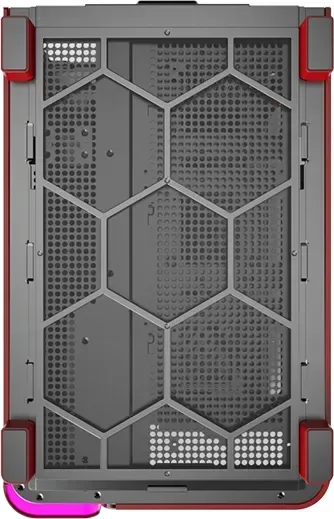
fan grille, dust filter outside
Left
closed, glass
Right
partially open
Rear
partially closed, fan grille top right, PCI slots (7x horizontal)
Front I/O Position
Case Side: Front, Height: Middle, Position: Right
USB Labeling
Left
Product Description
Welcome to the Montech King 95 Series
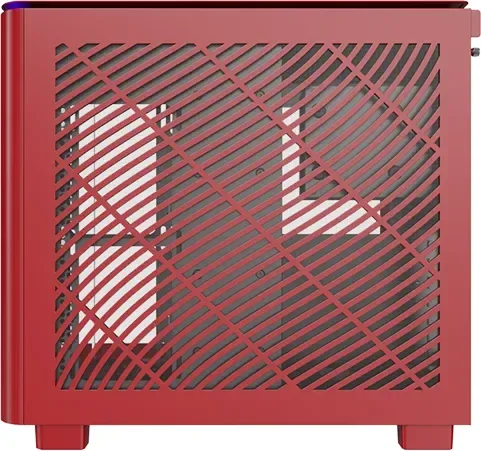
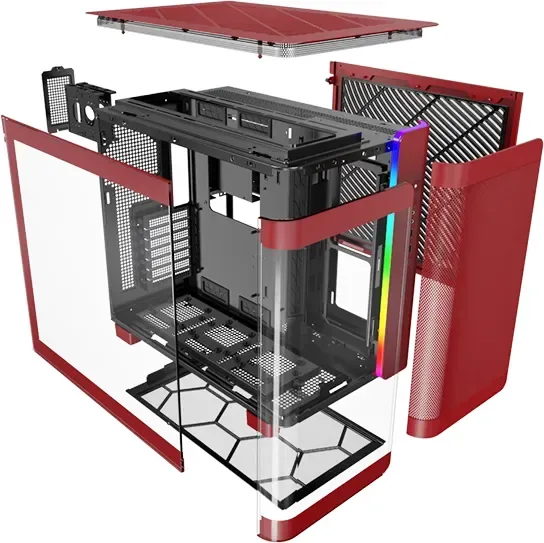
Discover the exceptional versatility of the Montech King 95 series. This middle tower computer case redefines what users expect from a high-performance chassis. The design prioritizes airflow and visual impact simultaneously. Tempered glass panels showcase your internal components while the solid frame ensures structural integrity. When planning your build, consulting the Montech King 95 Manual helps you understand the intricate details of internal space allocation. Motherboard support covers ATX, Micro-ATX, and Mini-ITX formats, giving you flexibility in component selection. The front I/O panel includes a modern Type-C connection alongside dual USB 3.0 ports and audio jacks. An LED button allows you to toggle RGB lighting patterns including sync modes with compatible motherboards.
Internal Build Capabilities
Inside, the case accommodates graphics cards up to 420mm in length. This is crucial for users utilizing the latest high-end hardware which often requires significant space. CPU coolers up to 175mm height fit comfortably without obstructing memory modules. Power supply units measuring up to 190mm can be installed in the dedicated compartment. The dust filter mesh protects internal components from debris though it is noted as non-removable for safety reasons. Cooling options are abundant with mounts for fans up to three hundred sixty millimeters on the top panel. Side supports allow for 120mm or 140mm units. A unique feature involves the side fan bracket which can rotate to become a front mount. This allows a mesh panel replacement for enhanced intake air flow. The accessories kit includes extensive hardware for installation such as screws, zip ties, and standoffs.
Design and Aesthetics
The case dimensions measure 475 by 300 by 442 millimeters fitting well in most desks. Color options include black white blue or red finishes. Build quality is reinforced with SPCC materials ensuring longevity. ARGB fans installed on the bottom or top provide excellent cooling performance. Managing cables is simplified by the layout design provided. Always adhere to safety warnings regarding the dust filter to avoid damage. This case represents a solid choice for custom PC enthusiasts. Furthermore the dual front panel system offers a distinct advantage. You can switch between airflow focused mesh and aesthetic glass depending on your needs. The side functional panel also holds additional drives or filters. Be aware that rotating the side fan bracket requires removing the front bottom fan first. This step ensures no collision occurs during movement. The installation of the pull-out hard drive tray simplifies connectivity access. Top mounting power supply units is another key option available for cable management. Users should check the compatibility guide for water cooler radiators. Some radiators reduce GPU compatibility height significantly. The LED button offers multiple states for lighting control. Pressing briefly changes modes while holding turns off or syncs. This level of control adds to the premium feel. The included anti-vibration rings reduce noise from fan operation. Thermal management is optimized through the multiple intake and exhaust points available. Constructing a PC with this chassis feels robust and secure. Every screw point aligns perfectly for a clean look. The materials resist scratches and wear over time. Maintenance is facilitated by the accessible design. You can reach internal components easily. This makes troubleshooting simpler for advanced users. The Montech King 95 Manual provides the necessary diagrams for wiring the ARGB strips correctly. Proper synchronization ensures uniform lighting across all installed fans and panels. This integration elevates the visual experience significantly. It is a top recommendation for mid-sized builds. The balance of price and performance remains competitive. Many builders appreciate the attention to detail in the mounting points. Side glass removal is straightforward with standard hardware. No specialized tools are typically needed for basic assembly. The design respects the user need for efficiency and style. It fits the modern desk setup requirements well. Overall value is high for the specifications provided.
Notes
Be sure to check fan orientation when installing. Remember the dust filter is non-removable. Ensure GPU clearance is met before finalizing build.
Search for 67,732 Manuals online


Type-in Brand or Model