
Mirka DEROS Manual
PDF manual · 224 Pages
English


Quick check
Incorrect answer, please try again.
Chat with your Mirka DEROS manual using AI
Get instant AI answers from your Mirka DEROS manual
Ask anything about the Mirka DEROS. Answers come from this manual, with the pages they are based on.
DEROS Maintenance Schedule
Empty and clean or replace the dust bag daily to ensure optimal performance and prevent highly combustible dust buildup.
Inspect the tool body, backing pad, power supply cable, and connectors regularly for signs of damage or excessive wear.
Change the pad saver placed between the backing pad and sanding disc regularly to protect the pad from wear during aggressive sanding.
Ask a Question
Do you recommend DEROS?
Yes NoFrequently Asked Questions
The Mirka DEROS is available in three distinct pad sizes: 77 mm (3 inches), 125 mm (5 inches), and 150 mm (6 inches). Each size offers unique benefits depending on whether you need precision detailing or covering large surface areas quickly.
Is this answer helpful?
To activate Bluetooth, plug the power cord into an outlet, then press and hold the RPM+ button while turning the unit on with the On/Off switch. A green LED will illuminate to confirm the connection is active. Note that the Mirka app must be installed for full functionality.
Is this answer helpful?
While you may physically attach other discs, Mirka recommends using only their original backing pads and sanding products. Using non-original parts can void the warranty, reduce dust extraction efficiency, and potentially compromise the electrical safety of the tool.
Is this answer helpful?
A red LED indicates a warning state. If it blinks red and green, check your voltage supply. If it stays solid red, the tool may have overheated due to excessive load; simply reduce pressure and let it cool down before resuming work.
Is this answer helpful?
Yes, the Mirka DEROS is built for professional environments. Its robust motor, thermal protection, and durable components make it ideal for continuous industrial use, provided it is maintained according to the manufacturer's guidelines and serviced by authorized personnel.
Is this answer helpful?
Advantages and Disadvantages
Advantages

- Variable speed control from 4,000 to 10,000 rpm for versatile applications
- Advanced Bluetooth connectivity for smart tool integration
- Excellent dust extraction efficiency with compatible vacuum systems
- Durable construction with thermal overload protection
- Available in three different pad sizes for varied project needs
Disadvantages

- Requires specific Mirka accessories for optimal warranty and performance
- Higher initial cost compared to basic orbital sanders
- May require purchasing a separate dust extractor for best results
- Bluetooth feature requires smartphone app installation for full utility
- Complex configuration changes needed when using interface pads
Product Specification
Type
Random orbit sander
No-load speed
4000-10000 rpm
Tool attachment
Hook and loop
Product Description
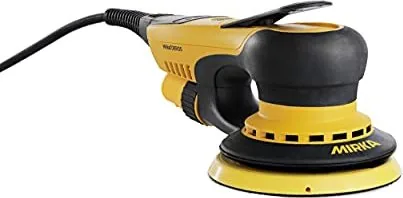
Experience Precision with the Mirka DEROS Electric Orbital Sander
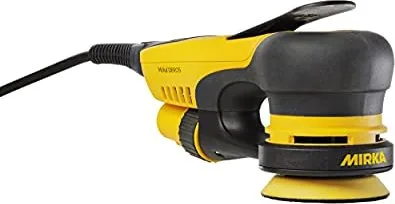
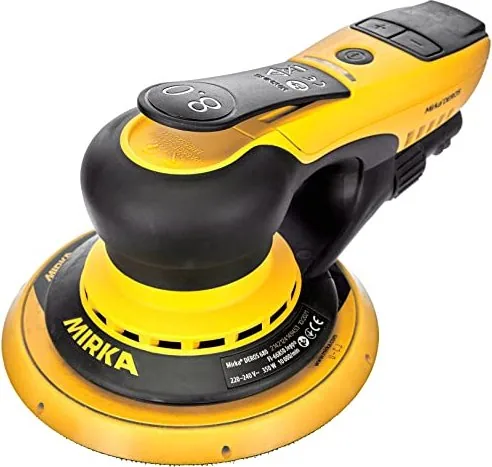
The Mirka DEROS Electric Orbital Sander represents a significant leap in professional sanding technology, designed for craftsmen and DIY enthusiasts who demand perfection. Available in 77 mm (3 inch), 125 mm (5 inch), and 150 mm (6 inch) pad sizes, this versatile tool handles everything from delicate detail work to large surface finishing. With power ratings ranging from 250 W to 350 W, it delivers consistent performance across various materials including wood, metal, stone, and plastics.
One of the standout features of the Mirka DEROS is its advanced speed control system. Users can adjust the orbital speed between 4,000 and 10,000 rpm using either the trigger position or dedicated RPM+ and RPM- buttons. This flexibility allows for precise material removal rates and superior surface finishes without burning the workpiece. The sander also includes a dual-mode speed control that lets you choose between linear acceleration or fixed maximum speed settings.
Dust extraction is critical for health and finish quality, and the Mirka DEROS excels here. It is engineered to work seamlessly with Mirka dust extractors and vacuum systems, significantly reducing airborne particulates. The integrated brake seal ensures efficient dust collection even under high vacuum conditions. For added protection, users can install Pad Savers, which extend the life of the backing pad during aggressive sanding sessions.
Connectivity is another modern advantage. Built-in Bluetooth Low Energy technology allows the sander to pair with the Mirka app, providing access to additional functions and remote monitoring capabilities. Simply hold the RPM+ button while powering on to activate the connection, indicated by a green LED light.
Safety is paramount. The device includes thermal protection that reduces speed if overheating occurs, preventing damage to the motor and ensuring user safety. Always use original Mirka pads and accessories to maintain warranty coverage and optimal electrical safety. Regular maintenance, such as checking seals and replacing worn parts at authorized service centers, keeps the tool performing at its peak.
Search for 67,732 Manuals online


Type-in Brand or Model