
Minox ACX 300 Manual
PDF manual · 33 Pages
English



Quick check
Incorrect answer, please try again.
Chat with your Minox ACX 300 manual using AI
Get instant AI answers from your Minox ACX 300 manual
Ask anything about the Minox ACX 300. Answers come from this manual, with the pages they are based on.
ACX 300 Maintenance Schedule
Check that the housing is clean and dry before inserting the camera to maintain waterproof integrity.
If not using the camera for an extended period, remove the batteries from the housing and store in a dry place.
Ask a Question
Do you recommend ACX 300?
Yes NoFrequently Asked Questions
Enable WiFi on the camera and search for SSID WIFI_ACX300_XXXXXX on your phone. Enter the default password 12345678. Download the MINOX ACX300 app to start controlling the camera remotely.
Is this answer helpful?
The camera body itself is not fully waterproof. You must place it inside the provided underwater housing to achieve waterproof capabilities up to 30 meters depth.
Is this answer helpful?
No, the WiFi function and the physical remote control cannot be operated simultaneously. You must choose one method of control at any given time.
Is this answer helpful?
It accepts Micro-SD cards up to 32GB. Class 10 cards are recommended for optimal performance, especially when recording high-resolution video.
Is this answer helpful?
Without WiFi enabled, the battery lasts about 90 minutes. When WiFi is active, the runtime drops to approximately 70 minutes due to higher power consumption.
Is this answer helpful?
Advantages and Disadvantages
Advantages

- Captures high-resolution 3K video and 12MP photos with excellent optical clarity
- Includes waterproof housing allowing use up to 30 meters depth
- Features a versatile wrist remote control for hands-free operation
- Digital image stabilization reduces shake during intense activities
- WiFi connectivity enables easy remote viewing and control via mobile app
Disadvantages

- Battery life decreases significantly when WiFi is actively used
- Micro-SD card is not included in the standard package
- Remote control cannot be used simultaneously with WiFi connection
- No HDMI cable included in the box for TV connection
- Manual format requires careful reading to understand all menu options
Product Specification
Effective Megapixel
12.0 Megapixels
Sensor
CMOS 1/2.3"
Video Function
H.264, MOV, 2560x1440@24p (16:9), 1920x1080@60p (16:9)
Photo Resolution
JPEG
Viewing Angle
150 degrees
Image Stabilizer
Electronic
Digital Zoom
No
Display
2" LCD
Waterproof
Up to 98 ft with case
Removable Storage
microSD/microSDHC
Connectivity
USB 2.0, HDMI
Wireless
Wi-Fi 4 (WLAN 802.11b/g/n)
Power Supply
Li-Ion Battery (1000mAh, removable)
Color
Black
Dimensions
2.46x1.70x1.20 in (WxDxH)
Weight
2.65 oz
Product Description
Discover the Minox ACX 300 Manual: Your Guide to Action Photography
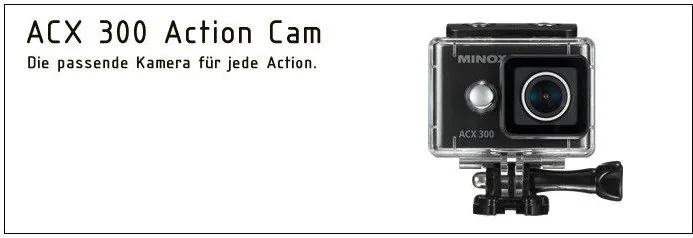
The MINOX ACX 300 represents a fusion of German engineering precision and modern action camera functionality. Designed for enthusiasts who demand high-quality imagery in compact form, this device captures stunning 3K video at 24 frames per second or crisp 12-megapixel stills. The manual serves as an essential companion, guiding users through the intuitive controls that make capturing life's adventures effortless.
At its core, the ACX 300 boasts a 150-degree wide-angle lens with an f2.8 aperture, ensuring expansive views even in tight spaces. Whether you are diving underwater up to 30 meters using the included waterproof housing or mounting it on a helmet for extreme sports, the camera delivers reliable performance. The built-in 2-inch LCD screen provides clear playback, while digital image stabilization helps keep your footage smooth despite vigorous movement.
Connectivity is seamless with integrated WiFi allowing remote control via smartphone apps available for both iOS and Android. Users can customize settings ranging from exposure metering to white balance presets for various lighting conditions. The camera also features a unique wrist-mounted remote control, enabling hands-free operation for dynamic shots. Battery life offers approximately 90 minutes of continuous recording without WiFi, making it suitable for extended outings.
Safety is paramount, with detailed instructions on handling heat, water, and electrical components. The device supports Micro-SD cards up to 32GB, offering ample storage for high-resolution media. Transferring files is straightforward via USB or by removing the card directly. This comprehensive guide ensures every user maximizes the potential of their MINOX ACX 300, transforming ordinary moments into extraordinary memories with professional-grade quality.
Search for 67,706 Manuals online


Type-in Brand or Model