
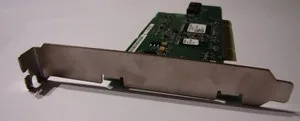
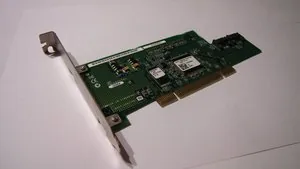
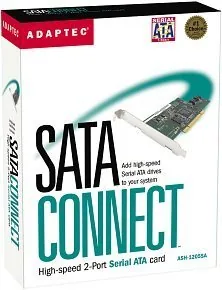
Microchip Adaptec SATAConnect ASH-1205SA Manual
PDF manual · 14 Pages
English



Quick check
Incorrect answer, please try again.
Chat with your Microchip Adaptec SATAConnect ASH-1205SA manual using AI
Get instant AI answers from your Microchip Adaptec SATAConnect ASH-1205SA manual
Ask anything about the Microchip Adaptec SATAConnect ASH-1205SA. Answers come from this manual, with the pages they are based on.
Ask a Question
Do you recommend Adaptec SATAConnect ASH-1205SA?
Yes NoFrequently Asked Questions
The ASH-1205SA provides two Serial ATA (SATA) connectors on a PCI 2.2 host adapter, allowing you to connect up to two internal SATA drives to a desktop PC that lacks native SATA ports.
Is this answer helpful?
The card’s drivers support Windows 98SE, Me, 2000, and XP. Driver installation methods vary by OS: the CD-based Found New Hardware wizard is used for installed systems, while Windows XP/2000 fresh installs may require the F6 floppy method.
Is this answer helpful?
Typical kit contents include the Adaptec ASH-1205SA card, one internal SATA cable, a SATAConnect CD with drivers and documentation, a floppy disk with drivers for Windows XP/2000 installs, and an installation guide.
Is this answer helpful?
You can connect a maximum of two SATA devices, one per onboard connector. Each drive requires a standard Molex-to-SATA power adapter or native SATA power from the system power supply depending on your drive’s power connector.
Is this answer helpful?
Verify drivers installed correctly, ensure the card is firmly seated in the PCI slot with the bracket screw secured, confirm SATA data and power cables are fully connected, and try a different PCI slot if detection fails.
Is this answer helpful?
No. Power down the computer, disconnect the power cord, and follow anti-static precautions before installing the card to avoid hardware damage and ensure safe installation.
Is this answer helpful?
Refer to the included User’s Guide and driver CD for verification steps. For further assistance consult Microchip/Adaptec online resources such as the product support site and knowledgebase.
Is this answer helpful?
Advantages and Disadvantages
Advantages

- Adds two SATA ports to PCI-equipped legacy desktops, enabling modern drives.
- Includes drivers on CD and floppy for in-place or fresh Windows installations.
- Simple, tool-free connection for SATA data via provided cable and standard power cords.
- Certified vendor drivers reduce compatibility risk across supported Windows OSes.
- Compact and inexpensive upgrade path compared with replacing motherboards.
Disadvantages

- Limited to two SATA devices, which may be insufficient for some setups.
- Requires an available PCI 2.2 slot; incompatible with PCIe-only systems.
- Driver support targets older Windows versions; modern OS support may be limited.
- Installation needs manual driver steps (F6 floppy) during older Windows setups.
- Performance constrained by PCI bus bandwidth compared with native SATA on modern boards.
Product Description
Microchip Adaptec SATA Connect retail Manual Overview
The Microchip Adaptec SATA Connect (ASH-1205SA) is a compact PCI host controller that brings Serial ATA connectivity to legacy desktop systems. Designed for straightforward installation and broad Windows compatibility, the card supports up to two internal SATA drives and includes the necessary cable and driver media. Its retail package typically contains the ASH-1205SA card, a SATA cable, a driver/software CD, a floppy driver disk for older OS installs, and printed installation guidance.
Key Features and Use
The ASH-1205SA targets users who need to add SATA support to older PCs without native SATA ports. It fits any PCI 2.2 slot, supports common Windows releases of its era (Windows 98SE, Me, 2000, XP), and provides two independent SATA connectors for hard drives or optical drives. Installation is hardware-simple: seat the card in an open PCI slot, attach SATA and power cables to devices, then install drivers from the included CD or floppy as required by the OS.
Driver installation paths are clear and OS-specific: for already-installed Windows versions the Found New Hardware wizard uses the CD; for fresh Windows XP/2000 installations the floppy‑based F6 method is supported. The vendor-supplied drivers are certified for the device, and the kit includes documentation to verify correct driver installation.
Practical Benefits
This adapter is practical for upgrading older desktops to use modern SATA drives, enabling improved drive performance and capacity without replacing the motherboard. It’s also useful for system builders or technicians who need a reliable, low-cost way to add SATA ports for additional storage or drive cloning tasks.
Who Should Consider It
- Users with legacy desktops requiring SATA support
- IT technicians doing drive upgrades or migrations
- Hobbyists repurposing older hardware with modern drives
Notes:
- The card supports up to two SATA devices via onboard connectors.
- Use the provided SATA cable and check power connector compatibility for each drive.
- Follow anti-static precautions when installing the card to avoid damage.
Search for 67,706 Manuals online


Type-in Brand or Model