
Mevo Start Manual
PDF manual · 174 Pages
English



Quick check
Incorrect answer, please try again.
Chat with your Mevo Start manual using AI
Get instant AI answers from your Mevo Start manual
Ask anything about the Mevo Start. Answers come from this manual, with the pages they are based on.
Ask a Question
Do you recommend Start?
Yes NoFrequently Asked Questions
The Mevo Start can stream or record for more than four hours depending on usage conditions.
Is this answer helpful?
Yes, you can stream to up to ten destinations simultaneously, but Facebook requires a Vimeo or Livestream partnership for multi-streaming.
Is this answer helpful?
Mevo Start supports SD, SDHC, and SDXC formats. Specific models from SanDisk, Samsung, Lexar, and others have been tested and recommended.
Is this answer helpful?
No, the Mevo app works directly on iOS and Android mobile devices without needing a computer.
Is this answer helpful?
On iOS, you can accept calls while streaming, but audio from external sources connected to the headphone jack will mute until the call ends.
Is this answer helpful?
Enable Bluetooth and Wi-Fi on your device, launch the Mevo app, and select either Mevo Hotspot or your local Wi-Fi network to pair.
Is this answer helpful?
Advantages and Disadvantages
Advantages

- Pocket-sized design allows for unobtrusive placement near subjects
- Battery life exceeds four hours for extended event coverage
- Supports simultaneous streaming to multiple platforms with a subscription
- Built-in microphone offers adjustable modes for speech and music
- Compatible with a wide range of iOS and Android devices
Disadvantages

- Graphics overlays require a paid Vimeo Producer or Premium plan
- Cannot stream to Facebook simultaneously with other providers except Livestream and Vimeo
- External audio compatibility depends on specific plug types like TRRS
- Firmware updates may disconnect the device if not done in hotspot mode
- No support for Chinese, Korean, or Japanese character sets in graphics
Product Specification
Sensor
CMOS
Recording Media
microSD/microSDHC/microSDXC
Video Function
H.264, 1920x1080
Lens
Fixed Focal Length
Digital Zoom
No
Display
No
Viewfinder
No
Flash/Video Light
No
Connectors
USB-C 2.0 (Charging), Microphone
Wireless
Wi-Fi 5 (WLAN 802.11a/b/g/n/ac)
Power Supply
Li-Ion Battery
Color
Black
Dimensions
3.43 x 2.95 x 1.34 in (WxHxD)
Weight
8.18 oz
Product Description
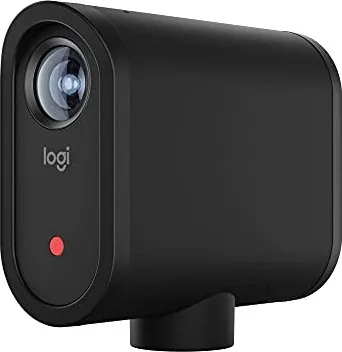
Mevo Start: The Ultimate Pocket-Sized Live Event Camera
The Mevo Start is a revolutionary pocket-sized live event camera designed to help busy consumers, organizations, and event producers seamlessly share engaging stories from their live events. Whether you are covering concerts, conferences, sports games, or school plays, this device enables an entirely new kind of video sharing experience. Its leading-edge technology allows users to edit video while the event unfolds, making it perfect for business owners of all sizes who need to share content online.
This versatile camera communicates with your mobile device via Bluetooth and Wi-Fi, offering flexible connection options including its own hotspot or local networks. It features a built-in microphone array with configurable modes for music and speech, ensuring clear audio in various environments. The Mevo Start supports recording to microSD cards and streaming directly to major platforms like YouTube, Facebook, Livestream, and Vimeo. With a battery life that exceeds four hours, it is ready to capture your event from start to finish.
Getting Started and Setup
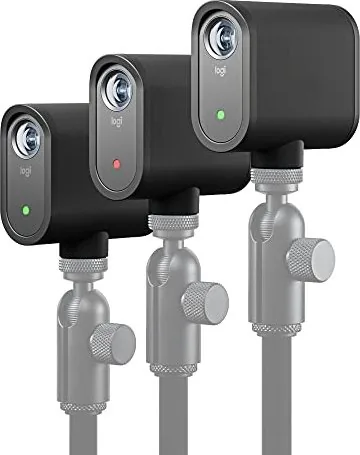
To begin using the Mevo Start, download the free Mevo app from the App Store or Google Play. Ensure your mobile device has Bluetooth and Wi-Fi enabled to pair with the camera. You can mount the camera on standard microphone stands or tripods using the included adapters. For optimal results, place the camera about five feet away from your subject to utilize its wide field of view effectively. Before your first use, fully charge the battery using the included USB-C cable and a wall charger.
Advanced Features and Customization
The Mevo app provides extensive control over your production. You can adjust image settings such as exposure, shutter speed, ISO, and white balance in real-time. For professional broadcasts, the camera supports graphics overlays like lower thirds, corner bugs, and full-screen slideshows, though these require a Vimeo Producer or Premium plan. Audio levels can be fine-tuned using the built-in mixer or by connecting external microphones via the 3.5mm jack or USB. The device also includes Echo Suppression for iOS users to prevent feedback when using external audio sources.
Notes
- The camera operates best within a temperature range of 32F to 95F.
- Firmware updates should be performed via Mevo Hotspot mode for reliability.
- A supported microSD card is required for recording and graphics overlay storage.
Search for 67,706 Manuals online


Type-in Brand or Model