
Melitta Optima Timer Manual
PDF manual · 52 Pages
English



Quick check
Incorrect answer, please try again.
Chat with your Melitta Optima Timer manual using AI
Get instant AI answers from your Melitta Optima Timer manual
Ask anything about the Melitta Optima Timer. Answers come from this manual, with the pages they are based on.
Optima Timer Maintenance Schedule
Clean parts that come into contact with coffee after each use. Filter cone and glass jug are dishwasher safe.
Once the number of brewing cycles based on water hardness is reached, run the descaling program and rinse with two clear water cycles.
Ask a Question
Do you recommend Optima Timer?
Yes NoFrequently Asked Questions
Press the TIMER button and hold it to start programming. Use the H and MIN buttons to adjust the desired hour and minute. Release the buttons, and the current time returns. Press TIMER again briefly to activate the function for the next brewing cycle.
Is this answer helpful?
No, you should never put hot water into the tank. Always use fresh, cold water to ensure proper brewing function and prevent damage to the internal components of the machine.
Is this answer helpful?
Run the descaling program when the red LED lights up permanently. This indicates the calculated number of brewing cycles has been reached based on your water hardness setting.
Is this answer helpful?
Yes, the filter cone and the glass jug are dishwasher safe. You can clean these parts after each use in the dishwasher without worrying about damage.
Is this answer helpful?
The default warm keeping time is thirty minutes. You can increase this up to two hours in four-step increments if you want to keep coffee warm for longer.
Is this answer helpful?
Children under eight years old must stay away from the appliance. Children over eight can use it only if supervised and instructed on safe use to avoid burns.
Is this answer helpful?
Advantages and Disadvantages
Advantages

- Built-in timer allows programming automatic start times for wake up coffee.
- Adjustable water hardness settings adapt to local water conditions for longevity.
- Integrated descaling program simplifies maintenance with clear LED indicators.
- Glass jug and filter cone are dishwasher safe for easy cleaning.
Disadvantages

- Warming plate becomes very hot and requires touching caution during use.
- Timer must be manually reprogrammed after power outages or unplugging.
- Requires specific cleaning agents like Swirl for effective descaling cycles.
- Glass jug is not safe for use in microwave ovens for heating.
Product Specification
Power
850W
Color
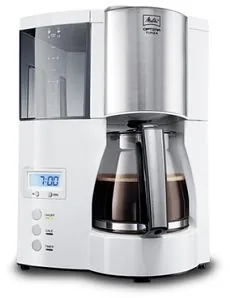
white, stainless steel
Capacity
8 Cups
Filter
Swivel filter
Features
removable water tank, Timer, auto shut-off after 2 hours, cord storage
Package Contents
1x Glass Carafe
Product Description
Welcome to the World of Melitta Coffee Brewing
Brewing the perfect cup of coffee starts with reliability and total control over your daily routine. The Melitta Optima Timer White Manual is designed specifically to bring your morning coffee ritual to a completely new level of quality and convenience. This machine is strictly suitable for home use and handles standard coffee quantities efficiently without any issues. You must read the attached manual carefully for absolute safety and performance guidelines before starting.
Mastering the Advanced Timer Function
The built-in timer feature lets you wake up to fresh aroma instantly every single morning. Press the TIMER button and use H or MIN buttons to set specific hours accurately. The device will start the brewing process automatically at the precise time you have programmed. Blue LED signals confirm the function status visually so you know it is active. You can cancel or change the timer settings easily by pressing buttons again immediately. Manual start is also available via the ON/OFF switch if you want coffee immediately without waiting for a preset time.
Managing Water Hardness Settings
Water hardness affects machine life significantly over long periods of daily use. Adjust the settings to four different levels based on your local area or supplier data. The factory defaults to high hardness initially but should be customized for best results. If the specific red light appears on the display, run the descale cycle immediately to prevent damage. This maintenance task takes twenty-five minutes automatically to complete the cleaning phase. Use Swirl products for chemical cleaning to ensure optimal internal conditions inside the boiler.
Descaling and Cleaning Protocols
Descaling is crucial for maintaining the internal components of this coffee maker. Follow the red LED indicators to know when to initiate the cleaning process. Use manufacturer recommended cleaners like Swirl Oxy Power for effective residue removal. Rinse the system twice with plain water afterwards to remove any chemical traces. Clean parts should be washed after each use to prevent buildup that affects flavor significantly.
Safety First in the Kitchen Environment
The warming plate gets very hot during operation and should never be touched while heating. Children under the age of eight should not use the machine without supervision from an adult. Keep the unit away from running water and hot kitchen surfaces at all times. Do not put the glass jug in a standard microwave oven for heating liquids. Always unplug the power cord before cleaning or doing any maintenance on the unit. This ensures you stay safe and protected while enjoying your fresh coffee every day at home.
Search for 67,732 Manuals online


Type-in Brand or Model
Benjamin Simpson
6 months ago
Is the water tank capacity actually 1 liter? Some say it fits 12 cups while others say only 4 large cups. Which is it?
Manual.ly
6 months ago
Thank you for your question regarding capacity. The water tank holds approximately 1 liter. While the manufacturer claims up to 12 small cups, this equates to roughly 4 to 6 large standard cups. For households larger than two people, this may be limiting. Additionally, please ensure you have 102 size filters available. The removable tank makes cleaning easy. We hope this clarifies the volume expectations.