
MegaSat HD 601 V3 Manual
PDF manual · 27 Pages
English



Quick check
Incorrect answer, please try again.
Chat with your MegaSat HD 601 V3 manual using AI
Get instant AI answers from your MegaSat HD 601 V3 manual
Ask anything about the MegaSat HD 601 V3. Answers come from this manual, with the pages they are based on.
Ask a Question
Do you recommend HD 601 V3?
Yes NoFrequently Asked Questions
The receiver outputs 576i/p, 720p, 1080i and 1080p and includes an HDMI upscaling feature to improve image quality on higher-resolution displays.
Is this answer helpful?
Yes. The MegaSat HD 601 V3 supports Unicable (EN 50494) and Unicable2/JESS (EN 50607), allowing configuration of IF programs and frequencies for up to 8 (Unicable) or 32 (JESS) users depending on your system.
Is this answer helpful?
Use the Installation > Satellite menu: add satellites by entering angle/direction/band, move them via the menu’s position edit, and manage transponders in the Transponder sub-menu, with OK to edit, pq to select and t/u to choose editing icons.
Is this answer helpful?
The USB 2.0 port supports FAT, FAT32 and NTFS. It can play movies, music and pictures, perform file operations (rename, copy, delete, create folders), format USB drives and upload or restore settings and channel lists.
Is this answer helpful?
Check dish alignment and signal strength in the antenna menu, verify LNB and coax cable connections, test/change the LNB if faulty, and ensure the TV is set to the correct HDMI/AV input.
Is this answer helpful?
Enable Parental Lock in Settings, activate the Password Lock (default 0000) and individually set menus or channels to locked/unlocked to restrict access.
Is this answer helpful?
Use the USB menu’s safe remove option and confirm with OK; a message will confirm successful removal. Do not disconnect power during copy operations to avoid data loss.
Is this answer helpful?
Advantages and Disadvantages
Advantages

- Supports DVB-S/DVB-S2 with MPEG-4/H.264 and MPEG-2 decoding for broad channel compatibility.
- Unicable/JESS support and DiSEqC/USALS make complex multi-LNB and motorized setups possible.
- HDMI upscaling to 1080p plus PAL/NTSC conversion and multiple aspect ratio options.
- USB 2.0 media playback, channel backup/load and firmware update via USB (FAT/FAT32/NTFS).
- Comprehensive channel management: blind scan, favorites, locking, multiple sort modes and EPG.
Disadvantages

- No built-in Wi‑Fi or network features—firmware updates and backups rely on USB only.
- Limited to 1080p output; not suitable for native 4K or HDR displays.
- Basic hardware interface (no Ethernet) may limit future feature expansion.
- Physical buttons and cloned remote layout may feel dated compared to modern smart receivers.
- Power consumption, while low, still requires mains power and a stable LNB supply for best performance.
Product Specification
Tuner Slots
1 (fixed)
Single Tuner
1x DVB-S2
Twin Tuner
no
Dual Tuner
no
Triple Tuner
no
Decoder
MPEG-4, HDTV
Smartcard Reader
no
Common Interface
no
Video Connections
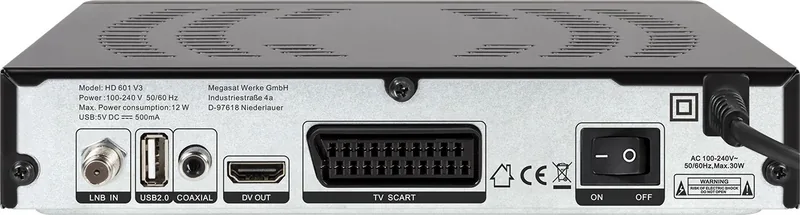
1x HDMI Out, 1x SCART Out
Audio Connections
1x Digital Audio Out (coaxial)
Other Connections
1x USB 2.0
Display
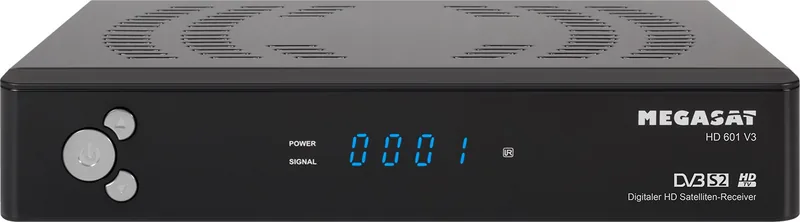
4-digit LED
Functions
EPG, Mediaplayer, Teletext
Program Storage Slots
4000
Favorite Lists
8
Timer
8
Control Signal
DiSEqC 1.0/1.1/1.2, Unicable, Unicable II, USALS 1.3
Special Features
Device Buttons, Power Switch, FTA
Power Consumption
12W maximum, 0.5W Standby
Color
black
Dimensions
8.66x1.57x5.51in (WxHxD)
Weight
1.16lb
Product Description
MegaSat HD 601 V3 — Powerful, Compact Satellite Receiver
The MegaSat HD 601 V3 is a versatile DVB-S/DVB-S2 satellite receiver designed for reliable HD and SD television reception. Equipped with H.264/MPEG-4 and MPEG-2 decoding, the unit supports multiple LNB types and advanced single-cable systems (Unicable, Unicable2 / JESS), enabling flexible installations for single or multi-receiver setups. Its sensitive tuner and broad frequency range make it suitable for C- and Ku-band reception, while DiSEqC and USALS compatibility simplify motorized dish control and multi-LNB arrangements.
The receiver outputs upscaled video through HDMI up to 1080p while also supporting Scart and analog outputs for older TVs. Picture options include multiple aspect ratios (4:3, 16:9) and PAL/NTSC conversion. The OSD is multilingual and supports teletext, subtitles, and a 7-day EPG for program guidance. For home convenience, the unit provides parental controls, eight favorite lists, five channel sorting modes, and USB 2.0 for media playback and firmware or channel-list backup.
Installation and operation are user-oriented: the main menu groups antenna setup, channel management, system settings, time and timer controls, and advanced USB features. Antenna configuration covers satellite and transponder management, LNB power and type, 22 kHz switching, DiSEqC inputs, and full Unicable/JESS frequency mapping for up to 32 users. Motorized dish features include auto and step movement, storing positions, and setting east/west limits with USALS support.
Channel management allows scanning modes (all, free, HD, SD, FTA, blind scan, multi-sat), renaming, moving, deleting, locking with a password, and creating favorite groups. The receiver supports saving and loading user channel lists to/from USB, and factory reset restores defaults. System settings include language selection, audio/subtitle preferences, OSD transparency, screen resolution, display timeout, and power-saving modes like low-power standby and automatic shutdown.
The USB player accepts FAT/FAT32 and NTFS formats and can play movies, music, and photos; it also offers file operations (rename, copy, format) and an upload mode to transfer settings or channel lists. Troubleshooting guidance covers signal issues, cabling, LNB power, and remote control operation. Technical specifications detail tuner/demodulator performance, input/output ports, power consumption (max 12 W, standby <0.5 W), physical dimensions, and operating temperature ranges. The device conforms to relevant EU directives and includes product registration and firmware update support.
Notes
- Default menu password: 0000.
- Recommended connection: HDMI for best picture quality.
- USB safe-remove option should be used before unplugging drives.
Search for 67,706 Manuals online


Type-in Brand or Model
Lukas Wagner
9 months ago
Is this satellite receiver easy to set up and use if I am not very technical?
Manual.ly
9 months ago
Yes. Reviewers consistently report that the setup is straightforward: you connect the receiver, turn it on, select the language, and the main menus and stations are already prepared. After that, using it is simple and the channel switching is quick. For the easiest start, follow the included quick guide and make sure your satellite connection is properly aligned and that you connect via HDMI or SCART. The device is designed to be beginner-friendly and is suitable even for older users.