
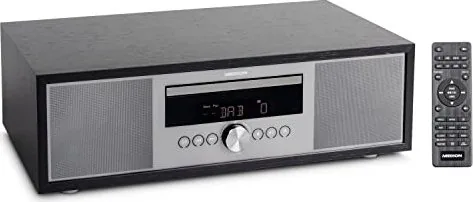
Medion Life P64145 Manual
PDF manual · 230 Pages
English



Quick check
Incorrect answer, please try again.
Chat with your Medion Life P64145 manual using AI
Get instant AI answers from your Medion Life P64145 manual
Ask anything about the Medion Life P64145. Answers come from this manual, with the pages they are based on.
Life P64145 Maintenance Schedule
Unplug the device. Use only a dry, soft cloth. Do not use chemical solutions or cleaning agents.
Insert two 1.5V AAA batteries observing polarity. Replace leaking or flat batteries immediately and clean contacts.
Remove batteries from the remote control and disconnect the mains plug before storing in a cool, dry place.
Ask a Question
Do you recommend Life P64145?
Yes NoFrequently Asked Questions
No, the USB port only supports audio playback, specifically MP3 files. Video files cannot be played on this device.
Is this answer helpful?
Press the Bluetooth button on the remote until PAIRING appears. Enable Bluetooth on your phone, select MD 44125, and enter the password 0000 if prompted.
Is this answer helpful?
The device supports USB drives up to 32 GB formatted in FAT16 or FAT32. Larger drives or other file systems may not work.
Is this answer helpful?
Press the SLEEP button repeatedly to cycle through options: 90, 60, 30, or 15 minutes. The display will show Zzz when active.
Is this answer helpful?
Yes, tune to a station and hold the PROG button. Select a program slot using the arrow keys and press OK to save the station.
Is this answer helpful?
No, the device is designed for indoor use only. Exposure to rain, snow, or direct sunlight can cause damage.
Is this answer helpful?
Advantages and Disadvantages
Advantages

- Supports multiple media formats including CD, USB, and Bluetooth streaming
- Built-in DAB+ and FM radio with automatic station storage
- Customizable sound settings with various equalizer presets
- Includes sleep timer and programmable wake-up alarm function
- Compact design with clear display and intuitive remote control
Disadvantages

- Does not support video playback on USB devices
- External hard drives are not compatible with the USB port
- No support for advanced file systems beyond FAT16 and FAT32
- Battery compartment requires careful handling to avoid leakage issues
- Telescopic antenna may be fragile if handled roughly
Product Specification
Consists of
CD player, tuner, built-in speakers, all-in-one device
Power
2x 15W RMS
Tuner
FM, DAB+
Audio formats
CD audio, CD-R/RW, MP3
Audio connections
AUX in (3.5mm jack), stereo line in (RCA), headphones (3.5mm jack)
Other connections
USB-A
Wireless
Bluetooth
Device dimensions
14.80x4.96x9.21 inches (WxDxH)
Weight
7.28 lbs
Product Description
Medion Life P64145: Your Ultimate All-In-One Audio Companion
The Medion Life P64145 is a versatile micro audio system designed to bring high-quality sound into your home with minimal effort. This compact device serves as a complete entertainment hub, supporting a wide range of media formats including CDs, USB drives, and wireless Bluetooth streaming. Whether you are looking to listen to your favorite radio stations via DAB+ or FM, play music from a memory stick, or connect your smartphone for wireless playback, this unit handles it all with ease.
Designed for private use, the Medion Life P64145 features a sleek interface with an intuitive remote control that allows you to manage every aspect of your listening experience. From adjusting the bass levels to selecting specific equalizer presets like Rock, Pop, Jazz, or Classic, you can tailor the sound to your preference. The built-in timer and sleep functions make it perfect for bedtime listening, ensuring the music stops automatically when you need to rest. Additionally, the device includes multiple connection options such as LINE IN and AUX jacks, allowing you to integrate external audio sources seamlessly.
Safety and durability are at the forefront of the design. The unit complies with strict EU regulations regarding safety and environmental standards. It includes clear warnings about battery handling and proper placement to prevent overheating or damage. The telescopic antenna ensures optimal signal reception for radio broadcasts, while the display brightness can be dimmed to suit low-light environments. With its robust build and user-friendly controls, the Medion Life P64145 stands out as a reliable choice for audiophiles seeking convenience and performance in a single package.
Notes
- Ensure the device is placed on a stable surface with adequate ventilation.
- Remove batteries if the device will not be used for an extended period.
- Always disconnect power before cleaning the unit.
Search for 67,706 Manuals online


Type-in Brand or Model