
Medion Life E85080 Manual
PDF manual · 130 Pages
English



Quick check
Incorrect answer, please try again.
Chat with your Medion Life E85080 manual using AI
Get instant AI answers from your Medion Life E85080 manual
Ask anything about the Medion Life E85080. Answers come from this manual, with the pages they are based on.
Life E85080 Maintenance Schedule
Switch off the device and wipe with a soft, dry cloth. Do not use rough cloths or alcohol-based cleaners.
Clean battery and device contacts before insertion if necessary to ensure proper connection.
Ask a Question
Do you recommend Life E85080?
Yes NoFrequently Asked Questions
Yes, you can play audio files from USB drives directly via the front panel USB port or stream from a PC using Network Attached Storage.
Is this answer helpful?
Reset the settings by navigating to the menu, selecting System Settings, then Factory Reset, and confirming with Yes to restore original defaults.
Is this answer helpful?
Yes, Spotify Connect is supported but requires a premium app on your mobile device logged into the same network as the radio.
Is this answer helpful?
Yes, you can use an ethernet cable connected to the RJ45 port for a wired internet connection if WiFi is unstable.
Is this answer helpful?
Yes, the device includes an alarm clock function that can wake you up to internet radio stations or sound alerts at set times.
Is this answer helpful?
Connect via UPnP protocol to stream music from your PC or use the Lifestream II application for enhanced control and management.
Is this answer helpful?
Advantages and Disadvantages
Advantages

- Access to over 15,000 internet radio stations through vTuner integration.
- Supports UPnP for streaming audio files from network storage devices easily.
- Includes Lifestream II app for convenient smartphone control options.
- Features built-in weather forecast display for accurate local regions.
- Provides alarm clock function to wake up to radio stations or sounds.
Disadvantages

- Remote control requires standard batteries which must be replaced occasionally.
- Cannot connect directly via Bluetooth, only WiFi or LAN connections.
- Setup process requires internet connection for initial wizard configuration.
Product Specification
Power
10W Peak
Audio Formats
FLAC, MP3, WAV, WMA
Tuner
Internet Radio
Streaming Clients
Apple AirPlay, Spotify
Audio Connections
AUX In (3.5mm Jack), Stereo Line Out (3.5mm Jack), Headphones (3.5mm Jack)
Additional Ports
USB-A 2.0, RJ-45
Wireless
Wi-Fi (Wireless LAN)
Power Supply
AC Power
Features
Remote Control
Dimensions
8.07 x 5.12 x 4.92 in (WxHxD)
Weight
3.53 lbs
Product Description
Introduction to the Medion E85080 Radio Experience
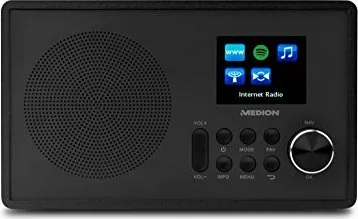
The Medion LIFE E85080 WLAN Internet Radio represents a significant step in home audio entertainment for modern families. Users looking for the Medion E85080 Manual find a comprehensive guide within this unit. This smart radio connects seamlessly to your home network, allowing access to thousands of global stations via vTuner services. The device supports over 15,000 internet radio stations worldwide, ensuring endless entertainment options for any musical taste. It features a 10 watt speaker for rich sound output.
Versatile Audio Playback Options
Beyond streaming, this unit handles local audio files effectively. You can play music from USB drives directly through the front panel USB port. For networked media, the radio supports UPnP protocols, letting you stream from your PC or Network Attached Storage. Spotify Connect integration requires a premium app on your mobile device but offers high-quality streaming directly to the speakers. FM radio capabilities are also robust, featuring automatic station searching and RDS display for artist information and news broadcasts.
User Interface and Connectivity
Control is straightforward with a clear LED display and included remote control. The unit includes a Lifestream II application for smartphone or tablet control, enhancing usability significantly. Network setup via WPS or manual key entry is standard for modern routers. Connectivity options include an ethernet port for wired stability when wifi is poor or unstable. Safety warnings in the manual are clear regarding electrical connections and battery usage for the remote control. Always ensure the device is installed indoors only to prevent weather damage.
Important Setup Considerations
Upon starting, a wizard guides initial configuration including language and time. Time settings can align automatically via network updates. Users should remember to keep the ventilation slots clear to prevent overheating. Cleaning requires a dry cloth only to avoid damage to the finish. Disposal follows standard electronic waste guidelines as per regulations. Keeping the manual is advised for future reference regarding reset procedures or technical specifications. This device suits modern homes seeking reliable internet audio solutions without complex wiring. The equalizer allows tone adjustments for jazz or rock styles. A built-in weather service provides forecasts for your local region directly on the display. An alarm clock function lets you wake up to your favorite internet radio station or sound effects. The compact size fits easily on shelves and the remote uses standard AAA batteries for power. The unit weighs approximately 1.6 kilograms and measures 205 by 130 millimeters. It consumes low power during standby if configured properly.
Search for 67,706 Manuals online


Type-in Brand or Model