
Maxxus CX 6.1 Manual
PDF manual · 36 Pages
English



Quick check
Incorrect answer, please try again.
Chat with your Maxxus CX 6.1 manual using AI
Get instant AI answers from your Maxxus CX 6.1 manual
Ask anything about the Maxxus CX 6.1. Answers come from this manual, with the pages they are based on.
CX 6.1 Maintenance Schedule
Clean slide rails with soapy water or degreaser and dry thoroughly. Apply silicone or MAXXUS glide spray weekly for frequent use.
Check that all screws and nuts are tight at least once a month and tighten if necessary.
Lubricate the cross-axes on the handlebar stem and the axes on the large drive discs with multi-purpose grease every 6 months.
Wipe down with a damp cloth and soap after every session to remove sweat. Do not use solvents.
Free maintenance reminders
Timed to your purchase date. Always free, unsubscribe anytime.
Ask a Question
Do you recommend CX 6.1?
Yes NoFrequently Asked Questions
No, the device is designed for indoor use only. Outdoor use may cause damage from rain or cold, voiding warranty coverage. It requires a dry indoor space with temperatures between ten and thirty degrees Celsius.
Is this answer helpful?
Clean surfaces after every use with a damp cloth and mild soap. Never use solvents as they can damage components. Prevent sweat damage by drying the machine immediately after workouts to avoid corrosion.
Is this answer helpful?
Home use typically grants two years of warranty coverage. However, specific conditions apply regarding product registration and maintenance records. Please consult the manual for exact terms based on your purchase location and usage type.
Is this answer helpful?
The maximum user weight supported is 160 kilograms. Exceeding this limit may affect stability and void the warranty. Ensure the floor can support the eighty-eight kilogram total weight of the unit as well.
Is this answer helpful?
Hand sensors provide reasonable readings but can be affected by skin conditions. For ECG-grade precision, an optional chest strap is recommended. Always keep your hands on the sensors during measurement for best results.
Is this answer helpful?
Included tools like Allen keys are provided for assembly. If missing, standard metric sizes are listed in the guide. Assembly involves two people due to heavy parts. Proper bolt tightening is essential for safety before use.
Is this answer helpful?
The device requires a 220-230V grounded outlet. Do not use extension cords unless certified by VDE standards. Always connect to a properly installed socket to prevent electrical faults or safety hazards during operation.
Is this answer helpful?
Advantages and Disadvantages
Advantages

- Magnetic braking system ensures quiet operation during sessions
- Stable movement patterns due to nine kilogram flywheel
- Recovery function allows quick fitness level assessment
- USB port enables charging mobile devices easily
- Front wheels facilitate transport and relocation of the unit
Disadvantages

- Heavy weight of eighty-eight kilograms requires two people for assembly
- Indoor use only due to weather resistance limitations
- Hand sensors may be less accurate than chest straps
- Uncertified extension cords can void safety warranties
- Requires specific temperature range between ten and thirty degrees Celsius
Product Specification
Colors
black, gray
Resistance
16-step electronically adjustable
Brake System
Permanent Magnet
Drive System
Ribbed Belt
Flywheel Position
Front
Flywheel Weight
63.93 lbs
Max User Weight
352.74 lbs
Dimensions
77.95x28.35x68.11 in
Weight
194.01 lbs
Features
Transport Wheels, Hand Pulse Sensors, Chest Strap Compatible, App Support (iOS, Android), USB, Bluetooth
Product Description
Elevate Your Fitness Journey
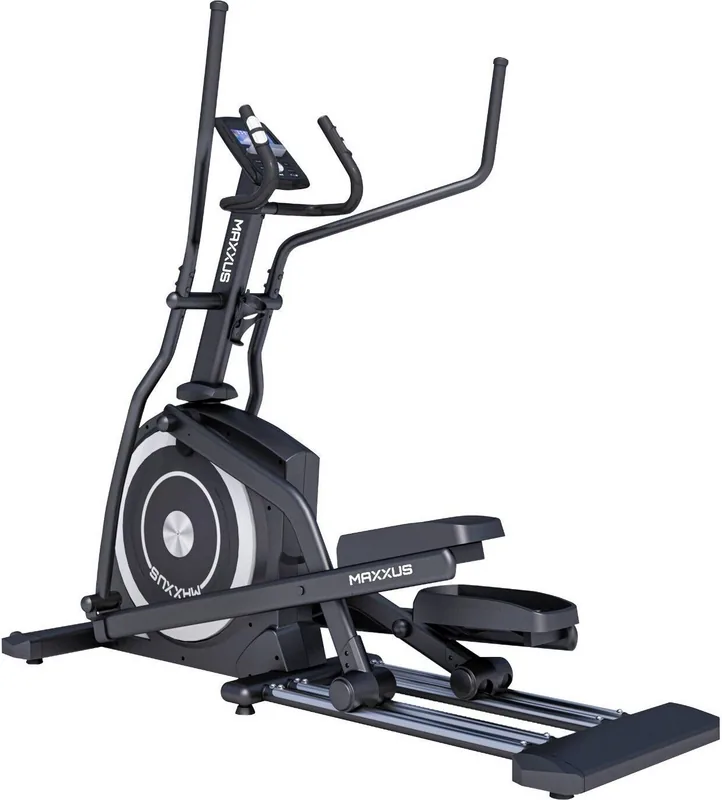
Achieve your health goals with the Maxxus CX 6.1 Crosstrainer. This equipment is designed for home and semi-professional environments. It offers a smooth elliptical motion that protects your joints while delivering a full-body workout. The device features a powerful magnetic braking system ensuring quiet operation during intense sessions. The flywheel weighs approximately nine kilograms contributing to stable movement patterns. Dimensions fit standard home gyms.
Key Features Explained
Resistance levels range from one to sixteen, controlled by the computerized console. Users can track time, distance, calories, and heart rate. The cockpit includes a USB port for charging mobile devices. A recovery function helps assess fitness levels quickly. For accurate heart rate data, users may utilize the supplied hand sensors or an optional chest strap. The display shows resistance profiles, speed, and RPM clearly. Personalized programs allow users to save custom workouts.
Safety and Assembly
Proper setup is crucial for safety. The unit weighs eighty-eight kilograms and requires a stable, dry indoor space. Temperature should stay between ten and thirty degrees Celsius. Outdoor use is not recommended. Transport is facilitated by front wheels. Always follow the safety guidelines found within the Maxxus CX 6.1 Crosstrainer Manual before starting use. Ensure all electrical connections are secure and the unit is level. Two people are recommended for moving parts. Do not use uncertified extension cords.
Training Recommendations
Effective training involves warm-ups and cool-downs. Experts suggest three to four sessions weekly for cardiovascular health. Duration should be between twenty-five and sixty minutes per session. Beginners start with lower intensity. Heart rate zones determine fat burning versus endurance training. Consult the guide for target percentages based on age. Proper hydration is essential. Drink water before workouts to maintain electrolytes. Stretching muscles post-session prevents soreness. Keep a training log to track progress.
Maintenance Essentials
Regular care extends the machine lifespan. Clean surfaces after every use to prevent sweat damage. Lubricate guide rails weekly for smooth operation. Check bolt tightness monthly. Never use solvents, use water and mild soap. Ensure the power cord connects to a grounded outlet. If noise occurs, check floor stability. Ensure the area is well ventilated for oxygen supply during use. Avoid placing cables where they can be damaged. The system ensures durability over years of exercise.
Final Thoughts
Fitness enthusiasts should consult the Maxxus CX 6.1 Crosstrainer Manual for detailed assembly steps. This resource covers wiring, part lists, and troubleshooting. Adhering to these instructions prevents voiding warranty coverage. The warranty varies by usage type. Home use grants specific protection. With its robust build and user-friendly interface, this crosstrainer supports long-term wellness routines. Remember to consult a doctor before intense training. Maxxus offers accessories for floor protection. Register your product to activate support services.
Search for 67,706 Manuals online


Type-in Brand or Model