
Marmitek Split 412 UHD Manual
PDF manual · 40 Pages
English



Quick check
Incorrect answer, please try again.
Chat with your Marmitek Split 412 UHD manual using AI
Get instant AI answers from your Marmitek Split 412 UHD manual
Ask anything about the Marmitek Split 412 UHD. Answers come from this manual, with the pages they are based on.
Ask a Question
Do you recommend Split 412 UHD?
Yes NoFrequently Asked Questions
It takes one HDMI source and sends the same audio and video signal to two displays at once. It is useful for TVs, projectors, gaming, or home cinema setups where you want mirrored content on both screens.
Is this answer helpful?
Yes. The splitter supports Ultra HD 4K along with Full HD 1080p and several other resolutions. For the best experience, use certified High Speed HDMI cables and ensure your source and displays also support 4K.
Is this answer helpful?
EDID controls how the source chooses resolution and audio settings. AUTO selects the best shared format for both displays, while COPY follows the settings of output 1 to help avoid playback issues with 3D or 4K.
Is this answer helpful?
Output 1 is important in COPY mode because the splitter uses that display as its reference. Connecting the highest-resolution screen there can improve compatibility and reduce format negotiation problems.
Is this answer helpful?
Check the power adapter, verify HDMI cables and connectors, and test each device separately. Make sure the source, splitter, and displays all support HDMI and HDCP, and avoid cables longer than recommended.
Is this answer helpful?
Yes, it supports all 3D formats. However, both the HDMI source and the display must support the same 3D format. If 3D fails, test the source directly on the display to isolate the problem.
Is this answer helpful?
Advantages and Disadvantages
Advantages

- Displays one HDMI source on two screens at the same time with stable audio and video.
- Supports 4K, 1080p, and 3D, making it useful for both modern and legacy setups.
- EDID AUTO/COPY modes help solve resolution and compatibility conflicts.
- Works with High Speed HDMI cables and can be paired with HDMI extenders.
Disadvantages

- Only provides two outputs, so it is not suited for larger multi-screen setups.
- Needs external power, so it is not a fully passive plug-and-play splitter.
- Performance depends on compatible HDMI, HDCP, and 3D support across devices.
- Cable length is limited, with a maximum HDMI run of about 15 meters.
Product Specification
Video Inputs
1x HDMI In
Video Outputs
2x HDMI Out
Resolutions up to
3840x2160@30Hz
Dimensions
5.79x0.98x2.80in (WxHxD)
Weight
0.66 lb
Product Description
Marmitek Split 412 UHD: a simple way to share one HDMI source
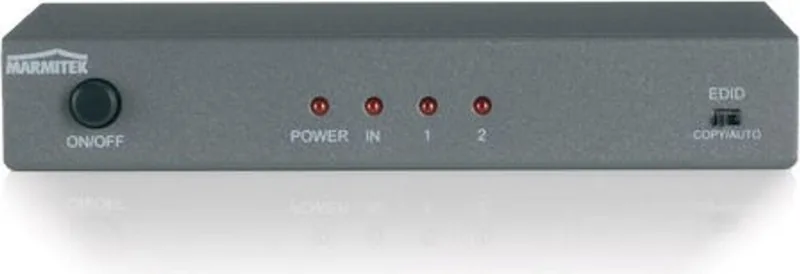
The Marmitek Split 412 UHD is a compact active HDMI splitter built for people who want one source on two screens without sacrificing picture quality. Whether you are connecting a Blu-ray player, game console, satellite receiver, or digital TV decoder, this unit lets the same audio and video signal appear on two TVs or projectors at the same time. It is especially useful in home cinema setups, meeting rooms, or anywhere a second display is needed in another room.
What makes it practical
Unlike passive splitters, the Split 412 UHD is designed to maintain signal quality while handling modern formats with ease. It supports Ultra HD 4K, Full HD 1080p, and all 3D formats, so it fits both current gear and older equipment. The device also supports advanced audio formats such as Dolby TrueHD and DTS-HD Master Audio, which makes it a solid choice for movie lovers who care about both image and sound.
A standout feature is the EDID switch. This gives you more control over how the source and displays negotiate resolution and audio settings. In AUTO mode, the splitter chooses the best common format for both screens. In COPY mode, it follows the capabilities of output 1, which can help avoid compatibility issues with 3D or 4K playback.
Easy setup, everyday convenience
Installation is straightforward: connect the HDMI source to the input, connect both displays to the outputs, and plug in the included power adapter. The manual recommends using High Speed HDMI certified cables and keeping cable lengths within the supported range for the best results. A useful tip is to connect the higher-resolution screen to Output 1, since this port is used as the reference in COPY mode.
The Split 412 UHD also works well with HDMI extenders, making it a flexible option if you want to send a signal farther away than a standard cable run allows. Its small size and light weight make it easy to place behind a TV, inside a cabinet, or near an AV rack without clutter.
Notes
- Best results come from matching compatible HDMI and HDCP devices.
- If you see poor image quality, check cables, power, and display settings first.
- 3D playback works best when both the source and display support the same format.
- This is a clean solution for splitting one HDMI feed to two screens without constant cable swapping.
Search for 67,706 Manuals online


Type-in Brand or Model