
Manhattan Numeric Keypad Manual
PDF manual · 2 Pages
English



Quick check
Incorrect answer, please try again.
Chat with your Manhattan Numeric Keypad manual using AI
Get instant AI answers from your Manhattan Numeric Keypad manual
Ask anything about the Manhattan Numeric Keypad. Answers come from this manual, with the pages they are based on.
Ask a Question
Do you recommend Numeric Keypad?
Yes NoFrequently Asked Questions
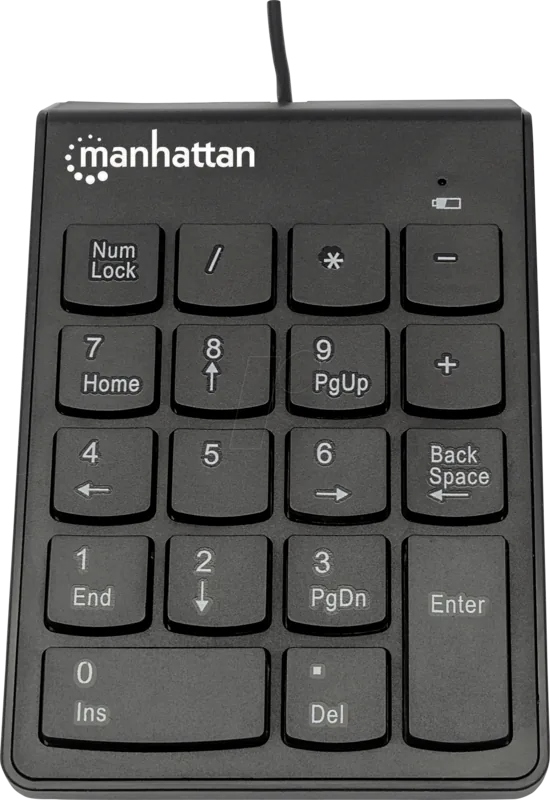
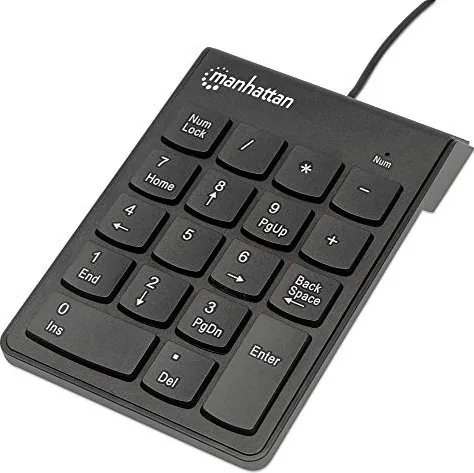
Plug the keypad into an available USB port on your PC. The device is plug-and-play and typically requires no drivers. Confirm the LED is lit to indicate Num Lock is active and the 19 numeric keys are operational.
Is this answer helpful?
The LED indicates that Num Lock is active. When lit, the keypad’s 19 keys function as a standard numeric pad. Press the Num Lock key to toggle between the default numeric layout and the alternate key mapping.
Is this answer helpful?
The Manhattan Numeric Keypad uses standard USB HID protocols and is compatible with most modern operating systems without additional drivers. For specific OS compatibility details, refer to manufacturer specifications at manhattan-products.com.
Is this answer helpful?
The product documentation references manufacturer warranty details and compliance with regional regulations such as FCC Class B and R&TTE. Warranty terms and regional service instructions are available via the manufacturer’s website and local distributors.
Is this answer helpful?
Follow local e-waste regulations. In the EU and other regions with separate collection systems, return the device to a designated recycling point or the point of sale. Remove and dispose of batteries separately per local rules if applicable.
Is this answer helpful?
Yes. Its compact, lightweight design and USB connectivity make it suitable for travel. Keep in mind that the wired connection requires an available USB port or an adapter for devices with alternate ports.
Is this answer helpful?
Advantages and Disadvantages
Advantages

- Plug-and-play USB connection for immediate use on most systems.
- Compact, lightweight design ideal for travel and small workspaces.
- LED indicator clearly shows Num Lock status for quick verification.
- Durable construction and clearly labeled keys for reliable daily entry.
- Multilingual documentation and global warranty/support information.
Disadvantages

- Limited to numeric input—no integrated shortcut or macro keys.
- Wired USB connection may be less convenient than wireless options.
- Basic layout with no backlighting, which can hinder low-light use.
- Alternate functions require toggling Num Lock, interrupting workflow.
- No user-serviceable parts; warranty offers replacement rather than repair.
Product Specification
Type
Numpad
Compatibility
PC, Mac OS
Key Type
Rubber Dome
Keys
18
Lighting
N/A
Key Height
flat
Key Shape
concave
Palm Rest
N/A
Housing
Plastic
Connectivity
wired (35.43 in), USB
Power Supply
USB
Dimensions (WxHxD)
3.15x0.47x4.49in
Weight
0.17lb
Special Features
Chiclet
Product Description
Manhattan Numeric Keypad, USB
The Manhattan Numeric Keypad is a compact, plug-and-play USB numeric keypad designed to boost data-entry speed and comfort for accountants, data clerks, students, and anyone who frequently works with numbers. Lightweight and portable, it connects via USB and is immediately recognized by most operating systems—no drivers required. A bright LED indicates Num Lock status, and the keypad ships with Num Lock enabled by default so the 19 keys operate as a standard numeric pad out of the box. Pressing the Num Lock key toggles an alternate key layout for added flexibility.
Ergonomically arranged keys reduce finger travel and fatigue during long numeric sessions. The keypad’s simple design makes it easy to add to a laptop workstation or tuck into desktop setups that lack a dedicated numeric block. With a durable construction and clearly labeled keys, it supports reliable daily use and straightforward maintenance. Its small footprint and USB connectivity make it a convenient travel companion for professionals on the go.
Beyond everyday use, the Manhattan Numeric Keypad is backed by multinational warranty and compliance information. The product documentation highlights disposal and recycling guidance consistent with WEEE regulations in the EU, and regulatory certifications such as FCC Class B and R&TTE compliance are cited, ensuring the keypad meets common safety and emissions standards.
Installation is straightforward: plug the keypad into a USB port, confirm the LED is lit to indicate Num Lock is active, and begin entering numbers. For those who prefer an alternate function layout, press Num Lock to switch modes and press again to return to the default mapping. Full technical specifications and warranty details are available from the manufacturer’s website, and localized multilingual instructions are included to support global users.
Whether you need a full-time numeric extension for a laptop or a reliable backup for a desktop keyboard, this Manhattan USB keypad aims for dependable function, straightforward setup, and broad compatibility.
Notes
- Num Lock is enabled by default; LED indicates active Num Lock.
- Plug-and-play USB connectivity—no drivers required for most systems.
- Manufacturer provides warranty and multilingual support documentation.
- Follow local regulations for electronic disposal and recycling.
Search for 67,706 Manuals online


Type-in Brand or Model