Manual.ly Logo

Manhattan Desktop Gigabit Switch Manual

0.0 · 0 Ratings

PDF manual · 2 Pages

English

M: OA-GPT-54-NAN
page

/ 2

Loading...
f68e4a7329f835409b99a911194c4cda9ac7 page 1
GIGABIT ETHERNET
SWITCH INSTRUCTIONS
MODELS 560696 & 560702
WARRANTY INFORMATION
English: For warranty information, go to manhattanproducts.com/warranty.
Deutsch: Garantieinformationen finden Sie unter manhattanproducts.com/warranty.
Español: Si desea obtener información sobre la garantía, visite manhattanproducts.com/warranty.
Français: Pour consulter les informations sur la garantie, visitez manhattanproducts.com/warranty.
Polski: Informacje dotyczące gwarancji znajdują się na stronie manhattanproducts.com/warranty.
Italiano: Per informazioni sulla garanzia, accedere a manhattanproducts.com/warranty.
En México: Póliza de Garantía Manhattan — Datos del importador y responsable ante el consumidor IC Intracom México, S.A.P.I. de C.V. • Av. Interceptor Poniente
# 73, Col. Parque Industrial La Joya, Cuautitlán Izcalli, Estado de México, C.P. 54730, México. • Tel. (55)1500-4500
La presente garantía cubre los siguientes productos contra cualquier defecto de fabricación en sus materiales y mano de obra.
A. Garantizamos los productos de limpieza, aire comprimido y consumibles, por 60 dias a partir de la fecha de entrega, o por el tiempo en que se agote
totalmente su contenido por su propia función de uso, lo que suceda primero.
B. Garantizamos los productos con partes móviles por 3 años.
C. Garantizamos los demás productos por 5 años (productos sin partes móviles), bajo las siguientes condiciones:
1. Todos los productos a que se reere esta garantía, ampara su cambio físico, sin ningún cargo para el consumidor.
2. El comercializador no tiene talleres de servicio, debido a que los productos que se garantizan no cuentan con reparaciones, ni refacciones, ya que su garantía
es de cambio físico.
3. La garantía cubre exclusivamente aquellas partes, equipos o sub-ensambles que hayan sido instaladas de fábrica y no incluye en ningún caso el equipo
adicional o cualesquiera que hayan sido adicionados al mismo por el usuario o distribuidor.
Para hacer efectiva esta garantía bastará con presentar el producto al distribuidor en el domicilio donde fue adquirido o en el domicilio de IC Intracom México,
S.A.P.I. de C.V., junto con los accesorios contenidos en su empaque, acompañado de su póliza debidamente llenada y sellada por la casa vendedora (indispensable
el sello y fecha de compra) donde lo adquirió, o bien, la factura o ticket de compra original donde se mencione claramente el modelo, número de serie (cuando
aplique) y fecha de adquisición. Esta garantía no es válida en los siguientes casos: Si el producto se hubiese utilizado en condiciones distintas a las normales; si el
producto no ha sido operado conforme a los instructivos de uso; o si el producto ha sido alterado o tratado de ser reparado por el consumidor o terceras personas.
manhattanproducts.com
REGULATORY STATEMENTS
FCC Class B
This equipment has been tested and found to comply with the limits for a Class B digital device, pursuant to Part 15 of Federal Communications Commission (FCC)
Rules. These limits are designed to provide reasonable protection against harmful interference in a residential installation. This equipment generates, uses and
can radiate radio frequency energy, and if not installed and used in accordance with the instructions may cause harmful interference to radio communications.
However, there is no guarantee that interference will not occur in a particular installation. If this equipment does cause harmful interference to radio or television
reception, which can be determined by turning the equipment off and on, the user is encouraged to try to correct the interference by one or more of the following
measures: reorient or relocate the receiving antenna; increase the separation between the equipment and the receiver; connect the equipment to an outlet on a
circuit dierent from the receiver; or consult the dealer or an experienced radio/TV technician for help.
CE (RE / EMC / LVD)
English: This device complies with the requirements of directives 2014/53/EU and/or 2004/108/EC & 2006/95/EC. The Declaration of Conformity for this product
is available at:
Deutsch:
Dieses Gerät enspricht den Direktiven 2014/53/EU und/oder 2004/108/EC & 2006/95/EC. Die Konformitätserklärung für dieses Produkt nden Sie unter:
Español: Este dispositivo cumple con los requerimientos de las Directivas 2014/53/UE y/o 2004/108/EC & 2006/95/EC. La declaración de conformidad para este
producto esta disponible en:
Français: Cet appareil satisfait aux exigences des directives 2014/53/UE et/ou 2004/108/CE & 2006/95/CE. La Déclaration de Conformité pour ce produit est
disponible à l’adresset :
Polski: Urządzenie spełnia wymagania dyrektyw 2014/53/UE i/lub 2004/108/EC & 2006/95/EC. Deklaracja zgodności dostępna jest na stronie internetowej
producenta:
Italiano: Questo dispositivo è conforme alle direttive 2014/53/UE e/o 2004/108/EC & 2006/95/EC. La dichiarazione di conformità per questo prodotto è
disponibile al:
manhattanproducts.com
• Use the included power adapter to connect the DC/5V jack (A) to an AC
outlet. Confirm that the Power LED (B) lights. Note: To ensure proper
operation, use only the included power adapter.
• All ports on the switch support Auto-MDI/MDI-X functionality, so
crossover cables and uplink ports are not needed for connections to PCs,
routers, other switches, etc. Cat5/5e UTP/STP cables provide optimal
performance; if a status LED (C) doesn’t indicate a link or activity, check
the corresponding device for proper setup and operation.
• Prior to use, it is recommended that the switch be placed/positioned:
– with a minimum of 25 mm (approx. 1”) of clearance on the top and
sides for adequate ventilation;
– away from sources of electrical noise: radios, transmitters, broadband
amplifiers, etc.;
– within 100 m (approx. 328’) of network devices it’s to be connected to.
• For specifications, go to manhattanproducts.com.
English: This symbol on the product or its packaging indicates that this product shall
not be treated as household waste. Instead, it should be taken to an applicable collec-
tion point for the recycling of electrical and electronic equipment. By ensuring
this product is disposed of correctly, you will help prevent potential negative
consequences to the environment and human health, which could otherwise
be caused by inappropriate waste handling of this product. If your equip-
ment contains easily removable batteries or accumulators, dispose of these separately
according to your local requirements. The recycling of materials will help to conserve
natural resources. For more detailed information about recycling of this product, con-
tact your local city office, your household waste disposal service or the shop where you
purchased this product. In countries outside of the EU: If you wish to discard this prod-
uct, contact your local authorities and ask for the correct manner of disposal.
Deutsch: Dieses auf dem Produkt oder der Verpackung angebrachte Symbol zeigt an, dass
dieses Produkt nicht mit dem Hausmüll entsorgtwerden darf. In Übereinstimmung mit
der Richtlinie 2012/19/EU des Europäischen Parlaments und des Rates über Elektro- und
Elektronik-Altgeräte (WEEE) darf dieses Elektrogerät nicht im normalen Hausmüll oder
dem Gelben Sack entsorgt werden. Wenn Sie dieses Produkt entsorgen möchten,
bringen Sie es bitte zur Verkaufsstelle zurück oder zum Recycling-Sammelpunkt Ihrer
Gemeinde.
Español: Este símbolo en el producto o su embalaje indica que el producto no debe
tratarse como residuo doméstico. De conformidad con la Directiva 2012/96/UE de la
UE sobre residuos de aparatos eléctricos y electrónicos (RAEE), este producto eléctrico
no puede desecharse se con el resto de residuos no clasificados. Deshágase de este
producto devolviéndolo a su punto de venta o a un punto de recolección municipal
para su reciclaje.
Français: Ce symbole sur Ie produit ou son emballage signifie que ce produit ne doit
pas être traité comme un déchet ménager. Conformément à la Directive 2012/19/UE sur
les déchets d’équipements électriques et électroniques (DEEE), ce produit électrique ne
doit en aucun cas être mis au rebut sous forme de déchet municipal non trié. Veuillez
vous débarrasser de ce produit en Ie renvoyant à son point de vente ou au point de
ramassage local dans votre municipalité, à des fins de recyclage.
Polski: Jeśli na produkcie lub jego opakowaniu umieszczono ten symbol, wówczas w
czasie utylizacji nie wolno wyrzucać tego produktu wraz z odpadami komunalnymi.
Zgodnie z Dyrektywą Nr 2012/19/UE w sprawie zużytego sprzętu elektrycznego i ele-
ktronicznego (WEEE), niniejszego produktu elektrycznego nie wolno usuwać jako nie
posortowanego odpadu komunalnego. Prosimy o usuniecie niniejszego produktu
poprzez jego zwrot do punktu zakupu lub oddanie do miejscowego komunalnego
punktu zbiórki odpadów przeznaczonych do recyklingu.
Italiano: Questo simbolo sui prodotto o sulla relativa confezione indica che il prodotto
non va trattato come un riuto domestico. In ottemperanza alla Direttiva UE 2012/19/
UE sui riuti di apparecchiature elettriche ed elettroniche (RAEE), questa prodotto
elettrico non deve essere smaltito come rifiuto municipale misto. Si prega di smaltire
il prodotto riportandolo al punto vendita o al punto di raccolta municipale locale per
un opportuno riciclaggio.
WASTE ELECTRICAL & ELECTRONIC EQUIPMENT
Disposal of Electric and Electronic Equipment per the European Union’s WEEE Directive: 2012/19/EU
Important: Read before use. • Importante: Leer antes de usar.
Model 560696
A
B
C

Chat with your Manhattan Desktop Gigabit Switch manual using AI

Get instant AI answers from your Manhattan Desktop Gigabit Switch manual

Ask anything about the Manhattan Desktop Gigabit Switch. Answers come from this manual, with the pages they are based on.

Ask a Question

0/1000

Do you recommend Desktop Gigabit Switch?

Yes No

Frequently Asked Questions

A

It is used to add more wired Ethernet ports to a network, making it easier to connect PCs, printers, routers, and other devices with stable Gigabit speeds.

Is this answer helpful?

A

No. All ports support Auto-MDI/MDI-X, so standard Ethernet cables are enough for connecting devices without using crossover cables or special uplink ports.

Is this answer helpful?

A

Cat5, Cat5e, or Cat6 Ethernet cables are recommended. The text notes that Cat5/5e UTP/STP cables provide solid performance for typical use.

Is this answer helpful?

A

Use the included power adapter and connect it to the DC/5V jack. The instructions stress using only the supplied adapter to ensure correct operation.

Is this answer helpful?

A

The LEDs help show power status, link status, and activity. If a port LED does not light or blink, the connected device or cable should be checked.

Is this answer helpful?

A

Yes. Leave about 25 mm of space around the unit for ventilation, keep it away from electrical noise sources, and stay within 100 m of connected network devices.

Is this answer helpful?

M: OA-GPT-54-NAN

Advantages and Disadvantages

Advantages

  • Eight RJ-45 Gigabit ports provide fast wired expansion for multiple devices.
  • Auto-MDI/MDI-X support removes the need for crossover cables or uplink ports.
  • Compact desktop design makes it easy to place in offices or home setups.
  • Status LEDs help confirm power, link, and network activity quickly.
  • Works with common Cat5, Cat5e, and Cat6 Ethernet cables.
VS

Disadvantages

  • No advanced management features for VLANs, monitoring, or traffic control.
  • Requires the included power adapter for proper operation.
  • Needs enough ventilation and careful placement away from electrical noise.
  • Best performance depends on keeping connected devices within cable-distance limits.
M: OA-GPT-54-NAN

Product Specification

Function

Switch

Type

Standalone

Network ports

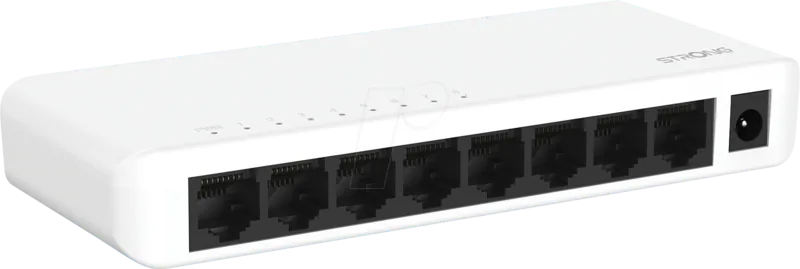
8x RJ-45 (Rear)

Speeds

8x RJ-45 (10/100/1000Base-T)

PoE

N/A

Backplane

16Gb/s, 9kB Jumboframes, 256kB Packet buffer, 2k MAC addresses

Officially supported standards

802.3, 802.3ab, 802.3az, 802.3u, 802.3x

Configuration

unmanaged

Cooling

passive

Dimensions (WxHxD)

5.51x1.10x3.07in

Weight

0.73 lbs

Color

white

Special features

external power supply

M: OA-GPT-54-NAN

Product Description

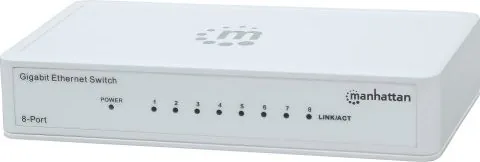
Manhattan Desktop Gigabit Switch, 8x RJ-45 Manual

The Manhattan Desktop Gigabit Switch is a practical choice for anyone who wants to expand a wired network without adding complexity. Built for everyday desktop use, it offers eight RJ-45 Gigabit Ethernet ports that can link computers, printers, routers, access points, and other network devices at high speed. For small offices, home workspaces, and AV setups, this kind of switch helps keep traffic moving smoothly while staying compact and easy to place.

One of its strongest advantages is simplicity. The switch supports Auto-MDI/MDI-X on every port, which means there is no need to worry about crossover cables or special uplink ports. Standard Cat5, Cat5e, or Cat6 cabling is enough for dependable performance, and the status LEDs make it easier to confirm power, link, and activity at a glance. That makes day-to-day troubleshooting much less stressful, especially when several devices are connected at once.

Another helpful detail is the included power adapter. The unit is designed to be powered from a DC/5V connection, and the instructions emphasize using only the supplied adapter for proper operation. Placement also matters: the switch should have room for ventilation, stay away from electrical noise sources, and remain within a reasonable cable distance from the devices it serves. These practical guidelines help preserve stable throughput and reliable connections over time.

Beyond convenience, the switch reflects a straightforward approach to network expansion. It is suitable for users who want a clean plug-and-play solution rather than a managed device with advanced configuration tools. That makes it especially appealing in environments where the goal is simply to add more wired ports with minimal setup.

Notes

  • Use the included power adapter only.
  • Leave about 25 mm of space around the unit for airflow.
  • Keep cabling within 100 m of connected devices.
  • For best results, use quality Cat5/5e/6 Ethernet cables.
  • Check LEDs if a port does not appear active.
M: OA-GPT-54-NAN

© Copyright 2026 Manual.ly
