Manual.ly Logo

Manhattan 161039 Manual

0.0 · 0 Ratings

PDF manual · 2 Pages

English

M: qwen/qwen3.5-flash-20260224
page

/ 2

Loading...
51d6d5a5ed80b7c655c23bc45ffc113af825 page 1
HI-SPEED USB 2.0
ULTRA HUB INSTRUCTIONS
MODEL 161039
WARRANTY INFORMATION
English: For warranty information, go to manhattan-products.com/warranty.
Deutsch: Garantieinformationen finden Sie unter manhattan-products.com/warranty.
Español: Si desea obtener información sobre la garantía, visite manhattan-products.com/warranty.
Français: Pour consulter les informations sur la garantie, visitez manhattan-products.com/warranty.
Polski: Informacje dotyczące gwarancji znajdują się na stronie manhattan-products.com/warranty.
Italiano: Per informazioni sulla garanzia, accedere a manhattan-products.com/warranty.
Slovensky: Pre informácie o záruke nabštívte manhattan-products.com/warranty.
En México: Póliza de Garantía Manhattan — Datos del importador y responsable ante el consumidor IC Intracom México, S.A.P.I.
de C.V. • Av. Interceptor Poniente # 73, Col. Parque Industrial La Joya, Cuautitlán Izcalli, Estado de México, C.P. 54730, México. •
Tel. (55)1500-4500
La presente garantía cubre los siguientes productos contra cualquier defecto de fabricación en sus materiales y mano de obra.
A. Garantizamos los productos de limpieza, aire comprimido y consumibles, por 60 dias a partir de la fecha de entrega, o por el tiempo
en que se agote totalmente su contenido por su propia función de uso, lo que suceda primero.
B. Garantizamos los productos con partes móviles por 3 años.
C. Garantizamos los demás productos por 5 años (productos sin partes móviles), bajo las siguientes condiciones:
1. Todos los productos a que se reere esta garantía, ampara su cambio físico, sin ningún cargo para el consumidor.
2. El comercializador no tiene talleres de servicio, debido a que los productos que se garantizan no cuentan con reparaciones, ni
refacciones, ya que su garantía es de cambio físico.
3. La garantía cubre exclusivamente aquellas partes, equipos o sub-ensambles que hayan sido instaladas de fábrica y no incluye en
ningún caso el equipo adicional o cualesquiera que hayan sido adicionados al mismo por el usuario o distribuidor.
Para hacer efectiva esta garantía bastará con presentar el producto al distribuidor en el domicilio donde fue adquirido o en el
domicilio de IC Intracom México, S.A.P.I. de C.V., junto con los accesorios contenidos en su empaque, acompañado de su póliza
debidamente llenada y sellada por la casa vendedora (indispensable el sello y fecha de compra) donde lo adquirió, o bien, la factura
o ticket de compra original donde se mencione claramente el modelo, número de serie (cuando aplique) y fecha de adquisición.
Esta garantía no es válida en los siguientes casos: Si el producto se hubiese utilizado en condiciones distintas a las normales; si el
producto no ha sido operado conforme a los instructivos de uso; o si el producto ha sido alterado o tratado de ser reparado por el
consumidor o terceras personas.
REGULATORY STATEMENTS
FCC Class B
This equipment has been tested and found to comply with the limits for a Class B digital device, pursuant to Part 15 of Federal Communi-
cations Commission (FCC) Rules. These limits are designed to provide reasonable protection against harmful interference in a residential
installation. This equipment generates, uses and can radiate radio frequency energy, and if not installed and used in accordance with
the instructions may cause harmful interference to radio communications. However, there is no guarantee that interference will not
occur in a particular installation. If this equipment does cause harmful interference to radio or television reception, which can be de-
termined by turning the equipment o and on, the user is encouraged to try to correct the interference by one or more of the following
measures: reorient or relocate the receiving antenna; increase the separation between the equipment and the receiver; connect the
equipment to an outlet on a circuit dierent from the receiver; or consult the dealer or an experienced radio/TV technician for help.
CE / R&TTE
manhattan-products.com
D
A
B
C
1 Plug the built-in USB cable (A) – with or without the extender cable – into
a USB port on the computer or connect the power jack (B) to an AC source
using the included power adapter. Confirm that the Power LED (C) lights.
2 Connect up to 7 peripherals to the Hi-Speed USB ports (D).
Note: The hub’s Multiple Transaction Translator helps obtain the required
bandwidth for maximum performance of low-, full- and high-speed
connected devices. If a port fails to work, disconnect the device to allow the
hub to recover, as the failure may be momentary due to excessive current.
Then reconnect the device.
• For specifications, go to manhattan-products.com.
Important: Read before use. • Importante: Leer antes de usar.
All trademarks and trade names are the property of their respective owners.
Alle Marken und Markennamen sind Eigentum Ihrer jeweiligen Inhaber.
Todas las marcas y nombres comerciales son propiedad de sus respectivos dueños.
Toutes les marques et noms commerciaux sont la propriété de leurs propriétaires respectifs.
Wszystkie znaki towarowe i nazwy handlowe należą do ich właścicieli.
Tutti i marchi registrati e le dominazioni commerciali sono di proprietà dei loro rispettivi proprietari.
Všetky ochranné známky a obchodné názvy sú majetkom ich príslušných vlastníkov.
© IC Intracom. All rights reserved. Manhattan is a trademark of IC Intracom, registered in the U.S. and other countries.
English: This device complies with the requirements of R&TTE Directive
1999/5/EC. The Declaration of Conformity for this product is available at:
Deutsch: Dieses Gerät enspricht der Direktive R&TTE Direktive 1999/5/EC Die
Konformitätserklärung für dieses Produkt nden Sie unter::
Español: Este dispositivo cumple con los requerimientos de la Directiva R&TTE
1999/5/EC. La declaración de conformidad para este producto esta
disponible en:
Français: Cet appareil satisfait aux exigences de la directive R&TTE 1999/5/CE.
La Déclaration de Conformité pour ce produit est disponible à l’adresset ::
Polski: Urządzenie spełnia wymagania dyrektywy R&TTE 1999/5/EC.
Deklaracja zgodności dostępna jest na stronie internetowej producenta:
Italiano: Questo dispositivo è conforme alla Direttiva 1999/5/EC R&TTE La
dichiarazione di conformità per questo prodotto è disponibile al:
Slovensky: Toto zariadenie vyhovuje požiadavkám smernice R&TTE 1999/5/
EC. Vyhlásenie o zhode pre tento výrobok je k dispozícii na:
North & South America
IC Intracom Americas
550 Commerce Blvd.
Oldsmar, FL 34677
USA
Asia & Africa
IC Intracom Asia
Far Eastern Technology Center
7-F No. 125, Section 2, Da Tong Rd.
Shijr, Taipei • Taiwan, ROC
Europe
IC Intracom Europe
Löhbacher Str. 7
D-58553 Halver
Germany

Chat with your Manhattan 161039 manual using AI

Get instant AI answers from your Manhattan 161039 manual

Ask anything about the Manhattan 161039. Answers come from this manual, with the pages they are based on.

Ask a Question

0/1000

Do you recommend 161039?

Yes No

Frequently Asked Questions

A

It includes seven high-speed USB 2.0 ports suitable for connecting keyboards, mice, and external storage devices simultaneously without performance loss.

Is this answer helpful?

A

Products without moving parts are covered for five years against manufacturing defects, provided the original receipt is kept for validation.

Is this answer helpful?

A

Yes, you must connect the power jack to an AC source to ensure stable power delivery to all connected peripherals during operation.

Is this answer helpful?

A

Disconnect the failing device to allow the hub to recover from excessive current surges, then reconnect it after a short pause.

Is this answer helpful?

A

No, it must not be treated as household waste. Use a certified recycling point for electrical equipment to prevent environmental harm.

Is this answer helpful?

A

The Multiple Transaction Translator helps obtain required bandwidth for low, full, and high-speed devices connected to the central hub unit.

Is this answer helpful?

A

Visit the official manufacturer website online to access detailed technical specifications and regulatory compliance declarations for the device.

Is this answer helpful?

M: qwen/qwen3.5-flash-20260224

Advantages and Disadvantages

Advantages

  • Features seven high-speed USB 2.0 ports for multiple peripherals
  • Includes a five-year warranty for products without moving parts
  • Built-in power adapter ensures stable connectivity under load
  • Power LED indicator provides clear visual feedback on status
  • Multiple Transaction Translator supports various device speeds
VS

Disadvantages

  • Designed for USB 2.0 speeds rather than newer USB 3.0 standards
  • Requires AC power adapter for optimal performance and stability
  • No individual port switches available to control devices separately
  • Maximum of seven devices can be connected at one time
  • Warranty claims require original sales receipt with serial number
M: qwen/qwen3.5-flash-20260224

Product Specification

Type

USB Hub

Form Factor

1x External (Cable-Connected (Connection Cable Not Detachable))

Connection

1x USB-A 2.0 (Plug via Cable, 480Mb/s, 8.27 in Cable Length)

Ports

7x USB-A 2.0 (Port)

Transfer Rate

7x USB-A 2.0 (Port, 480Mb/s)

Power

Power not via connection, Power Input (1x Barrel Jack), External Power Supply Required and Included (1x Barrel Jack)

Dimensions

1.97x0.79x3.54 in (WxHxD)

Weight

0.12 lbs

Case Color

blue

Compatibility

universal

Manufacturer Warranty

3 years

USB Label

Link

M: qwen/qwen3.5-flash-20260224

Product Description

Enhancing Connectivity with the Manhattan Ultra USB-Hub

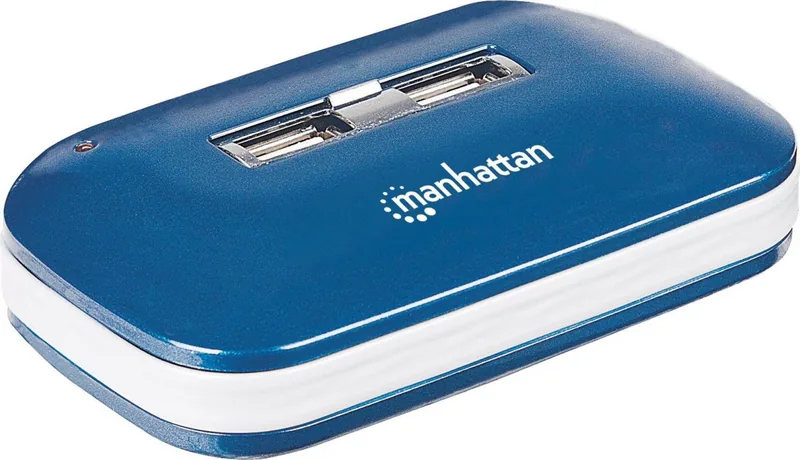
In today's digital landscape, expanding computer connectivity is absolutely essential for productivity and efficiency. The Manhattan Ultra USB-Hub, 7x USB-A 2.0, offers a robust and reliable solution for users needing additional ports for their hardware needs. This device simplifies the complex process of connecting multiple peripherals to a single computer connection at once. Whether you are working from home, managing office equipment, or setting up a media station, having accessible USB ports is crucial for seamless operations without constant cable swapping or dongle clutter.

Key Features and Technical Specifications

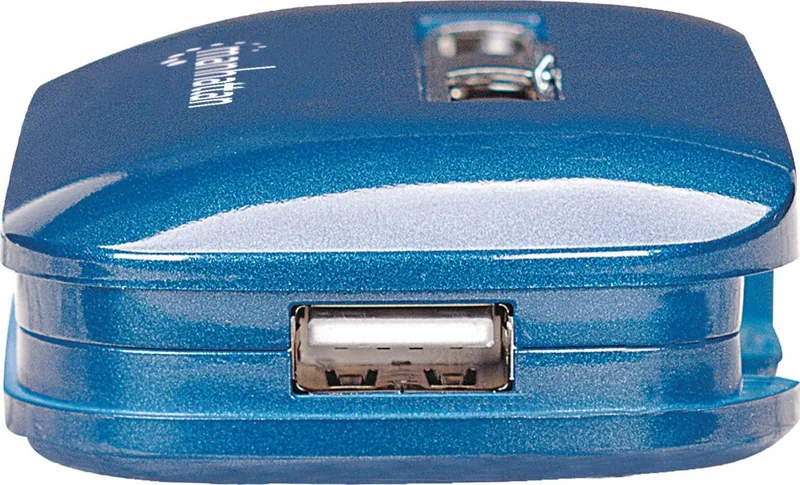
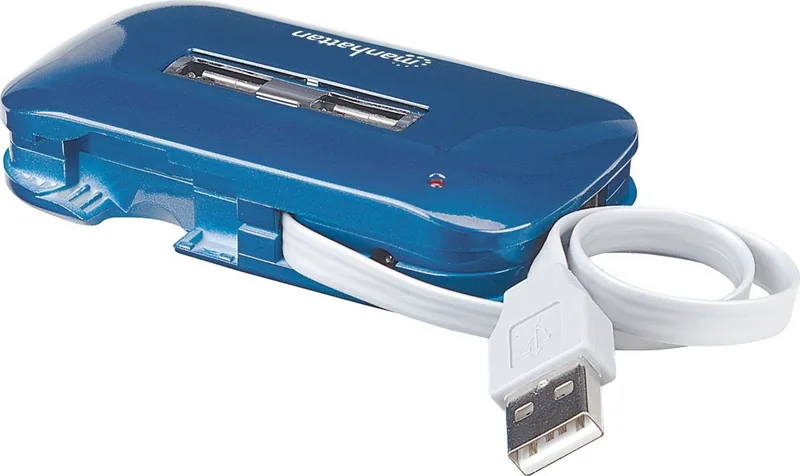
The Manhattan Ultra USB-Hub, 7x USB-A 2.0, comes equipped with seven high-speed USB 2.0 Type-A ports. This configuration allows users to connect keyboards, mice, printers, and external hard drives simultaneously. The unit features a built-in USB cable and an optional extender cable for flexible positioning. A dedicated power jack allows connection to an AC source using the included power adapter, ensuring stable power delivery. A distinct power LED indicator confirms the device is active. The advanced Multiple Transaction Translator technology ensures that bandwidth requirements are met for all connected devices.

Installation and Usage Instructions

Setting up is straightforward. Plug the built-in USB cable into a standard USB port or connect the power jack to an AC source. Confirm the Power LED lights up to indicate readiness. Connect up to seven peripherals to the Hi-Speed ports. If a port fails, disconnect the device to allow the hub to recover as failures may be caused by excessive current. Reconnect the device after a pause. This step helps maintain optimal performance consistency.

Warranty Protection and Product Safety

Manhattan provides strong assurance for the quality and longevity of this product. The warranty coverage extends to physical defects in materials and manufacturing processes. Products without moving parts are guaranteed for five years under normal use conditions. To claim warranty service, present the product to the distributor with the original sales receipt clearly showing the model and serial number. Always follow the specific instructions for use to avoid voiding coverage due to unauthorized alterations. The product complies with FCC Class B limits and European CE standards for safety. Recycling information is available for proper disposal of electronic waste according to local municipal regulations to prevent environmental harm.

Important Disposal and Maintenance Notes

Please ensure correct disposal of this product when it reaches the end of its useful life. It should not be treated as ordinary household waste under any circumstances. Take the device to a certified recycling point for electrical equipment to ensure safe material recovery. Batteries should be disposed of separately according to local requirements. This step helps prevent potential environmental harm and allows conservation of natural resources through industrial recycling. Visit the official manufacturer website online for further technical specifications. Reference the USB-A 2.0 [Plug] Manual for additional setup details to ensure proper installation.

M: qwen/qwen3.5-flash-20260224

© Copyright 2026 Manual.ly
