
Manhattan 130714 Manual
PDF manual · 2 Pages
English



Quick check
Incorrect answer, please try again.
Chat with your Manhattan 130714 manual using AI
Get instant AI answers from your Manhattan 130714 manual
Ask anything about the Manhattan 130714. Answers come from this manual, with the pages they are based on.
Ask a Question
Do you recommend 130714?
Yes NoFrequently Asked Questions
macOS does not support different video output on two external monitors, adjust displays in System Preferences. Windows allows extended desktop selection for multi-monitor setups. Some Intel graphics cards only support three active screens at once for best performance.
Is this answer helpful?
The Power Delivery capacity is up to 100 watts for connected laptops. Ensure your charger supports the required wattage for optimal charging speed during heavy usage tasks.
Is this answer helpful?
Plug and play for fast setup with no driver download required on most systems. Windows users install drivers automatically while Mac network connections remain automatic generally.
Is this answer helpful?
Different products have different periods but general non-moving part items are guaranteed by five years physical change. Moving part products have 3 years warranty coverage.
Is this answer helpful?
Yes, return it to your local point of sale or recycling pickup point in your municipality. Do not treat it as unsorted household waste per EU Directive rules.
Is this answer helpful?
The unit is tested to comply with Class B digital device limits. This protects against harmful interference in residential installations. Follow instructions to prevent interference with radio communications.
Is this answer helpful?
Scan the QR code or visit the registered website link to verify details. Bring the product and sales receipt to the distributor for coverage confirmation.
Is this answer helpful?
Advantages and Disadvantages
Advantages

- Supports dual 4K@60Hz or single 8K@30Hz display resolution for premium visuals.
- 100W Power Delivery keeps laptop charged during operation for all-day productivity.
- Plug and play function requires no manual driver installation for immediate use.
- Ethernet RJ45 port offers wired internet with clear status LED indicators.
- Reduces cable clutter by replacing multiple dongles and adapters with one solution.
Disadvantages

- macOS does not support different video output on two external monitors simultaneously.
- Some Intel graphics cards allow only three active screens at the same time limit.
- Warranty excludes products altered by consumers or repaired by third-party persons.
- No service workshops exist since the warranty covers physical exchange only not repair.
Product Specification
Type
LAN Adapter, USB Hub, Video Adapter
Form Factor
1x external cable-connected (cable not detachable)
Connection
1x USB-C 3.1 (Connector via cable, 10Gb/s, USB-C with DisplayPort 1.4, USB PD max. 20V/4.25A/85W, 23.62 in cable length)
Ports
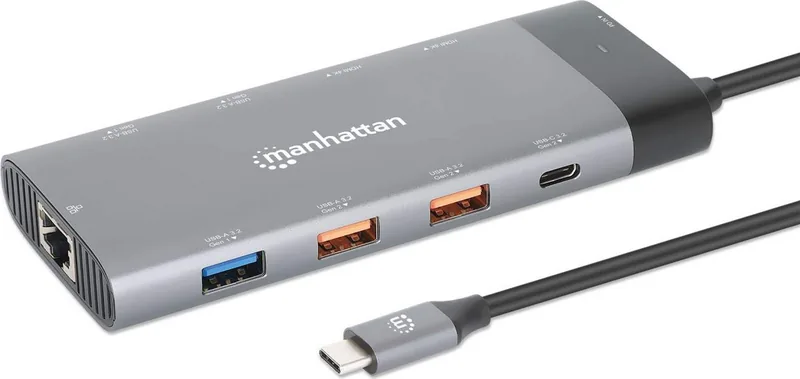
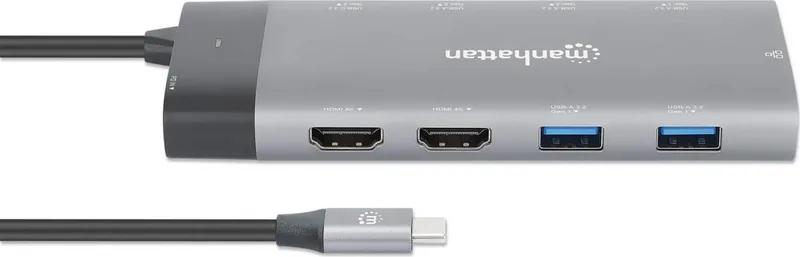
1x RJ-45, 1x USB-C 3.1 (Port), 2x USB-A 3.1 (Port), 3x USB-A 3.0 (Port), 1x HDMI 2.0 (Port), 1x HDMI 2.1 (Port)
Transfer Rates
1x RJ-45 (10/100/1000Base-T), 1x USB-C 3.1 (Port, 10Gb/s), 2x USB-A 3.1 (Port, 10Gb/s, 5V/0.5A/2.5W), 3x USB-A 3.0 (Port, 5Gb/s, 5V/0.5A/2.5W), 1x HDMI 2.0 (Port, max. 3840x2160@60Hz), 1x HDMI 2.1 (Port, max. 3840x2160@60Hz)
Power Supply
Power also via connection, AC Power (1x USB-C port USB PD, max. 20V/5A/100W), external adapter possible but not included
Dimensions
2.13x0.67x5.12in (WxHxD)
Weight
0.40 lbs
Housing Color
black
Compatibility
universal
Features
Metal housing
Manufacturer Warranty
3 years
USB Label
Link
Note
Maximum simultaneous monitors: 2 (max. 3840x2160@60Hz)
Product Description
Elevate Your Productivity
Transform your computer setup with the powerful connectivity of the Manhattan 10-in-1 Docking Station, USB-C 3.1 [Plug] Manual. This hub is designed for professionals seeking a streamlined workspace that accommodates multiple high-resolution displays and peripheral devices simultaneously. With seamless compatibility across Windows and Mac platforms, users experience a hassle-free installation process requiring no additional driver downloads. The device supports up to 100W Power Delivery, ensuring your laptop remains charged while providing robust connectivity for all your peripherals.
Visual quality takes center stage with support for resolutions reaching 8K at 30Hz on a single video output. When utilizing dual monitors, each screen can handle 4K resolution at a smooth 60Hz refresh rate. This capability makes it ideal for creative professionals, financial analysts, and developers who require extensive screen real estate. The Ethernet port provides stable internet access with clear LED indicators showing connection status. Green signifies a valid connection while orange indicates active data transmission.
Regulatory compliance ensures safety and interference protection. The unit meets FCC Class B standards and CE requirements for electromagnetic compatibility and electrical safety. Users can register their product online to access warranty information and support resources. Disposal follows strict WEEE guidelines to minimize environmental impact through proper recycling channels. The equipment generates radio frequency energy and must be installed according to instructions to prevent harmful interference.
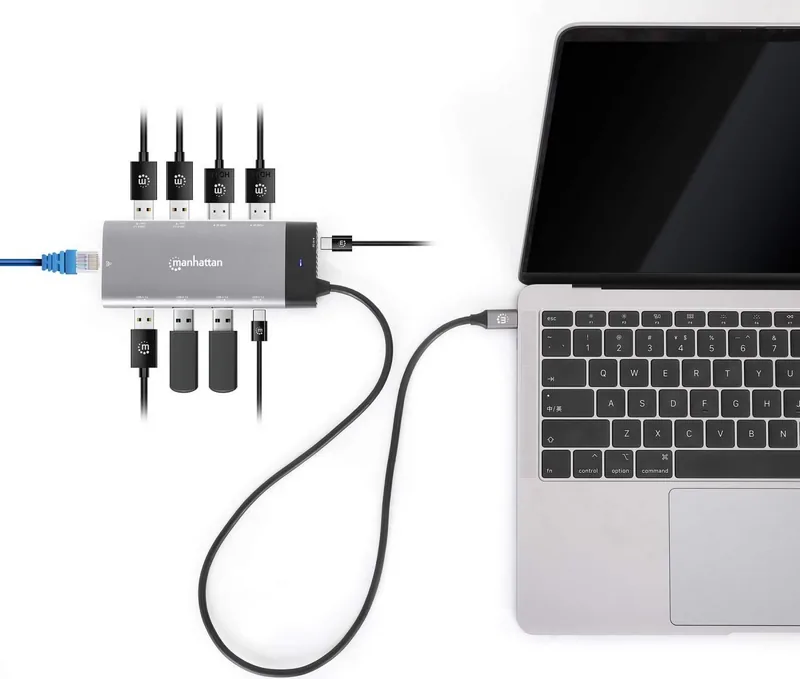
For setup, simply connect the USB-C cable to your computer. On Mac systems, display settings may require adjustment in System Preferences to extend the desktop properly. Windows users encounter automatic driver installation which prepares the connection immediately. Note that some Intel graphics cards might limit the number of active screens to three simultaneously. Always ensure the power adapter supports sufficient wattage for optimal performance throughout daily tasks.
The network connection should appear automatically for most Mac users. If issues arise, users should navigate to Network preferences and select USB 10/100/1000 LAN. This ensures stable throughput for demanding applications. Additionally, the docking station includes multiple USB ports for keyboards and mice. Organize your desk by reducing cable clutter with this single cable solution. It replaces multiple dongles and adapters found in older systems. Efficiency is key in modern work environments.
Enjoy five years of coverage for products without moving parts under specific conditions. This warranty protects against manufacturing defects but does not cover user-altered parts or unauthorized repairs. Keep your receipt and original packaging for any service requests. Explore the product range further at the official manufacturer website for the latest specifications available online. Register at the provided link to validate your purchase details accurately. Experience superior reliability in business settings.
Notes: Check compatibility before purchase. Ensure power supply is adequate.
Search for 67,732 Manuals online


Type-in Brand or Model