
Man & Machine Very Cool Flat MagFix Manual
PDF manual · 6 Pages
English



Quick check
Incorrect answer, please try again.
Chat with your Man & Machine Very Cool Flat MagFix manual using AI
Get instant AI answers from your Man & Machine Very Cool Flat MagFix manual
Ask anything about the Man & Machine Very Cool Flat MagFix. Answers come from this manual, with the pages they are based on.
Ask a Question
Do you recommend Very Cool Flat MagFix?
Yes NoFrequently Asked Questions
The warranty period is one year in the United States and most international regions. In Europe, customers receive an extended two-year limited warranty. This covers defects in materials and workmanship upon shipment.
Is this answer helpful?
No, the keyboard unit must never be fully submerged in liquid. Only the silicone drape cover can be immersed. Ensure the USB connector remains dry at all times.
Is this answer helpful?
Press and hold the F11 key for three seconds to lock the keyboard. Press the same key again for three seconds to unlock it after cleaning is complete.
Is this answer helpful?
Approved agents include chlorine bleach, alcohol, glutaraldehyde, phenol, and formaldehyde. Oxidizing agents like hydrogen peroxide are also acceptable within specified ppm limits.
Is this answer helpful?
No, never use abrasive cleaning aids or scourers. Use soft non-abrasive cloths like microfiber or soft brushes to avoid damage to the surface.
Is this answer helpful?
Do not expose the product to temperatures below zero degrees Celsius or above seventy degrees Celsius. This prevents material deformation or electronic failure.
Is this answer helpful?
Contact the original place of purchase first. If bought directly from the manufacturer, submit a Return Material Authorization form online for return instructions.
Is this answer helpful?
Advantages and Disadvantages
Advantages

- Hygienic design allows for extensive disinfection using various agents.
- Quick disconnect cable offers flexible positioning in four directions.
- Keyboard lock feature prevents accidental inputs during cleaning.
- No software installation required for easy plug-and-play setup.
- Durable silicone drape can be autoclaved up to 134 degrees.
Disadvantages

- Keyboard unit cannot be submerged in liquid or disinfected via immersion.
- Strict temperature limits apply to prevent damage from heat or cold.
- Prohibited chemicals like acetone or petroleum fluids must never be used.
- Warranty duration varies significantly depending on geographic region.
- Silicone drape is sold separately for some configurations and replacements.
Product Specification
Layout
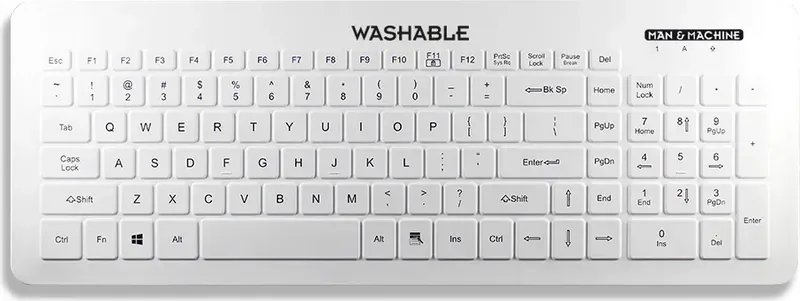
German
Type
Rubber Dome
Backlight
N/A
Keycap Level
Regular, framed, Chiclet
Keycap Format
Flat
Keycap Profile
Straight
Numeric Keypad
Standard
Cursor Keys
Integrated
Control Keys
Proprietary
F-Keys
Standard (top row, no bottom gap, ungrouped)
Enter Key
Short
Delete Key
Standard
Status Indicators
Caps Lock, Num Lock
Wrist Rest
N/A
Housing
Plastic, Silicone (Protection Sleeve)
Housing Color
Solid, White
Keycap Type
Solid, White
Legend
Solid, Black
Connection
Wired (17.72 inches, 59.06 inches extension), USB-A 2.0
Power Source
USB
Dimensions (Width x Height x Depth)
16.54 x 0.91 x 5.98 inches
Weight
1.25 lbs (without protection sleeve), 1.47 lbs (with protection sleeve)
Features
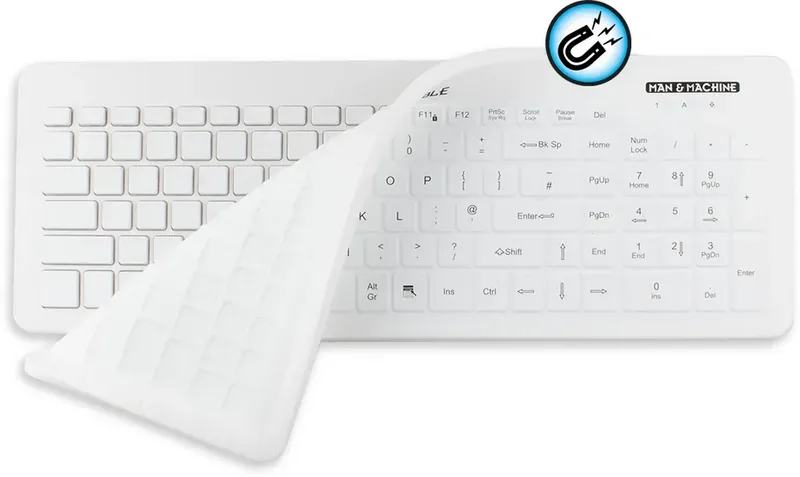
Splash-proof + IP68, FN Key, includes protection membrane (Silicone), magnetic back
Product Description
Innovating Hygiene in the Modern Workspace
When it comes to maintaining a sterile environment while working in critical fields, equipment choices matter significantly for safety protocols and operational success. The Man & Machine Very Cool Flat MagFix Hygienic Keyboard, white, USB, German Manual, represents a top-tier solution for medical and clinical settings where cleanliness is paramount and non-negotiable. This device is engineered with user safety and operational efficiency in mind, ensuring that medical technicians can perform complex tasks without worrying about contamination or accidental input during rigorous cleaning procedures. This attention to detail ensures a hygienic workspace that meets the highest regulatory standards for hospitals and clinics.
Design and Functionality
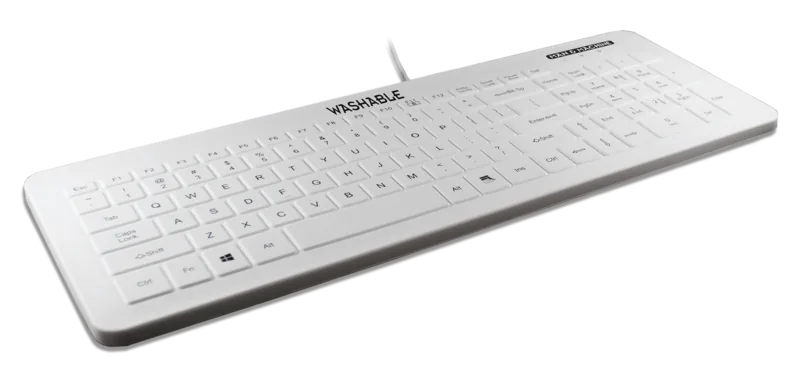
The sleek white design not only looks professional but also aids in spotting dirt or spills easily for timely intervention before they spread. A standout feature is the Quick Disconnect cable which allows for easy removal from the USB extension cable port. Users can position the extension cable in four distinct directions: left, right, back, or hanging straight down. This flexibility adapts to various workspace setups and surgical tables seamlessly. Furthermore, there is no complex software installation required for setup, making it plug-and-play ready immediately after unboxing without driver conflicts or IT support requirements.
Hygiene and Maintenance
Hygiene is the core strength of this keyboard system designed for high-risk areas. It features a specific lock mechanism activated by holding the F11 key for three seconds to disable inputs completely. This prevents accidental presses during rigorous cleaning or handling. The surface can withstand a wide range of disinfectants including alcohol, chlorine-based bleach, glutaraldehyde, and formaldehyde up to specific ppm limits. However, the main keyboard unit must never be submerged in liquid water. Only the silicone drapes attached can be immersed or sterilized in an autoclave up to 134 degrees Celsius for up to 200 cycles. Always use approved soft cloths and avoid abrasive scrubbers or petroleum fluids to maintain integrity and longevity.
Warranty and Support
Selecting the right peripherals for sensitive environments requires careful consideration of longevity and support agreements. This model stands out due to its robust warranty options which vary by region for your protection. In the United States and other countries, there is a one-year limited warranty against defects in materials. In Europe, the coverage extends to two years for added peace of mind. If a product malfunctions, contact the original place of purchase. If purchased directly, submit a Return Material Authorization. Returned products must be sanitized before return. Whether you are in a hospital, laboratory, or industrial setting, trust this tool to withstand daily wear while keeping infection risks low. Contact your distributor today to secure this essential piece of equipment for your team to ensure optimal workflow and hygiene standards.
Important Restrictions
Please note strict temperature limits must be respected to ensure device functionality and safety. This keyboard should not be exposed to temperatures below zero or above seventy degrees Celsius. Acetone and petroleum based cleaning fluids are strictly forbidden as they damage materials. Pressure sterilization is not allowed for the keyboard unit itself. These restrictions protect the investment and ensure continuous reliable performance over time.
Search for 67,732 Manuals online


Type-in Brand or Model