
Maktec M9400 Manual
PDF manual · 15 Pages
English



Quick check
Incorrect answer, please try again.
Chat with your Maktec M9400 manual using AI
Get instant AI answers from your Maktec M9400 manual
Ask anything about the Maktec M9400. Answers come from this manual, with the pages they are based on.
M9400 Maintenance Schedule
Remove and check carbon brushes regularly. Replace when worn down to the limit mark.
Replace the carbon plate on the cork rubber plate when it is worn down.
Ask a Question
Do you recommend M9400?
Yes NoFrequently Asked Questions
It is intended for sanding large surfaces of wood, plastic, metal, and painted materials. It works best on flat or broad areas where steady belt movement can remove material evenly.
Is this answer helpful?
Yes. It includes a dust bag that attaches to the dust spout. This helps collect sanding debris and keeps the workspace cleaner during operation.
Is this answer helpful?
Yes. The lever is pulled out to release the belt, then the new belt is fitted over the rollers and the lever is returned to its original position. Make sure the belt direction matches the tool.
Is this answer helpful?
Yes. The lock button allows continuous operation after pulling the switch trigger. To stop it from locked mode, pull the trigger fully again and release it.
Is this answer helpful?
Use the adjusting knob while the belt is running to center it properly. This prevents frayed edges, uneven wear, and extra stress on the sander frame.
Is this answer helpful?
Check and replace the carbon plate and carbon brushes when worn. Keep the parts clean and use only compatible replacement parts to maintain safe and reliable performance.
Is this answer helpful?
Advantages and Disadvantages
Advantages

- Wide belt size helps cover large surfaces quickly and evenly.
- Dust bag attachment supports cleaner sanding and easier cleanup.
- Adjustable belt tracking improves belt life and working precision.
- Continuous-operation lock is useful for longer sanding tasks.
Disadvantages

- Best suited to broad surfaces, not tight corners or detailed shaping.
- Requires careful belt alignment to avoid edge wear and frame damage.
- Noise level is fairly high, so hearing protection is recommended.
- Regular maintenance is needed for carbon plates and brushes.
Product Specification
Type
Belt Sander
Power
940 W (230 V)
Belt Speed
1,246.72 ft/min
Sanding Area
3.94 in (W)
Belt Length
24.02 in
Features
Softgrip, Auxiliary Handle, Dust Extraction
Weight
13.67 lb
Scope of Delivery
Dust Bag
Product Description
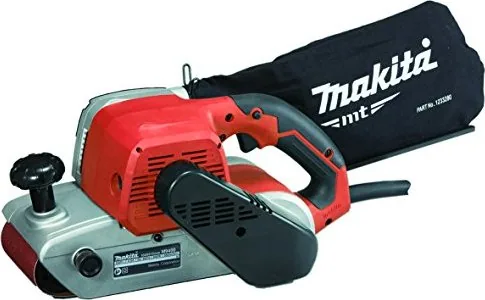
Maktec by Makita M9400 Electric Belt Sander
The Maktec by Makita M9400 Electric Belt Sander is built for users who need fast, controlled sanding across wide surfaces. Designed for wood, plastic, metal, and painted finishes, it offers a practical balance of power, comfort, and straightforward handling. If you're searching for the Maktec by Makita M9400 Electric Belt Sander Manual, you'll quickly see that the tool is made around simple operation and dependable everyday use.
With a 100 mm x 610 mm belt and a belt speed of 380 m/min, this sander is suited to removing material efficiently while still giving you enough control for finishing work. The body is compact enough for a handheld tool, and the two-handed grip helps keep movement stable during longer sanding sessions. It is especially useful when working on larger panels, doors, furniture parts, and other broad surfaces that need even pressure.
One of the most practical features is the adjustable belt tracking system, which helps keep the abrasive belt centered during use. That matters because proper alignment reduces frayed edges and unnecessary wear. The dust bag also adds real value, collecting debris as you work and helping maintain a cleaner workspace. For many users, this makes the sanding process feel less messy and more manageable.
The M9400 also supports continuous operation with a lock button, which can be helpful during repetitive sanding tasks. A removable step accessory adds flexibility when the tool is used in different orientations, giving it a bit more versatility on the job. Maintenance is equally straightforward, with replaceable carbon plates and carbon brushes that help extend the life of the tool when serviced correctly.
Key takeaways
- Built for fast sanding on wood, metal, plastic, and painted surfaces.
- Belt tracking adjustment helps improve accuracy and belt life.
- Dust bag support keeps sanding cleaner and more efficient.
- Continuous-run function adds convenience for longer projects.
Notes
- Use the correct dust mask and eye protection.
- Avoid forcing the tool; let its weight do the work.
- Keep the belt aligned before starting extended sanding.
- Regular brush and plate checks help preserve performance.
Search for 67,732 Manuals online


Type-in Brand or Model
porro_dignissimos
9 months ago
Is the grinder powerful and well built, and is the power cable really too short?
Manual.ly
9 months ago
Yes, users report strong performance and a very solid, high-quality build. The unit has noticeable weight, so it can create a bit of impact during use, and it is recommended to hold it firmly and keep it stable. Regarding the power cable: some buyers mention it feels short, so planning the workspace is important. A practical workaround is using a suitable extension cable with the correct rating for the tool. If you are tight on distance to the socket, consider placing the grinder closer or using a power strip nearby, so you can work safely without stressing the cord.