Manual.ly Logo

Maclean MCE620 Manual

0.0 · 0 Ratings

PDF manual · 2 Pages

English

M: qwen/qwen3.5-flash-20260224
page

/ 2

Loading...
c4eb9ba260666b5f15a294455a39bbed7dd9 page 1
Main Features and Technical Parameters
• Input power supply: DC5V/1A • Rated power: 5W
• Adjustment of light mode: Capacitive touch switches, Sliding dimming
• Light Source: light-emitting diode
• Three mode light switch: natural - white - warm white
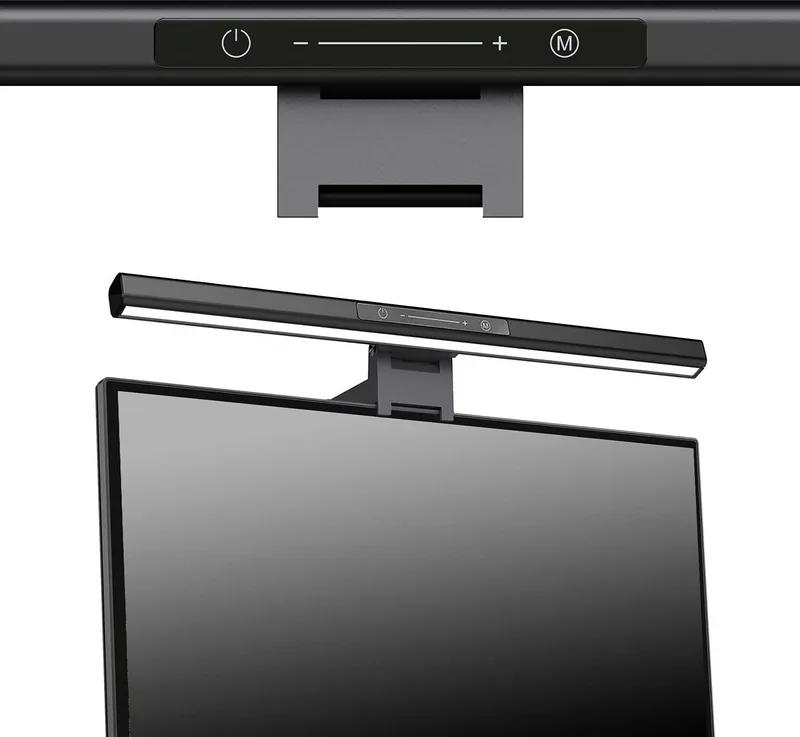
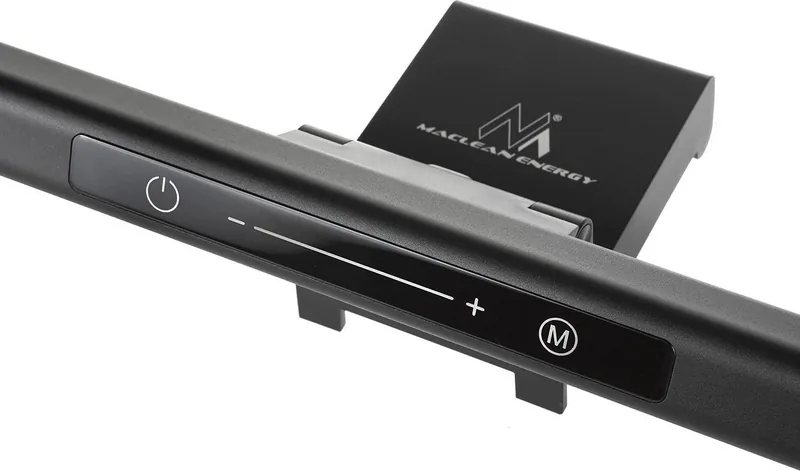
Product illustration: 01. Lamp pole 02. Lamp ON/OFF button
03. Brightness adjustment slider 04. Color temperature switch button
05. Fixed holder 06. Rotation cover 07. Type-C USB 5V input port
08. Maximum adjustment 35° angle 09. Maximum 90°
Instruction: 1. Hold the lamp pole, open the rotation cover at the
bottom, place the product on the computer screen stably; connect one
end of the USB cable to the power input interface of the product, and the
other end to the power output or with USB 5V output device to connect
the power supply.
2. Lamp ON/OFF button: Short touch: Lamp ON/OFF.
3. Lamp switch button M: Short touch: the color temperature of dierent
lights can be switched, which is (natural light - white light - warm
white light) cycle switching.
4. Lamp slider button: Touch the slider icon to adjust the brightness.
Slide from " – " to " + ", brightness will increase. Slide from " + " to " – "
brightness will decrease.
5. Pole angle adjustment: Hold the xed holder, gently pinch the lamp
pole, and swing up and down to adjust the required angle, max. 35°.
Cautions: 1. This product is for indoor use only. 2. This product might be
turned on or o under strong electromagnetic wave. 3. The light source
in this lamp shall be replaced by the manufacturer or its service agent
or someone with similar qualications. 4. When the moving part of the
product is stretched or rotated to the limited position, don’t pulled
strongly to avoid damage.
5. Suggest to adjust the color temperature (light eect) to below than
4000K when at night (like natural light, warm white light is better).
Packing Accessories: USB cable(x1) Instruction manual (x1)
LED lamp for the monitorEN I
Główne cechy i parametry techniczne:
• Zasilanie wejściowe: DC5V / 1A • Moc znamionowa: 5 W
• Regulacja mocy światła - przycisk przesuwny
• Źródło światła: dioda elektroluminescencyjna
• Trzy tryby światła: naturalny - biały - ciepły biały
Ilustracja: 01. Słupek lampy 02. Przycisk włączania / wyłączania lampy
03. Suwak regulacji jasności 04. Przycisk przełączania temperatury
barwowej 05. Uchwyt 06. Pokrywa obrotowa 07. Port wejściowy
USB 5V typu C 08. Maksymalna regulacja kąta 35° 09. Maksymalnie 90°
Instrukcja: 1. Umieść produkt stabilnie na ekranie komputera.
Aby podłączyć zasilanie, podłącz jeden koniec kabla USB do interfejsu
wejściowego zasilania produktu, a drugi koniec do wyjścia zasilania
lub urządzenia wyjściowego USB 5V.
2. Przycisk włączania / wyłączania lampy: Krótkie naciśnięcie:
włączanie / wyłączanie lampy.
3. Przycisk M lampy: Krótkie naciśnięcie: można przełączać temperaturę
barwy różnych świateł, czyli przełączanie cykliczne (naturalne światło
→ białe światło → ciepłe białe światło).
4. Przycisk suwaka lampy: Dotknij ikony suwaka, aby dostosować
jasność. Przesuń od „-” do „+” aby zwiększyć poziom jasności.
Przesuń od „+” do „-” aby zmniejszyć poziom jasności.
5. Regulacja kąta: Przytrzymaj uchwyt, delikatnie poruszaj w górę
i w dół, aby ustawić wymagany kąt, maksymalnie 35°.
Środki ostrożności: 1. Ten produkt jest przeznaczony wyłącznie do
użytku wewnątrz pomieszczeń. 2. Ten produkt może zostać włączony
lub wyłączony pod wpływem silnych fal elektromagnetycznych.
3. Źródło światła w tej lampie może wymienić producent, jego
przedstawiciel serwisowy lub osoba o podobnych kwalikacjach.
4. Aby uniknąć uszkodzenia, gdy ruchoma część produktu jest
rozciągnięta lub obrócona do ograniczonej pozycji, nie należy
mocno ciągnąć.
Akcesoria: Kabel USB (x1) Instrukcja obsługi (x1)
Lampka LED na monitorPL I
Hauptmerkmale und technische Parameter
• Stromversorgung: DC5V / 1A • Nennleistung: 5 W
• Einstellung des Lichtmodus: kapazitive Berührungsschalter,
Schiebedimmen • Lichtquelle: Leuchtdiode
• Drei-Farbtemperaturen-Schalter: natürlich - weiß - warmweiß
Produktabbildung: 01. Lampenmast 02. Lampen Ein/Aus-Schalter
03. Schiebedimmer 04. Farbtemperaturen-Schalter 05. Halterung
06. Rotation cover 07. Type-C USB 5V Büchse
08. Max. Einstellungswinkel 35° 09. Maximum 90°
Anweisung: 1. Halten Sie den Lampenmast fest, önen Sie die
Rotationsabdeckung unten und stellen Sie das Produkt stabil auf den
Computerbildschirm. Schließen Sie ein Ende des USB-Kabels an die
Stromeingangsschnittstelle des Produkts und das andere Ende an
den Stromanschluss oder an ein USB 5V-Ausgabegerät an, um die
Stromversorgung herzustellen. 2. Lampe EIN / AUS- Schalter: Kurze
Berührung: Lampe EIN / AUS 3. Farbtemperaturen-Schalter M: Kurze
Berührung: Die Farbtemperatur verschiedener Lichter kann
umgeschaltet werden in Zyklusumschaltung (natürliches Licht > weißes
Licht > warmweißes Licht). 4. Schiebedimmer: Berühren Sie das
Schiebedimmer-Symbol, um die Helligkeit anzupassen. Schieben Sie
von "-" nach "+", um die Helligkeit zu erhöhen. Wenn Sie von "+" nach
"-" schieben, nimmt die Helligkeit ab. 5. Winkeleinstellung: Halten Sie
die Halterung fest, drücken Sie den Lampenmast vorsichtig zusammen
und schwenken Sie ihn auf und ab, um den erforderlichen Winkel von
maximal 35° einzustellen.
Vorsichtsmaßnahmen: 1. Dieses Produkt ist nur für den Innenbereich
bestimmt. 2. Dieses Produkt kann unter starken elektromagnetischen
Wellen ein- oder ausgeschaltet werden. 3. Die Lichtquelle in dieser
Lampe muss vom Hersteller oder seinem Servicemitarbeiter oder einer
Person mit ähnlichen Qualikationen ersetzt werden.
Accesorries: USB-Kabel x1 Bedienungsanleitung x1
Monitorlampe LEDDE I
Paramètres techniques: • Alimentation d'entrée: DC5V / 1A
• Puissance nominale: 5W • Réglage du mode d'éclairage: interrupteurs
tactiles capacitifs, gradation coulissante • Source lumineuse: diode
électroluminescente • Interrupteur d'éclairage à trois modes: naturel -
blanc - blanc chaud
Illustration du produit: 01. Pôle de la lampe 02. Bouton ON/OFF
de la lampe 03. Curseur de réglage de la luminosité 04. Bouton de
commutation de la température de couleur 05. Support xe
06. Couvercle de rotation 07. Port d'entrée USB 5V Type-C
08. Réglage maximum Angle de 35° 09. Maximum 90°
Instruction: 1. Tenez le pôle de la lampe, ouvrez le couvercle de rotation
en bas, placez le produit sur l'écran de l'ordinateur de manière stable;
connectez une extrémité du câble USB à l'interface d'entrée
d'alimentation du produit et l'autre extrémité à la sortie d'alimentation
ou à un périphérique de sortie USB 5V pour connecter l'alimentation.
2. Bouton ON / OFF de la lampe: Touche courte: Lampe ON / OFF.
3. Bouton de commutation de la lampe M: Touche courte: la température
de couleur de différentes lumières peut être commutée, ce qui est une
commutation de cycle (lumière naturelle - lumière blanche - lumière
blanche chaude).
4. Bouton du curseur de la lampe: appuyez sur l'icône du curseur pour
régler la luminosité. Faites glisser de "-" à "+", la luminosité
augmentera. Faites glisser de "+" à "-", la luminosité diminuera.
5. Réglage de l'angle du pôle: Tenez le support xe, pincez doucement le
pôle de la lampe et faites-le pivoter de haut en bas pour régler l'angle
requis, max. 35 °.
Précautions: 1. Ce produit est destiné à une utilisation en intérieur
uniquement. 2. Ce produit peut être allumé ou éteint sous de fortes
ondes électromagnétiques. 3. La source lumineuse de cette lampe doit
être remplacée par le fabricant ou son agent de service ou une personne
possédant des qualications similaires.
Accessoires d'emballage: Câble USB x1 / Manuel d'instructions x1
Mode d`emploi LEDFR I
MACLEAN MCE620
A
B

Chat with your Maclean MCE620 manual using AI

Get instant AI answers from your Maclean MCE620 manual

Ask anything about the Maclean MCE620. Answers come from this manual, with the pages they are based on.

Ask a Question

0/1000

Do you recommend MCE620?

Yes No

Frequently Asked Questions

A

Press the button labeled M to cycle through natural, white, and warm white light settings effectively.

Is this answer helpful?

A

The lamp requires a DC 5V input at 1 Amp via the Type-C USB port for operation.

Is this answer helpful?

A

Yes, use the slider button to slide from minus to plus for higher or lower brightness levels.

Is this answer helpful?

A

No, place the holder stably on the screen and connect the USB cable for simple power.

Is this answer helpful?

A

Yes, it offers natural light modes and is designed to reduce glare on computer screens.

Is this answer helpful?

A

This product is designed for indoor use only and should not be exposed to weather or rain.

Is this answer helpful?

A

Hold the fixed holder and gently swing the lamp pole up and down to the desired angle.

Is this answer helpful?

M: qwen/qwen3.5-flash-20260224

Advantages and Disadvantages

Advantages

  • Adjustable angles allow precise light direction up to 35 degrees and 90 degrees for optimal viewing.
  • Three distinct light modes including natural, white, and warm white for different times of day.
  • Capacitive touch switches provide intuitive control without physical wear from constant button pressing.
  • Type-C USB connection ensures compatibility with most standard power adapters and modern hubs.
  • Compact design fits securely on computer screens to save valuable desk space efficiently.
VS

Disadvantages

  • Intended strictly for indoor use which limits portability options for outdoor or travel work.
  • Light source cannot be replaced by the user requiring professional service assistance for changes.
  • Strong electromagnetic waves can potentially interrupt the on or off functions unexpectedly.
  • Maximum angle adjustment is limited to 35 degrees for the pole section only.
  • Requires a DC 5V power supply which may not be provided with the purchase.
M: qwen/qwen3.5-flash-20260224

Product Specification

Light Source

Dimmable

Energy Efficiency Class (A to G)

G

Energy Consumption

5 kWh/1,000h

Dimensions

18.11x0.83x0.83in (WxDxH)

M: qwen/qwen3.5-flash-20260224

Product Description

Elevate Your Workspace with the Maclean MCE620

In the modern digital landscape, eye strain remains a significant concern for professionals and students spending long hours in front of screens. Achieving the optimal lighting balance is essential for maintaining productivity and comfort throughout the day. The Maclean MCE620 offers a sophisticated solution designed to minimize glare and improve screen visibility. This LED lamp provides a practical and efficient method for creating a better visual environment in both home offices and corporate settings.

Key Features and Technical Specifications

The device operates efficiently on a DC5V/1A power supply, ensuring that energy consumption remains low while delivering a stable rated power of 5W. A standout feature is the capacitive touch switch functionality. This allows users to adjust the light mode without physically pressing buttons, which helps maintain a clean surface and reduces mechanical wear over time. The light source utilizes advanced LED technology to offer three distinct modes. These include natural light for daytime tasks, white light for high contrast work, and warm white light for evening relaxation. This versatility allows you to tailor the atmosphere according to the time of day or your personal preference.

Installation and Adjustability

Setting up the Maclean MCE620 is designed to be straightforward for all users. The fixed holder secures the lamp firmly to your computer screen. The Type-C USB port connects easily to standard power outlets or USB devices, ensuring compatibility with most setups. You can rotate the cover for a maximum of 90 degrees and adjust the lamp pole up to 35 degrees using the fixed holder. This high degree of flexibility ensures that light hits the correct spot without reflecting on the display surface. To understand the detailed settings, you can refer to the Maclean MCE620 Manual specifications to ensure the absolute optimal placement for your specific monitor type.

Safety and Usability Guidelines

Safety remains a priority for this device intended for indoor use only. The light source should be handled by qualified service agents if replacement becomes necessary in the future. It is important to avoid pulling moving parts forcibly when they reach their mechanical limits to prevent damage. Strong electromagnetic waves in specific environments can occasionally affect operation, so keep the area clear of heavy interference sources. By integrating this lamp into your daily routine, you create a superior visual environment for all your digital tasks.

Power and Connection Details

The connection mechanism is designed for versatility. The USB cable included in the package connects to the Type-C USB 5V input port located at the base of the lamp pole. This allows you to plug the device into a computer port, a phone charger, or any powered USB hub. The sliding dimmer button makes it easy to change brightness levels with a simple touch. Sliding from the negative mark to the positive mark increases brightness instantly. Sliding in the opposite direction reduces it carefully. This smooth adjustment prevents sudden changes in lighting that might distract you during work.

M: qwen/qwen3.5-flash-20260224

© Copyright 2026 Manual.ly