
Mackie ProFXv3 Manual
PDF manual · 42 Pages
English



Quick check
Incorrect answer, please try again.
Chat with your Mackie ProFXv3 manual using AI
Get instant AI answers from your Mackie ProFXv3 manual
Ask anything about the Mackie ProFXv3. Answers come from this manual, with the pages they are based on.
Ask a Question
Do you recommend ProFXv3?
Yes NoFrequently Asked Questions
Yes, Hi-Z switches optimize input impedance for guitars and basses allowing direct connection without a DI box.
Is this answer helpful?
It is a global switch affecting all mic channels simultaneously so verify position before connecting microphones to prevent pops.
Is this answer helpful?
Three modes are available: Standard for tracking, Loopback for video streaming, and Interface for computer audio return.
Is this answer helpful?
No, do not expose to rain or moisture and maintain minimum distance from heat sources to ensure safety compliance.
Is this answer helpful?
Rotate the Studio Command Control Knob until Presets is highlighted then push to save up to six custom configurations.
Is this answer helpful?
Balanced XLR and unbalanced 1/4 TRS connectors provide line-level signals suitable for amplifiers or powered speakers.
Is this answer helpful?
An FX footswitch jack allows control over internal effects state enabling on-off switching via external hardware.
Is this answer helpful?
Advantages and Disadvantages
Advantages

- Onyx mic pres provide up to 60 dB of gain and ultra-low noise performance for pristine audio capture
- GigFX effects engine offers twelve diverse presets editable via a full-color LCD display for creative expression
- Bi-directional Bluetooth supports music playback and caller integration directly into mix channels
- 24-Bit 192 kHz 2x4 USB-C audio interface enables high-resolution recording and streaming workflows
- Solid steel chassis with tough ABS side protection ensures legendary built-like-a-tank durability
Disadvantages

- Phantom power switch affects all mic channels globally without individual channel selection control
- Small model lacks auxiliary monitor knobs entirely limiting stage mix customization for users
- Channel insert points available only on mid-range and high-end versions restricting outboard processing
- Mute switches do not affect pre-aux sends during activation which may complicate live monitoring
- External processors required for specialized routing on entry models to achieve complex signal paths
Product Specification
Features
Audio Interface (2 In / 4 Out), Integrated Effects
Product Description
Elevate Your Audio Production Experience
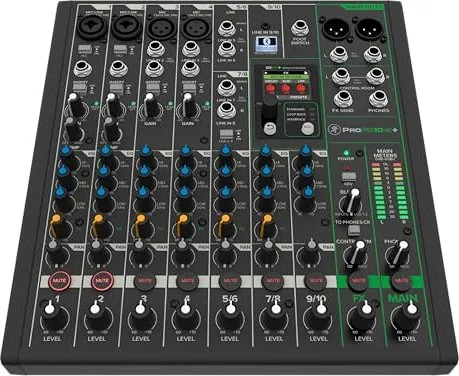
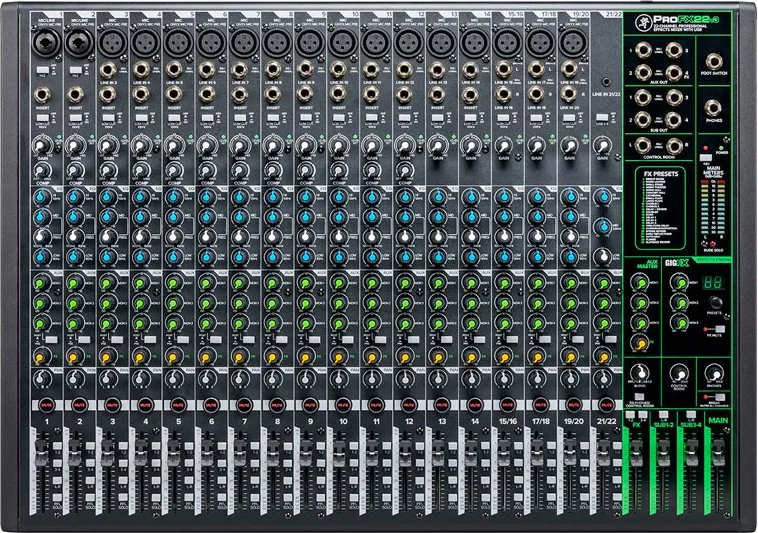
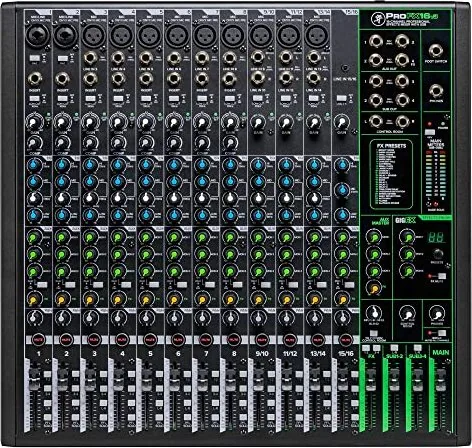
Finding the perfect sound board for your studio or live gig starts with reliability and versatility. The Mackie ProFX v3 series stands out as a robust solution designed for modern audio workflows. This analog mixer blends classic warmth with digital connectivity. Whether you are streaming podcasts or recording bands, the integration of Onyx mic preamps ensures clear signal capture up to 60 dB of gain. The enhanced GigFX engine provides twelve diverse effects ranging from hall reverbs to slapbacks, editable via a full-color LCD display. Adjusting tone with high cut filters on delay tracks helps manage mud in low frequencies.
Connectivity plays a huge role in today music landscape. Built-in USB-C audio interface capabilities allow for direct 2x4 recording at 24-bit resolution. Musicians can engage three distinct recording modes including loopback to stream gameplay without feedback issues. Additionally bi-directional Bluetooth support lets hosts integrate phone calls directly into their mix channels. Users who have reviewed the Mackie ProFX v3 Manual often appreciate how seamless these connections are compared to older generations. You can even send audio to external processors via dedicated insert jacks on specific channels.
Safety and build quality remain paramount for professional equipment. The chassis features solid steel construction with tough ABS side protection. Important safety guidelines emphasize maintaining ventilation clearance and proper grounding to prevent electrical hazards. These mixers handle voltage inputs globally thanks to universal power supply blocks on select models. Unplugging during lightning storms is recommended to protect internal circuitry from surges. Avoid placing liquids near the apparatus to prevent accidental short circuits.
Model Variations
Three distinct models cater to varying channel needs. The six-channel version suits solo performers while the twelve-channel option handles large stage setups. Subgroups on larger units offer advanced routing flexibility. Main meters utilize traffic light styling to indicate peak levels safely. Pan controls employ constant loudness design to maintain perceived volume across the stereo field. Mute switches illuminate red when engaged for visual confirmation during busy sessions. Gain knobs feature unity level markers to simplify setting optimal input sensitivity without distortion.
Detailed Setup Tips
Setting up the unit correctly prevents damage to drivers and ears. Always turn down volume controls before powering on equipment. Follow the sequence of turning on mixer first then amplifiers last to avoid speaker popping sounds. Save shipping boxes and packing materials for future transport needs. Save your sales receipt in a secure location for warranty claims. Regular maintenance involves cleaning with dry cloths only. Never attempt to open the cover yourself due to risk of electric shock. Qualified service personnel should handle any repairs involving internal components. This equipment complies with FCC rules regarding radio interference limits. Consider wearing protectors during operation to safeguard hearing health. Correct disposal follows guidelines for electrical components recycling purposes.
Search for 67,706 Manuals online


Type-in Brand or Model