
Mackie M-Caster Studio Manual
PDF manual · 25 Pages
English



Quick check
Incorrect answer, please try again.
Chat with your Mackie M-Caster Studio manual using AI
Get instant AI answers from your Mackie M-Caster Studio manual
Ask anything about the Mackie M-Caster Studio. Answers come from this manual, with the pages they are based on.
Ask a Question
Do you recommend M-Caster Studio?
Yes NoFrequently Asked Questions
Use the USB-C cable included. Select M Caster Studio as audio device in computer settings.
Is this answer helpful?
Yes, Channel 1 has a 48V switch. Press it in before connecting mics.
Is this answer helpful?
No, USB is audio only. Do not expect power delivery from the USB port.
Is this answer helpful?
Enable PC access in Utility, connect, and copy the update file. Use Store Mode then Utility Update.
Is this answer helpful?
It allows you to watch live sports or play arcade games on the display.
Is this answer helpful?
Go to Utility menu and select Factory Reset. This erases all saved samples and presets.
Is this answer helpful?
Yes, use the Smartphone Stereo Jack for direct connectivity without a computer.
Is this answer helpful?
Advantages and Disadvantages
Advantages

- Compact design with sleek aesthetics suitable for any desk setup.
- Built-in MixViewer display for easy monitoring without a screen.
- ContourFX and StreamFX offer extensive sound shaping and voice effects.
- Versatile connectivity including USB, Bluetooth, and XLR inputs.
- 3GB internal storage for custom audio samples and triggers.
Disadvantages

- USB connection supports audio only and does not supply power to the unit.
- Headphone and headset amplifiers can be very loud risking hearing damage.
- No physical power switch requires plugging or unplugging to turn off.
- Internal storage may be insufficient for large libraries without PC access.
- Setup requires reading manual thoroughly to manage input selections correctly.
Product Specification
Interface
USB-C 2.0, Bluetooth
Input Channels
2
Output Channels
2
Mic Preamps
1
Analog Inputs
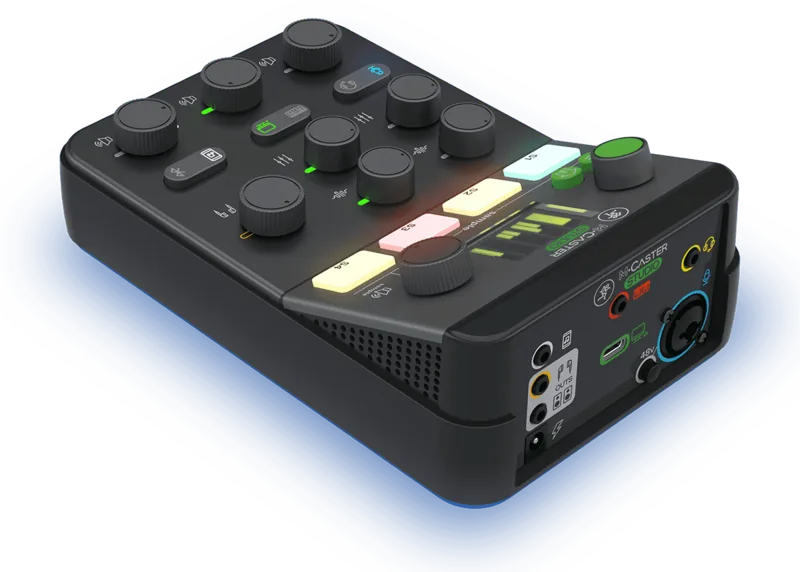
1x Mic In (XLR), 1x Mic In (3.5mm Jack), 3x Stereo Line In (3.5mm Jack)
Analog Outputs
1x Stereo Line Out (3.5mm Jack), 1x Headphone (3.5mm Jack)
Digital Inputs
No
Digital Outputs
No
Features
Bus powered, Streaming Interface
Dimensions
5.08x2.83x7.99in (WxHxD)
Weight
1.54 lbs
Product Description
Welcome to the Mackie M Caster Studio Streaming Experience
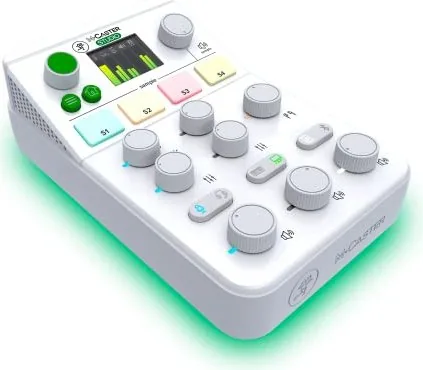
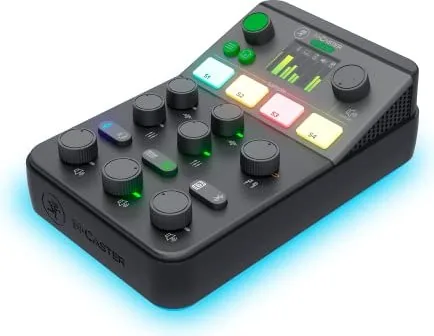
The Mackie M Caster Studio is a powerful live streaming mixer designed for creators seeking high quality audio without the complexity of a full console. This compact unit delivers pristine sound quality with unmatched flexibility in a sleek design that fits any desk. You can use your favorite microphone plus a headset, media player and more to capture your content perfectly for your audience. Pick the perfect vocal sound with selectable ContourFX Presets which enhance your voice naturally with digital signal processing. StreamFX makes it easy to add the finishing touch with tons of fun voice changing effects to choose from during your broadcast to keep viewers engaged. USB connectivity allows for use as an audio interface on a Mac or PC ensuring smooth integration with your computer for recording. Bluetooth connectivity allows for remote call in support or music playback wirelessly from a phone or tablet device. Connect directly to your smartphone headphone jack to both send and receive audio for flexible streaming options on the go.
View levels settings and more via the built in MixViewer color display for real time monitoring without needing extra screens to function. The built in Sampler allows you to transfer and store audio files directly on the M Caster Studio and trigger them via four dedicated buttons easily for sound effects. RGB LED strip with a whole rainbow of user selectable colors lights up your desk perfectly to match your brand. You can even have it cycle through all the colors automatically for dynamic visuals that attract attention during live sessions. Included accessories ensure you are ready to start immediately with the provided USB cable and power supply included in the box.
Important safety information exists within the documentation to ensure your longevity and hearing protection while using the device. Operate between zero and forty five degrees Celsius for optimal performance and avoid exposing it to rain or moisture conditions. Do not block ventilation openings to prevent overheating during long streaming sessions. The USB connection is audio only and does not power the unit so connect the power adapter securely. Refer to the detailed Mackie M Caster Studio Manual for troubleshooting if you encounter signal issues or noise. Utility settings allow you to adjust output gain and manage storage mode for file access. Factory reset clears all samples and presets if needed to start fresh. Connectivity supports various input selectors for channels with blue and green indicators for easy identification of active sources. Warranty covers defects in materials and workmanship for original purchasers under normal use conditions according to policy. Gamer's Paradise lets you watch live sports or play arcade games on the screen during breaks. This comprehensive tool supports PC and Mac systems with 24 bit 48 kHz audio. Enjoy professional control with the Mackie M Caster Studio for all your streaming needs today.
Search for 67,706 Manuals online


Type-in Brand or Model