
Mackie M-Caster Live Manual
PDF manual · 15 Pages
English



Quick check
Incorrect answer, please try again.
Chat with your Mackie M-Caster Live manual using AI
Get instant AI answers from your Mackie M-Caster Live manual
Ask anything about the Mackie M-Caster Live. Answers come from this manual, with the pages they are based on.
Ask a Question
Do you recommend M-Caster Live?
Yes NoFrequently Asked Questions
Yes. The unit has a 48V phantom power switch dedicated to the XLR mic input. Engage the phantom power switch only when using microphones that require it and verify switch position before connecting sensitive mics.
Is this answer helpful?
No. The USB-C computer connection is audio-only and does not provide power. Power the unit via the included USB-A/USB-C power cable connected to a wall adapter or an external USB battery pack.
Is this answer helpful?
ContourFX offers seven DSP presets for professional vocal shaping (EQ, compression, filters) to improve clarity and tone. StreamFX provides seven creative voice-changing effects. Each preset has its own intensity knob so you can blend subtle to dramatic processing per channel.
Is this answer helpful?
M•Caster Live includes an XLR mic input, a TRS instrument/line input, a TRRS smartphone input for two-way audio, and USB audio I/O for computer/game sound. Input selector switches let you choose the active source per channel.
Is this answer helpful?
Ensure all connectors are fully seated, avoid routing audio cables near AC adapters or transformers, raise levels gradually to avoid overdrive, and verify device output volumes are high enough. If using a computer, set its audio input/output to 'M•Caster Live' in settings.
Is this answer helpful?
The unit provides a stereo headphone output and a stereo speaker output for powered monitors. Always start with volume knobs turned down when connecting headphones or headsets, then raise gradually to safe listening levels to prevent hearing damage.
Is this answer helpful?
Visit Mackie support at www.mackie.com/support for FAQs, manuals, and service locator information. For warranty or repair service, contact Mackie technical support via the website or phone to locate authorized service centers.
Is this answer helpful?
Advantages and Disadvantages
Advantages

- Portable, battery-friendly USB-C power for mobile streaming setups.
- XLR mic input with 48V phantom supports professional condenser microphones.
- ContourFX and StreamFX DSP provide both polished vocal shaping and fun voice effects.
- Multiple dedicated inputs (mic, headset, TRS line, USB, TRRS phone) for versatile routing.
- Compact footprint with headphone and speaker outputs for flexible monitoring.
Disadvantages

- USB connection is audio-only and does not power the unit from a computer.
- Limited to three input channels — may be restrictive for larger multi-mic setups.
- DSP presets are preset-limited (seven each) and lack fully parametric manual editing.
- Headphone and headset outputs can be very loud; risk of hearing damage without caution.
- No onboard power switch; relies on cable disconnection to power down.
Product Specification
Interface
USB-C 2.0
Input Channels
2
Output Channels
2
Mic Preamps
1
Analog Inputs
1x Mic In (XLR), 1x Mic In (3.5mm Jack), 3x Stereo Line In (3.5mm Jack)
Analog Outputs
1x Stereo Line Out (3.5mm Jack), 1x Headphones (3.5mm Jack)
Digital Inputs
no
Digital Outputs
no
Special Features
Bus powered, Streaming Interface
Dimensions
5.08x2.05x7.99in (WxHxD)
Weight
1.10 lb
Product Description
Mackie M•Caster Live — Portable Streaming Mixer
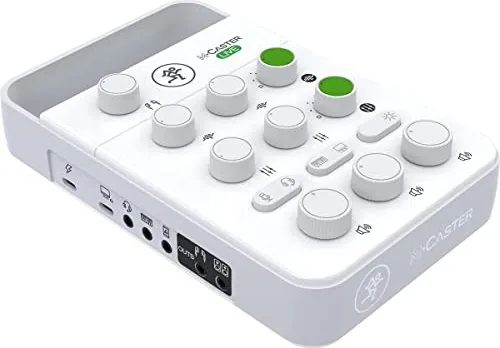
Mackie M•Caster Live is a compact, road-ready mixer built specifically for mobile streamers, podcasters, and content creators who need professional sound on the go. It combines microphone preamp capability, multi-source inputs, DSP-based voice shaping (ContourFX), and creative voice effects (StreamFX) in an ultra-portable chassis. Power options include a USB-C connection compatible with wall supplies or external battery packs, making it easy to set up mobile streaming sessions from virtually anywhere.
Key features and workflow
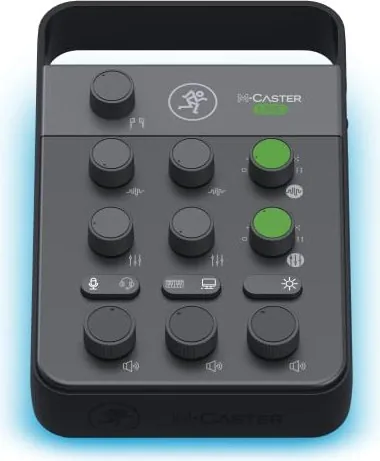
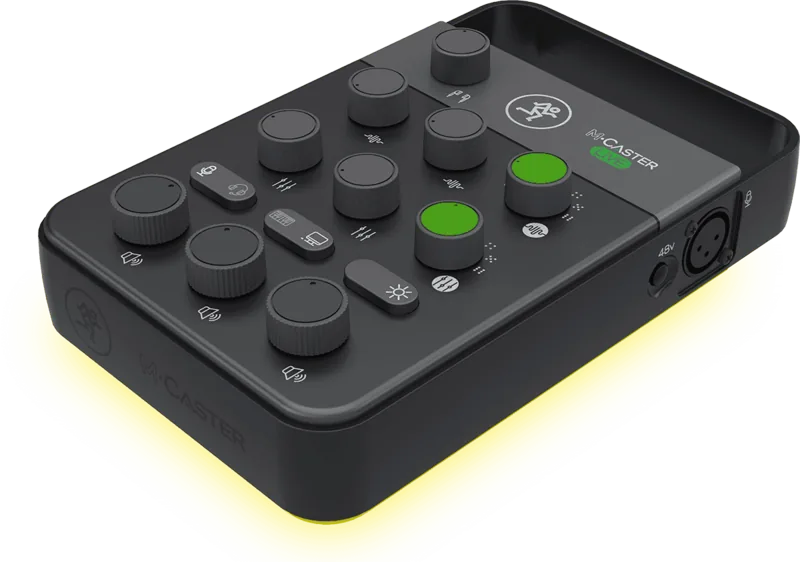
M•Caster Live supports a true XLR mic input with switchable 48V phantom power for condensers, a dedicated headset/line input for gaming headsets, a stereo line/TRS jack for instruments or media players, and USB audio I/O for computer integration. A dedicated TRS headphone output and stereo speaker output deliver monitoring flexibility. Input selector switches let you choose between sources quickly, while individual volume knobs for each channel and a master mix control let you balance levels with ease.
DSP features are central to the unit: ContourFX offers seven selectable presets for tuning voice tone and clarity (EQ, compression, filters), and StreamFX provides seven playful voice-altering effects to add personality to streams. Each effect has a dedicated intensity knob so creators can dial in subtle or dramatic processing. An RGB LED strip with several color options provides visual flair and can be matched to a streaming setup.
Practical setup and use cases
Typical setups include connecting a condenser or dynamic mic to the XLR input (engaging phantom power when needed), plugging a phone into the TRRS input for call-ins, using the USB connection for game audio or computer playback, and driving studio monitors or headphones for monitoring. The unit’s small footprint and battery-compatible power make it ideal for live-streaming from remote locations, streaming games, producing podcasts, or quick voice-over sessions.
Build and support notes
The M•Caster Live emphasizes safety and reliable operation with clear instructions about ventilation, avoiding moisture, and proper cable routing to avoid noise. Troubleshooting guidance covers common issues (no power, noise, distortion) and points users to Mackie support and authorized service centers. Specs include USB audio-only connectivity, 48V phantom availability, and compact physical dimensions.
Notes:
- Use low volumes when plugging headphones or headsets to avoid hearing damage.
- USB-C into the computer provides audio but not device power; use the included power cable for powering the unit.
- Keep firmware, drivers, and computer settings updated and select "M•Caster Live" as the audio device when using USB I/O.
Search for 67,706 Manuals online


Type-in Brand or Model