
Mackie EM-USB Manual
PDF manual · 16 Pages
English



Quick check
Incorrect answer, please try again.
Chat with your Mackie EM-USB manual using AI
Get instant AI answers from your Mackie EM-USB manual
Ask anything about the Mackie EM-USB. Answers come from this manual, with the pages they are based on.
Ask a Question
Do you recommend EM-USB?
Yes NoFrequently Asked Questions
Yes, it is plug-and-play compatible with Windows 7 or higher and MacOS 10.10 or higher without needing to install drivers manually on your computer system.
Is this answer helpful?
Yes, there is a mute switch that silences the mic input while allowing you to hear computer output through the headphones connected to the bottom jack.
Is this answer helpful?
The frequency response is 30 Hz to 18 kHz providing a wide range suitable for vocals and instruments with high quality audio reproduction standards.
Is this answer helpful?
Warranty duration varies so check www.mackie.com for specific terms. Keep sales receipt as proof of purchase date for any warranty service claims within the period.
Is this answer helpful?
No, the EM-USB is built-in interface powered, so external phantom power is not required for operation during standard recording sessions or usage.
Is this answer helpful?
Yes, connect stereo headphones using a 1/8 connector to the headphone jack on the bottom panel with independent volume control for monitoring levels.
Is this answer helpful?
Advantages and Disadvantages
Advantages

- USB-C connectivity allows direct computer connection without external audio interfaces or drivers.
- Onboard headphone monitoring provides separate volume control for monitoring audio signals easily.
- Rugged construction ensures built-like-a-tank reliability for consistent performance over years of use.
- Cardioid pattern rejects peripheral noise to keep performance crystal clear in various rooms.
- Includes tripod stand and clip for easy setup anywhere immediately upon unboxing package.
Disadvantages

- Requires computer USB port power so cannot be used with standard microphone preamps alone.
- Plug-in power dependency limits use in setups without powered USB available nearby ports.
- Fixed USB cable may wear out over time and cable is non-detachable from mic unit.
- Does not include XLR output limiting connection to direct digital recording on computer only.
- Warranty only covers original purchaser so resale does not include manufacturer support coverage.
Product Specification
Type
Instrument Microphone, Vocal Microphone, Streaming Microphone, Desktop Microphone
Design
Digital
Transducer Type
Condenser
Polar Pattern
Cardioid
Connection
USB-C
Frequency Response
30 Hz - 18 kHz
Max SPL
130 dB
Signal-to-Noise Ratio (SNR)
89 dB
Package Contents
Desktop Stand
Features
Headphone Jack (3.5mm)
Dimensions
1.81 x 1.81 x 7.09 in
Weight
0.86 lbs
Product Description
Mackie EM-USB Microphone Overview
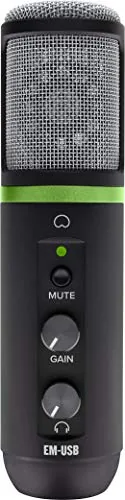
The Mackie EM-USB represents a significant step forward for home recording enthusiasts seeking high fidelity audio solutions locally. It sets the standard in professional, affordable microphones designed for home recording, live streaming, podcasts, and online content creation globally. Its audio reproduction rivals mics many times more expensive, making it a top choice for budget-conscious creators worldwide today. Onboard controls for gain, mute, and headphone monitoring volume make it extremely versatile for various recording scenarios without needing external processing hardware units.
Key Features and Performance
This device features USB-C connectivity, allowing the onboard USB interface to plug directly into your computer for fast, easy recording without external drivers or power supplies. Onboard headphone monitoring with independent volume control offers a convenient monitoring solution directly from the microphone body itself. Users can optimize the microphone output to their computer and DAW while using the mute button to switch off the mic while still hearing computer output clearly. This ensures clear signal paths and immediate feedback.
Building for Reliability
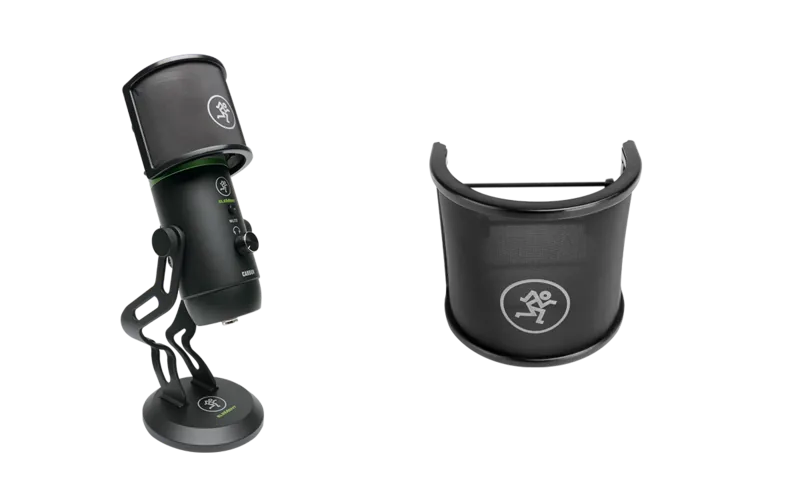
The rugged construction ensures consistency with built-like-a-tank reliability across years of heavy use in mobile or studio environments consistently. The cardiod polar pattern rejects peripheral noise to keep your performance crystal clear in untreated rooms during recording sessions. Included accessories like a tripod stand, mic clip, and USB-C cable make setup simple for mobile or studio environments easily. The system requires Windows 7 or higher or MacOS 10.10 for seamless plug-and-play operation across different operating systems without additional software.
User Guidance and Safety
For detailed setup and operation, referring to the Mackie EM-USB Manual is highly recommended to maximize usage safety and performance longevity over time. Remember to lower mixer channels when connecting to avoid sudden loud bursts that could damage equipment or hearing. Keep the microphone in the case when not in use to protect it from dust and moisture or damage during transport. Never attempt to disassemble the microphone as modifications void warranty coverage and risk permanent damage to the capsule.
Specifications and Warranty Details
The condenser capsule measures 14 mm with a frequency response from 30 Hz to 18 kHz for full audio range. Sensitivity is -32 dB with a max input SPL of 130 dB to handle loud sources without distortion issues. The dynamic range ensures high fidelity signal conversion accuracy. The microphone is lightweight at 0.87 lb making it portable for travel and field recording situations. Keep your sales receipt in a safe place as it is evidence for warranty service claims during the period. LOUD warrants the product free from defects in materials and workmanship. The warranty does not extend to anyone other than the original purchaser. For products purchased outside these regions, contact local distributor for warranty coverage information details. Contact technical support for help at 1.800.898.3211 or visit website for documentation.
Search for 67,706 Manuals online


Type-in Brand or Model