
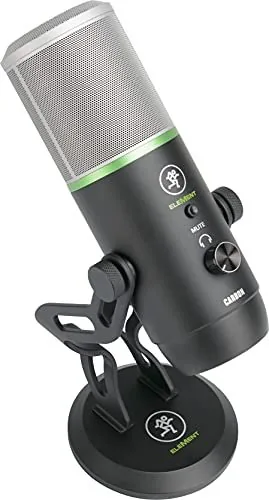

Mackie EleMent Carbon Manual
PDF manual · 20 Pages
English



Quick check
Incorrect answer, please try again.
Chat with your Mackie EleMent Carbon manual using AI
Get instant AI answers from your Mackie EleMent Carbon manual
Ask anything about the Mackie EleMent Carbon. Answers come from this manual, with the pages they are based on.
EleMent Carbon Maintenance Schedule
Keep the microphone clean by washing the outside with a dry cloth. Do not use water or damp conditions.
Keep the microphone in the case when not in use to protect it from dust and damage.
Ask a Question
Do you recommend EleMent Carbon?
Yes NoFrequently Asked Questions
The Mackie Carbon supports five selectable polar patterns: Stereo, Cardioid, Bi-directional (Figure-8), Super-cardioid, and Omni-directional. This allows users to adapt the microphone for different recording environments and sources.
Is this answer helpful?
No, the Mackie Carbon is class-compliant. It connects directly via USB-C and works immediately on both Windows and Mac operating systems without requiring any driver installation.
Is this answer helpful?
The package includes Pro Tools First and Waveform OEM professional software. These come with extensive plugin bundles, including effects like EQ, compression, and reverb, to help you start producing high-quality audio right away.
Is this answer helpful?
Yes, the Carbon features an onboard headphone output with independent volume control. This allows you to monitor your recordings in real-time without latency issues, even when the mute switch is engaged.
Is this answer helpful?
Absolutely. With its USB-C connectivity and plug-and-play functionality, the Carbon is ideal for gamers looking to stream or record high-quality commentary without complex audio interfaces.
Is this answer helpful?
Advantages and Disadvantages
Advantages

- Five selectable polar patterns for versatile recording scenarios
- Legendary Onyx preamp circuitry for ultra-low noise and clarity
- Plug-and-play USB-C connectivity with no drivers required
- Includes Pro Tools First and Waveform OEM software packages
- Onboard headphone monitoring with independent volume control
Disadvantages

- No XLR output available for analog mixing consoles
- Fixed capsule size may not suit all specialized vocal needs
- Requires direct USB connection rather than using hubs
- Headphone jack only supports stereo output
- Built-in stand may be less stable than heavy-duty boom arms
Product Specification
Type
Streaming microphone, desktop microphone
Design
digital (16bit/48kHz)
Transducer principle
dynamic
Polar pattern
Figure-8, omnidirectional, cardioid, supercardioid, stereo
Connection
USB-C
Frequency range
20Hz-20kHz
Max SPL
126dB
Signal-to-noise ratio (SNR)
100dB
Package contents
Desktop stand
Features
Headphone jack (3.5mm)
Weight
2.01 lbs
Product Description
Unlock Studio Quality with the Mackie Carbon
The Mackie Carbon Premium USB Condenser Microphone is designed to elevate your audio game, whether you are a podcaster, musician, gamer, or content creator. This device brings professional studio quality directly to your desktop without the need for complex setups. Featuring legendary Onyx mic preamp circuitry, the Carbon delivers crystal clear vocals and instruments with ultra-low noise, ensuring your recordings stand out from the crowd.
One of the standout features of the Carbon is its versatility. It comes equipped with five selectable polar patterns: Stereo, Cardioid, Bi-directional (Figure-8), Super-cardioid, and Omni-directional. This allows you to optimize the microphone for various scenarios, from capturing room ambience in stereo to isolating a single voice in a noisy environment. The onboard controls make it incredibly user-friendly; you can adjust gain, mute the input instantly, and monitor your sound through the dedicated headphone jack with independent volume control.
Connectivity is seamless thanks to the built-in USB-C interface. The Carbon is class-compliant, meaning it works plug-and-play on both Windows and Mac systems without requiring any additional drivers. You get recording-ready fast, supported by included software like Pro Tools First and Waveform OEM, which come packed with powerful plugins to enhance your production workflow immediately. The rugged construction ensures that this microphone is built like a tank, providing consistent performance for years of daily use.
Whether you are recording music, streaming live, conducting interviews, or creating online content, the Mackie Carbon provides the reliability and sound quality you need. The package includes a sturdy desk stand and a USB-C cable, making it ready to go right out of the box. Experience the difference of premium audio engineering tailored for modern creators.
Search for 67,706 Manuals online


Type-in Brand or Model