
Mackie DLZ Creator Manual
PDF manual · 95 Pages
English


Quick check
Incorrect answer, please try again.
Chat with your Mackie DLZ Creator manual using AI
Get instant AI answers from your Mackie DLZ Creator manual
Ask anything about the Mackie DLZ Creator. Answers come from this manual, with the pages they are based on.
Ask a Question
Do you recommend DLZ Creator?
Yes NoFrequently Asked Questions
No, the device supports class 10 USB flash drives and microSD cards. Do not use SSDs or HDDs as they will not be recognized by the system.
Is this answer helpful?
The modes are Easy, Enhanced, and Pro. Easy simplifies features, Enhanced adds flexibility, and Pro unlocks full DSP controls like EQ and gates.
Is this answer helpful?
It balances microphones by assigning weight priority, keeping the host audible over guests without manual fader adjustments during live production.
Is this answer helpful?
Yes, channels 1 through 4 accept 48V phantom power to run condenser microphones requiring external DC voltage. Dynamic mics do not need this.
Is this answer helpful?
There are four 1/4-inch TRS headphone jacks available for independent monitoring setups to suit different guests or crew members.
Is this answer helpful?
Yes, the 10-inch display allows tapping, dragging, and double-tapping to adjust settings and navigate tabs for efficient workflow management.
Is this answer helpful?
Keep the unit dry, maintain ventilation distance, avoid heat sources, and use only specified accessories and stands to ensure longevity and warranty coverage.
Is this answer helpful?
Advantages and Disadvantages
Advantages

- Adaptive digital mixer design optimized for podcasting and streaming workflows.
- Mix Agent technology automates microphone levels for consistent audio quality.
- Three operating modes including Pro for advanced EQ and dynamics control.
- Multiple recording options via USB and microSD card storage slots.
- Independent four-headphone outputs with customizable mix modes.
Disadvantages

- Ethernet jack currently not implemented according to manual notes.
- Solid state drives and hard drives not supported on USB port.
- Some features may be limited in Basic or Easy mode settings.
- Firmware updates may change screen layout and functions slightly.
- Phantom power safety requires careful setup with specific microphone types.
Product Specification
Type
Streaming Mixer
Input Channels
12 (4 Mono, 4 Stereo)
Mic Preamps
4
Equalizer
3-Band
Channel Strip
Hi-Z, High-Pass Filter, Compressor, Gate, Mute, Solo, Level Meter
Fader
8x Channel, 1x Master, 3.94 inches
Analog Inputs
4x Mic/Line/Instrument In (XLR/0.25-inch Combo), 1x Stereo Line In (0.25-inch Jack), 1x 2-Track In (0.14-inch Jack)
Analog Outputs
1x Stereo Main Out (0.25-inch Jack), 4x Headphones (0.14-inch Jack)
Interfaces
Bluetooth 5.0, Card Reader (microSD/microSDHC/microSDXC), LAN, USB-A to Device, USB-C
Features
Audio Interface (14 In/4 Out), 10.1-inch Touchscreen, Integrated Effects
Dimensions
12.99x4.06x15.00 inches (WxHxD)
Weight
6.17 lbs
Product Description
Creating a professional audio setup for podcasting or streaming requires a device that bridges simplicity with power. The Mackie DLZ Creator arrives as an adaptive digital mixer designed specifically for these modern content creation needs. It features advanced technology like Mix Agent to automate levels and keep your sound clean. To understand the full capabilities of this hardware, users often refer to the comprehensive Mackie DLZ Creator Manual found online. This guide helps enthusiasts navigate the extensive controls available.
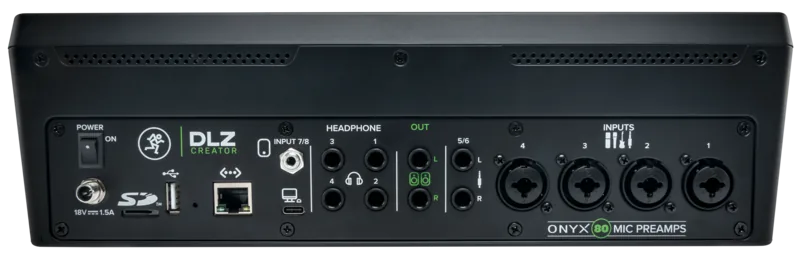
The mixer offers a robust rear panel packed with connectivity options. It includes XLR and 1/4-inch combo inputs for microphones and instruments. There are also dedicated line input jacks and headphone outputs for monitoring. Powering the unit is a universal power supply that works globally without voltage switching. Recording is versatile with support for USB drives and microSD cards directly on the device. You can store sessions without relying on a computer for capture.
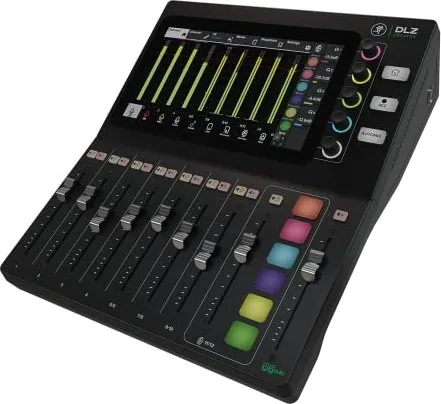
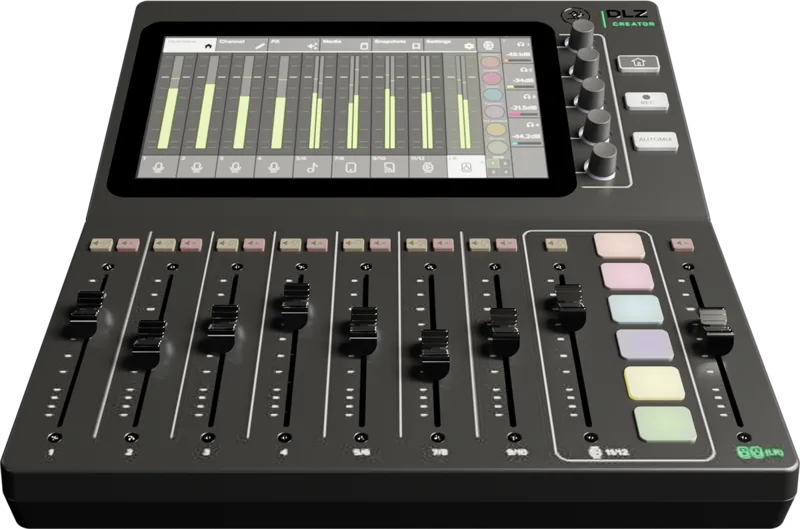
On the top panel, a large 10-inch touch screen dominates the interface. It allows for intuitive control of channels, effects, and routing. The screen displays levels and settings clearly. Users can choose between three distinct software modes. Easy Mode simplifies the interface for beginners. Enhanced Mode adds more flexibility for entry-level broadcasters. Pro Mode unlocks the full potential with advanced DSP controls like EQ, gates, and compressors for each channel.
Automation is a key feature. The AutoMix feature helps balance multiple microphones automatically. Assigning weights ensures the host remains audible over guests. This reduces the need for constant manual fader adjustments during live broadcasts. You can also create snapshots to save different mix states for quick recall between segments. Headphone mixes are another highlight. Each of the four headphone outputs can be configured independently. You can send different mixes to different monitors. This ensures guests hear exactly what they need without bleed into the main stream. The routing simplifies complex setups for USB audio interfaces too.
Ultimately, this mixer simplifies the studio environment. It combines analog inputs with digital routing flexibility. Whether you are running a talk show or a full band stream, the DLZ Creator adapts to your workflow. Proper setup ensures optimal signal levels and prevents clipping. The guidance helps you through gain staging and phantom power settings safely. This device stands out as a versatile tool for modern audio production requiring reliability and ease of use. Users who consult the detailed resources can master the system quickly. The channel strips include solo and mute buttons for quick isolation. Input meters help monitor signal strength visually to avoid digital clipping. The sampler channel allows triggering sound effects with dedicated pads during production.
Search for 67,706 Manuals online


Type-in Brand or Model