
Mackie DC16 Manual
PDF manual · 84 Pages
English



Quick check
Incorrect answer, please try again.
Chat with your Mackie DC16 manual using AI
Get instant AI answers from your Mackie DC16 manual
Ask anything about the Mackie DC16. Answers come from this manual, with the pages they are based on.
Ask a Question
Do you recommend DC16?
Yes NoFrequently Asked Questions
It is a digital control surface for managing live audio with the DL32R. It gives hands-on access to faders, routing, EQ, dynamics, mixes, talkback, and monitoring.
Is this answer helpful?
No. The DC16 depends on a DL32R mixer and the Master Fader app. It is a control surface, not a standalone mixer.
Is this answer helpful?
Dante makes audio networking more flexible and efficient. It helps route signals between the DC16, DL32R, and other Dante-compatible gear with less cabling and cleaner setup.
Is this answer helpful?
It automatically configures key monitor, headphone, talkback, and stereo record/playback paths between the DC16 and DL32R, saving time and reducing setup errors.
Is this answer helpful?
The surface has 16 input channel strips plus one master strip. It can also navigate across mixes, subgroups, VCAs, FX, and matrices through banking and page controls.
Is this answer helpful?
It should be used carefully. The manual warns that the headphone amp is loud and can cause hearing damage, so the volume should start low and be raised slowly.
Is this answer helpful?
Advantages and Disadvantages
Advantages

- Motorized touch-sensitive faders provide fast, tactile control across 16 channels and the master section.
- Dante integration simplifies routing for headphones, monitors, talkback, and stereo recording/playback.
- Color-coded mixes and clear displays make navigation easier during live mixing and quick scene changes.
- Smart Bridge USB support adds iPad control, charging, and flexible workflow options.
Disadvantages

- It does not work as a standalone mixer and depends on the DL32R and Master Fader ecosystem.
- Setup can be complex for first-time users, especially when configuring Dante and slots.
- Several labeled functions are marked NYI, so not every control is active in the current release.
- The headphone output is powerful and can be unsafe if volume is raised too quickly.
Product Specification
Type
DAW Controller
Buttons
no
Pads
no
Rotary knobs
1
Faders
17, Motorized faders, 3.94 in
Other controllers
Mute buttons, Transport buttons
Connections
1x USB-A (USB to Device), LAN, Footswitch, Stereo Line In (0.14 in jack), Mic In (XLR), Stereo Line Out (0.25 in jack)
Dimensions
36.81x17.60x3.31in (WxHxD)
Weight
37.48 lbs
Product Description
Mackie DC16 Control Surface: A Smart Command Center for Live Mixing
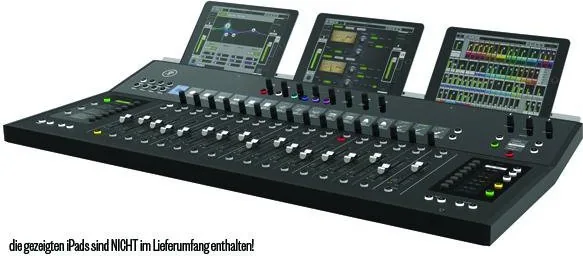
The Mackie DC16 Control Surface Manual reveals a mixer designed for engineers who want speed, precision, and hands-on control without giving up modern networked workflows. Built to pair with the DL32R and Master Fader ecosystem, the DC16 acts as a powerful surface for shaping live sound, managing mixes, and navigating complex setups with confidence.
Built for Fast, Flexible Operation
At the heart of the DC16 are 16 input strips plus a master strip, each with motorized touch-sensitive faders, clear LED metering, solo and mute access, and color-coded mix selection. That layout makes it easy to jump between channels, output mixes, subgroups, VCAs, FX returns, and matrices without losing your place. The display-and-encoder workflow keeps edits visible and immediate, so adjustments feel direct instead of buried in menus.
Deep Control Without the Guesswork
The surface provides fast access to gain, trim, EQ, dynamics, sends, delay, pan, and more. The Fat Channel keeps the most common tools front and center, while the channel editing buttons expand control across all channels or the currently selected one. That balance is especially useful in live environments, where you may need to react quickly to feedback, change mic levels, or fine-tune monitor sends on the fly.
Dante and Smart Bridge Integration
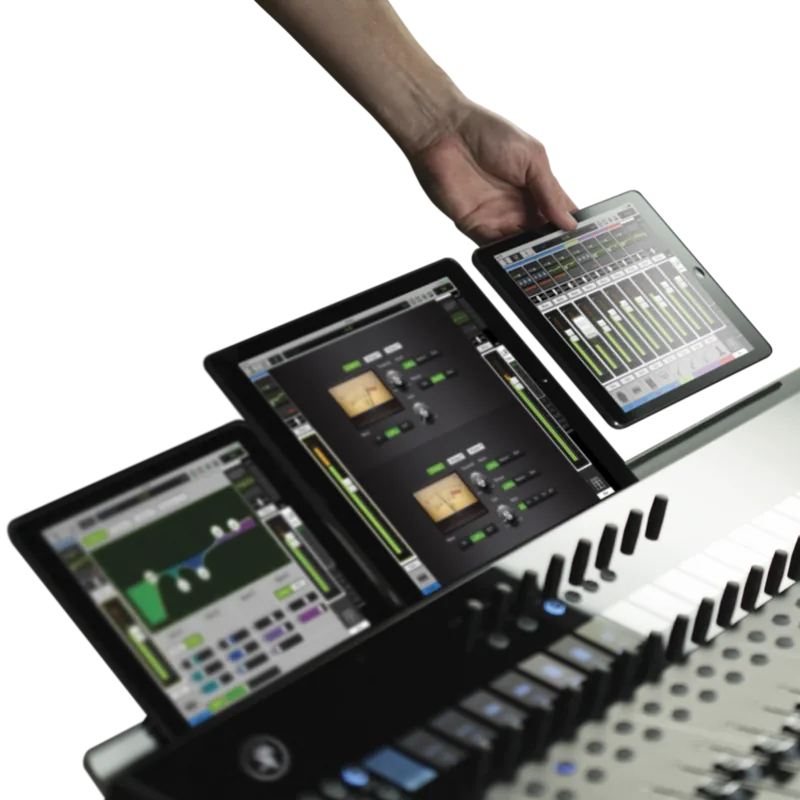
One of the DC16’s biggest strengths is its Dante connectivity. Auto-routing makes setup easier by linking headphones, monitors, talkback, and stereo playback/recording between the DC16 and DL32R. The rear-panel network and USB connections also support iPad control, charging, and wireless workflow options through the Smart Bridge. For modern audio teams, that means fewer cables, cleaner routing, and more ways to stay connected during a show.
Practical Design for Real-World Use
The DC16 is clearly built for professional environments. It includes talkback, monitor outputs, lamp power, footswitch support, and safety-focused operating guidance. The system also supports multiple slots for larger installations, which can matter in theaters, houses of worship, broadcast setups, or multi-engineer rigs. While some features are marked as not yet implemented, the manual shows a platform designed to grow over time.
Notes
- Best suited for users already working with the DL32R ecosystem.
- Auto-routing Dante is the quickest path for most live setups.
- Headphone output can be very loud, so start with low volume.
- Some advanced functions depend on Master Fader and firmware updates.
Search for 67,706 Manuals online


Type-in Brand or Model