
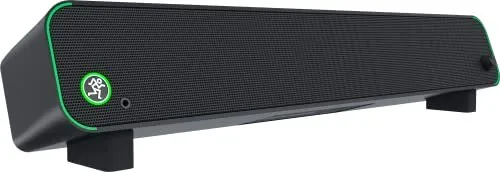
Mackie CR StealthBar Manual
PDF manual · 16 Pages
English



Quick check
Incorrect answer, please try again.
Chat with your Mackie CR StealthBar manual using AI
Get instant AI answers from your Mackie CR StealthBar manual
Ask anything about the Mackie CR StealthBar. Answers come from this manual, with the pages they are based on.
Ask a Question
Do you recommend CR StealthBar?
Yes NoFrequently Asked Questions
Locate the momentary EQ preset switch on the side panel of the CR StealthBar. Press this button repeatedly to cycle through Music, Voice, and Game modes. The unit will announce the selected mode via a voice prompt, and you can verify the setting by checking the active LEDs.
Is this answer helpful?
Yes, you can connect your smartphone via Bluetooth 5.0 for wireless streaming or use the included 1/8-inch cable to plug directly into the stereo input jack. Simply select the corresponding input source using the Input Selector Switch on the side panel.
Is this answer helpful?
The swappable feet allow you to adjust the tilt angle of the soundbar to 0, 8, or 15 degrees. This feature ensures the speakers are angled correctly toward your listening position, improving stereo imaging and sound clarity regardless of your monitor height.
Is this answer helpful?
No, the USB-C port on the CR StealthBar is designed for audio transmission only. It acts as an interface to send digital audio from your computer to the speakers but does not provide electrical power to charge other devices.
Is this answer helpful?
Plug a pair of stereo headphones into the 1/8-inch Phones Output jack on the front panel. Doing so automatically disables the main speaker output, allowing you to listen privately. The front volume knob controls the headphone volume.
Is this answer helpful?
Yes, the device works seamlessly with both macOS and Windows computers via the USB-C connection. You simply need to select the CR StealthBar as your default audio output device in your operating system settings after connecting the cable.
Is this answer helpful?
Advantages and Disadvantages
Advantages

- Three distinct EQ presets (Music, Voice, Game) for tailored audio performance
- Versatile connectivity including USB-C, Bluetooth 5.0, and 1/8-inch inputs
- Compact design with adjustable feet for perfect monitor placement and sound angle
- High-quality Mackie acoustic tuning ensures clear vocals and punchy bass
- Front panel controls integrate power, volume, and mute functions with visual LED feedback
Disadvantages

- No built-in microphone for voice commands or hands-free calling
- Headphone output lacks independent volume control separate from main speaker level
- USB connection handles audio only and does not provide power to connected devices
- Bluetooth pairing requires manual switching on the unit for first-time connections
- External power supply adds a small footprint behind the desk compared to internal adapters
Product Specification
Type
Soundbar
Channels
2.0
Total Power
50W Peak
Frequency Range
67Hz-20kHz
Audio Connections
AUX In (3.5mm Jack), Sub Out (3.5mm), Headphones (3.5mm Jack)
Other Connections
USB-C
Wireless
Bluetooth 5.0
Color
Black
Dimensions
18.7x3x4 in (WxDxH)
Consists of
Soundbar
Product Description
Elevate Your Desktop Audio Experience with the Mackie CR StealthBar
The Mackie CR StealthBar is a compact, high-performance desktop soundbar designed specifically for PC users who demand superior audio quality without cluttering their workspace. Whether you are a gamer seeking immersive soundscapes, a content creator needing crystal-clear voice reproduction, or a music enthusiast looking for punchy bass and crisp highs, this soundbar delivers legendary Mackie acoustic tuning in a sleek form factor that fits perfectly under most monitors.
Equipped with three selectable EQ presets - Music, Voice, and Game - the CR StealthBar allows you to tailor the sound profile to your specific activity instantly. The Music mode reduces unwanted low-frequency color while boosting upper mids and highs for a vibrant listening experience. The Voice mode enhances speech clarity and detail, making it ideal for video calls and podcasts. Meanwhile, the Game mode emphasizes full-range audio with increased bass and brilliant treble to keep you in the action.
Connectivity is seamless and versatile. Use the USB-C connection to stream audio directly from your computer, eliminating the need for external sound cards. For wireless freedom, built-in Bluetooth 5.0 support lets you pair smartphones, tablets, or laptops effortlessly. Additionally, a standard 1/8-inch stereo input accepts line-level signals from any device with a headphone jack, while a dedicated 1/8-inch output allows you to connect powered subwoofers or additional speakers for an expanded soundstage.
The design includes swappable adjustable feet, enabling you to tilt the unit to 0, 8, or 15 degrees for optimal sound projection toward your ears. A front-panel volume knob doubles as a power switch and mute control, featuring a glowing Running Man logo ring that indicates power status, mute engagement, and Bluetooth connectivity. With its robust construction and compliance with global safety standards, the CR StealthBar is ready to transform your desk setup into a professional audio station.
Search for 67,706 Manuals online


Type-in Brand or Model