
Mac Audio MMC 200 Manual
PDF manual · 32 Pages
English



Quick check
Incorrect answer, please try again.
Chat with your Mac Audio MMC 200 manual using AI
Get instant AI answers from your Mac Audio MMC 200 manual
Ask anything about the Mac Audio MMC 200. Answers come from this manual, with the pages they are based on.
Ask a Question
Do you recommend MMC 200?
Yes NoFrequently Asked Questions
Search for MAC AUDIO MMC 200 on your phone or tablet Bluetooth settings. Select the device from the list. If asked for a password, enter 0000. This connects the phone wirelessly for streaming audio to the speakers without cables.
Is this answer helpful?
The device plays standard CD discs, as well as CD-R and CD-RW formats. Ensure discs are clean and unscratched for best performance and to prevent reading errors during playback sessions.
Is this answer helpful?
The warranty period is two years starting from the date of purchase. It covers defects caused by material or workmanship issues. You must provide your receipt as proof of purchase for any warranty claims.
Is this answer helpful?
Tune to the desired station. Press the Program or Memory button on the remote. Select the station number you want to save. Press Program again to save it. Repeat this for up to thirty presets to store favorites.
Is this answer helpful?
Yes, use only a dry cloth to clean the surface. Do not use cleaning agents or chemical solvents as they can damage the finish. Avoid exposing the device to moisture or liquids to prevent electrical hazards.
Is this answer helpful?
The unit operates on 100 to 240 Volts AC. This means it works with standard household voltage in many regions. It has a built-in linear power supply for broad compatibility across different locations.
Is this answer helpful?
Advantages and Disadvantages
Advantages

- Bluetooth 2.1 EDR wireless streaming capability for smartphones and tablets.
- Robust CD player supports CD, CD-R, and CD-RW formats for playback.
- Built-in FM tuner with RDS allows station name and text display.
- Five equalizer presets (Rock, Pop, Jazz, etc.) for sound customization.
- Front USB input supports MP3 files from flash drives conveniently.
Disadvantages

- No line out for connection to external amplifiers or recorders.
- Speakers must be the supplied model for optimized performance matching.
- Manual volume control only, lacks automatic gain or leveling features.
- Power standby consumption exists even when not in active use mode.
- No physical reset button included for troubleshooting minor errors.
Product Specification
Includes
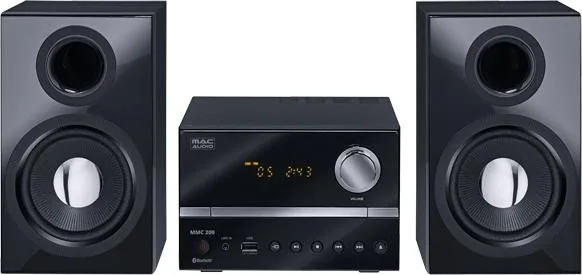
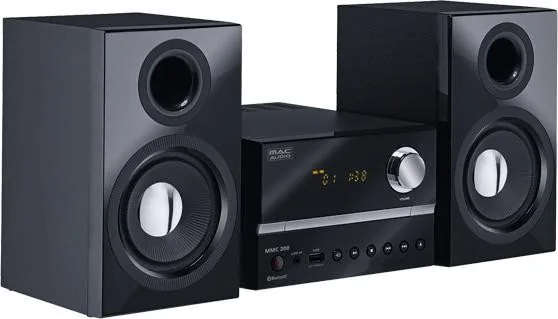
CD Player, Tuner, Speakers
Tuner
FM
Audio Formats
CD Audio, CD-R/RW, MP3
Audio Connections
AUX In (3.5mm Jack), Headphones (3.5mm Jack)
Other Connections
USB-A
Wireless
Bluetooth
Device Color
Black
Speaker Color
Black
Device Dimensions
4.72x7.09x9.02 in (WxHxD)
Speaker Dimensions
4.92x8.07x5.91 in (WxHxD)
Weight
8.71 lbs
Product Description
Welcome to High Fidelity with Mac Audio MMC 200
Welcome to the world of high-fidelity audio with the Mac Audio MMC 200. This compact system offers a blend of modern connectivity and classic functionality for music lovers everywhere. The device supports Bluetooth 2.1 with EDR, allowing seamless wireless streaming from smartphones and tablets to the speakers. To pair your mobile device, simply search for MAC AUDIO MMC 200 and use the default password. The system also features a robust CD player capable of handling CD-R and CD-RW formats alongside standard discs. For digital library playback, a front USB input supports MP3 files stored on flash drives up to specific capacities.
Entertaining listening sessions is further enhanced by a built-in FM tuner with RDS capabilities. You can view program service names and radio text directly on the amber seven-segment display. The tuner allows for thirty station presets and includes search functions for easy navigation between frequencies. Audio customization is possible through five equalizer presets including Rock, Pop, Jazz, Classic, and Flat modes. This ensures you can tailor the sound profile to your preferred genre instantly without external equipment.
Setup is straightforward with supplied 100mm bass reflex speakers designed for this model. Position them to form an equilateral triangle with your listening spot for optimal stereo imaging and natural sound reproduction. Connectivity options on the front panel include a LINE IN jack with stereo mini plug for additional auxiliary devices like MP3 players. The rear panel houses terminals for the speakers, antenna connection for better FM signal reception, and the main power supply unit. A remote control provides convenient access to volume, track selection, and source switching from a distance.
The remote controls repeat modes for CD and USB playback allowing track or shuffle selection. You can set the clock time using dedicated buttons during standby mode for accurate scheduling. The display shows volume levels up to thirty-two units for precise control. Safety is a priority during operation and long-term usage. Ensure sufficient ventilation with a minimum ten centimeter gap around the unit to prevent overheating and fire hazards. Do not expose the system to moisture or liquids to avoid damage to internal components.
The power cable should be protected from damage and kinking at the socket connection points. The unit operates on standard household voltage ranging from 100 to 240 Volts AC. For cleaning, use only a dry cloth to avoid surface damage or chemical reactions. The warranty period lasts for two years starting from the purchase date for the original owner. It covers defects due to material or workmanship but excludes wear parts and damage from misuse. To maintain the device, refer to the user guide for maintenance instructions and troubleshooting. If issues arise, contact a qualified specialist to handle repairs safely. Do not attempt to open the chassis yourself due to risk of electric shock from high voltage components. This system prioritizes safety and user convenience in daily audio enjoyment for all users. Keep the receipt for warranty claims. Dispose of the product at collection points.
Search for 67,732 Manuals online


Type-in Brand or Model