
Mac Audio MAC 620 Manual
PDF manual · 88 Pages
English



Quick check
Incorrect answer, please try again.
Chat with your Mac Audio MAC 620 manual using AI
Get instant AI answers from your Mac Audio MAC 620 manual
Ask anything about the Mac Audio MAC 620. Answers come from this manual, with the pages they are based on.
MAC 620 Maintenance Schedule
Use a clean silicone cloth and neutral detergent. Do not use rough cloths or non-neutral detergents like alcohol.
Use a cleaning disc if the image is blurred or distorted due to a dirty laser lens.
We suggest using a cleaning disc more frequently in this vehicle unit than at home due to environmental conditions.
Ask a Question
Do you recommend MAC 620?
Yes NoFrequently Asked Questions
Consult installation instructions for 2.0 DIN slot. Professional help is recommended to ensure safety and correct wiring connections.
Is this answer helpful?
Yes, it supports Bluetooth for hands-free calling and wireless audio streaming from compatible smartphones.
Is this answer helpful?
Yes, you can play videos on the screen but not while driving. Safety laws require the parking brake to be engaged for video.
Is this answer helpful?
The system supports DVD, CD, VCD, CD-R, and CD-RW formats with various audio and video data.
Is this answer helpful?
Use the small reset button on the front panel with a pen tip to restore factory default settings.
Is this answer helpful?
No, navigation requires a separate microSD card purchase. The system is compatible with specific map cards.
Is this answer helpful?
Advantages and Disadvantages
Advantages

- Large 6.2-inch TFT touchscreen display for clear visibility in all lighting
- Built-in Bluetooth supporting hands-free calls and audio streaming
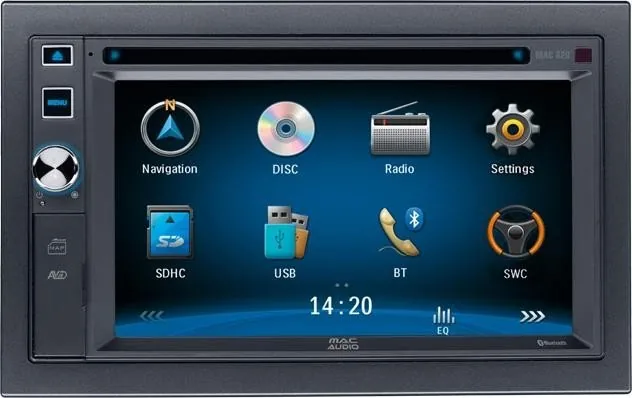
- Versatile media support including USB, SD, and Disc playback
- 4-channel amplifier delivers robust power to car speakers
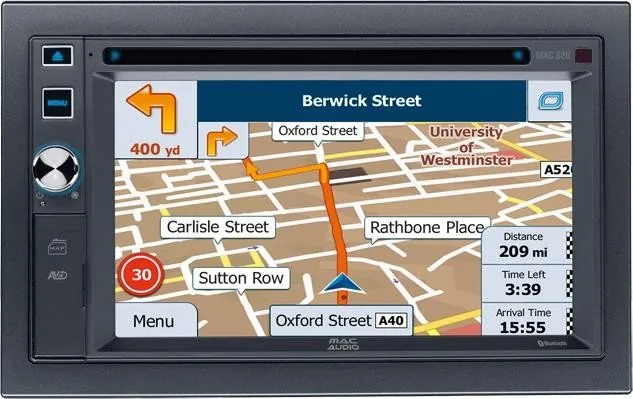
- Navigation ready with support for separate SD map cards
Disadvantages

- Video display disabled while driving for safety reasons
- Navigation map card must be purchased separately for use
- Reset required for system hangs after illegal operation
- Screen sensitive to water exposure and requires gentle cleaning
- Installation recommended by professionals to ensure safety compliance
Product Specification
Type
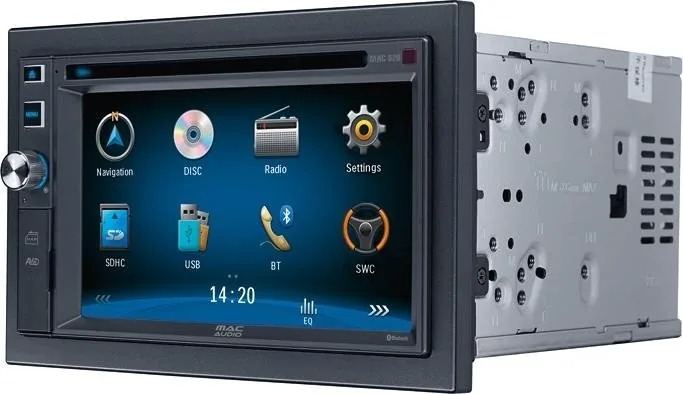
Head Unit, 2-DIN
Display
6.2", LCD, 800x480 Pixels, Touchscreen
Navigation
No
TMC
No
Tuner
FM, AM, LW
Media
CD (CD-R/RW), DVD (DVD-R/RW), USB Storage, Memory Card
Audio Formats
AAC, MP3, WMA
Video Formats
AVI, MPEG-1, MPEG-2, MPEG-4, Xvid
Power
4x 40W Peak
Connections
4x Preamp Output (4V), 1x AUX In (Front), 1x Video Out, 1x USB 2.0 (Front), Card Reader (microSD), Bluetooth
Theft Protection
Security Code
Features
Hands-free, Remote Control, Variable Lighting, USB Charging (500mA)
Product Description
Mac Audio MAC 620 Experience Overview
Upgrade your vehicle audio system with the Mac Audio MAC 620 receiver. This robust in-dash component fits a standard double-DIN slot and delivers high-quality sound for every passenger on board. The front panel features a large 6.2-inch touch screen that displays media information clearly under various lighting conditions. Drivers appreciate the responsive interface for changing tracks or adjusting settings easily while on the road. Installation requires basic car audio knowledge, ensuring a secure fit within your dashboard structure without damaging the vehicle interior. This unit integrates seamlessly into modern transport setups.
The unit supports multiple music sources including compact discs and digital media files. You can connect USB drives or SD cards for playing MP3s and videos directly onto the monitor. Built-in Bluetooth technology allows for hands-free calling and wireless music streaming from smartphones safely. The system includes a 4-channel amplifier that powers speakers effectively without distortion at high volumes. Users often consult the Mac Audio MAC 620 Manual guidelines before initial setup to maximize performance. This information covers essential wiring diagrams and configuration options for optimal electrical integration into various vehicle types.
Radio reception is handled by a powerful tuner capable of FM, AM, and digital signal processing for clear audio. Traffic announcements update automatically when compatible broadcasts are active within range of the antenna. Navigation capabilities are available via a separate microSD card option, providing turn-by-turn directions on the main monitor. The device respects safety laws by disabling video during motion unless the parking brake is engaged for viewing. This ensures compliance with federal driving regulations across different regions.
Sound customization includes equalizer presets and balance adjustments for left-right and front-rear audio distribution. Settings allow for subwoofer integration to enhance bass response in smaller cabins or larger trunk spaces. Power consumption stays reasonable for a typical 12-volt car electrical system. Regular maintenance keeps the player running smoothly for years without mechanical failure. This receiver remains a top choice for drivers seeking versatility and clarity in their daily commute. Technical specs guarantee a wide frequency range and dynamic range suitable for audiophile listening.
Additional Notes
Ensure proper ventilation around the chassis to prevent overheating. Avoid exposing the unit to moisture or extreme temperatures. Clean the screen regularly with a soft cloth only.
Search for 67,706 Manuals online


Type-in Brand or Model