
Manual.ly Logo

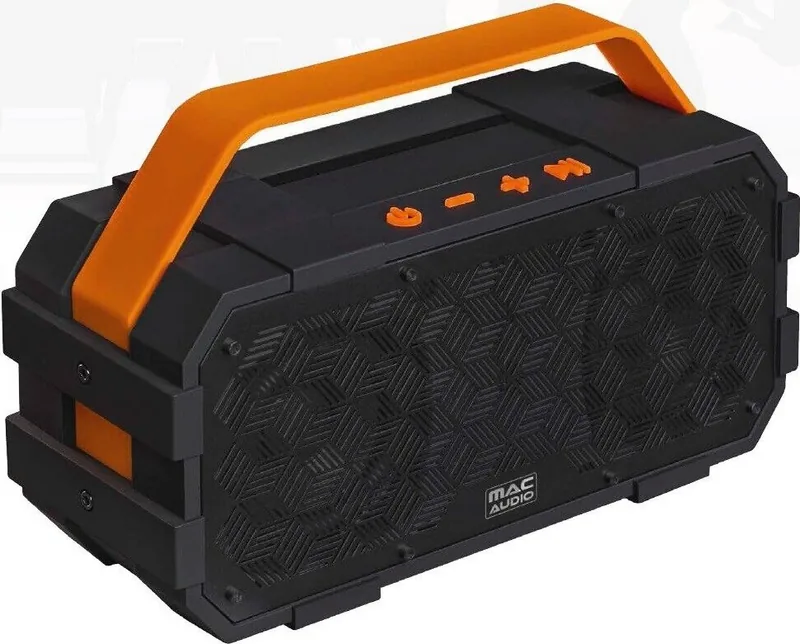
Mac Audio BT Wild 801 Manual

0.0 · 0 Ratings

PDF manual · 5 Pages

English

M: qwen/qwen3.5-flash-20260224
page

/ 5

Loading...
ee89a77b5e1c4d2c1f75c566167af0664384 page 2
BT WILD 801
OWNER’S MANUAL
Dear MAC AUDIO Customer,
Thank you for choosing an MAC AUDIO product.
Please read through the instruction manual carefully before starting to
use the device. It is imperative you observe all of the information. Keep
the manual in a safe location.
IMPORTANT SAFETY INSTRUCTIONS
· Read these instructions.
· Keep these instructions.
· Heed all warnings.
· Follow all instructions.
· Clean only with dry cloth.
· Do not block any ventilation openings. Install in accordance with the
manufacturer’s instructions.
· Do not install near any heat sources such as radiators, heat registers,
stoves, or other apparatus (including amplifiers) that produce heat.
· No naked flame sources, such as lighted candles, should be placed on
the device.
· Unplug the USB charging cable during lightning storms.
· Refer all servicing to qualified service personnel. Servicing is required
when the apparatus has been damaged in any way, such as liquid has
been spilled or objects have fallen into the apparatus, the apparatus
has been exposed to rain or moisture, does not operate normally, or
has been dropped.
· The USB cable should not continue to be operated if there is visible
damage. A damaged cable must be replaced.
· Danger of explosion if battery is incorrectly replaced. Replace only with
the same or equivalent type. Dispose of used batteries according to the
manufacturer’s instructions.
· This product contains a non-removable Lithium Ion rechargeable
battery.
· Batteries (battery pack or batteries installed) shall not be exposed to
excessive heat, such as sunshine, fire and the like.
· The apparatus shall not be exposed to dripping or splashing or placed
nearobjects filled with liquids.
CARE AND MAINTENANCE
· Please use a soft, dry cloth with no cleaning agents, sprays or chemical
solvents, as these could damage the surfaces.
· If the speaker are used outside on a deck or patio, make sure you take
them indoors in the event of a rainstorm to prevent possible damage.
· Do not operate or store the system in extreme temperatures (below
32ºF/0ºC and above 112ºF/40ºC).
Caution: To reduce the risk of electric
shock, do not remove cover (or back). No
user serviceable parts inside. Refer
servicing to qualified service personnel.
DECLARATION OF CONFORMITY
Hereby, Magnat Audio-Produkte GmbH declares that the BT WILD 801
is in compliance with the essential requirements and other relevant
provisions of directive 2014/53/EU. The Declaration of Conformity can be
found at www.mac-audio.de in the download area of the device.
Operating frequency: 2402-2480 MHz
Maximum power transmitted acc. EN62479: 0.46 dBm
INSTRUCTIONS FOR DISPOSAL
In accordance with European Directive 2012/19/EU all electrical and
electronic appliances must be disposed of separately via local collection
points. Please observe the local regulations and do not dispose of your
old appliances with normal household waste.
BATTERY DISPOSAL
Old batteries are hazardous waste and must be disposed of in accordance
with current regulations.
Bluetooth® is a trademark of Bluetooth Special
Interest Group (SIG) Inc.
CONTENTS
· BT WILD 801 loudspeaker
· USB charging cable
· 3.5 mm audio cable
THE LOUDSPEAKER
FRONT
1
TOP
2 3 4 5
1. LED indicator
2. ON/OFF button
3. Volume - / Previous track
4. Volume + / Next track
5. Play/Pause / Answer calls / Pair
CHARGE YOUR SPEAKER
Before you start using the speaker for the first time, it’s a good idea to
charge it completely.
To charge the speaker: Open the DC5V flap on the rear of the speaker.
Plug the included USB charging cable into the DC IN jack behind this flap.
Plug the other end of the USB charging cable into a power source, like a
computer or a USB charging adapter.
The LED indicator is red while the speaker is charging. It turns off when
the speaker is fully charged.
Note: You can use the speaker while it’s charging.
TURN ON
Press and hold the button on the top of the speaker. The power up
tone sounds and the LED indicator starts blinking rapidly blue.
After a few seconds, the speaker goes to Bluetooth pairing mode to set
up with your smartphone.
PAIR AND CONNECT
Enable Bluetooth on your smartphone or other device.
Make sure the LED indicator is blinking rapidly blue. (If it isn’t, switch the
speaker off and on again.)
Choose BTWILD801 from the pairing options on your smartphone. (If it’s
not in the list, choose “Scan” from your phone’s Bluetooth menu.)
The speaker gives an audio signal when it’s finished pairing and
connecting to your smartphone. The LED indicator blinks slowly blue.
Note: The process of enabling Bluetooth and connecting varies from device to device.
See your device’s owner‘s manual for more information and specific instructions.
Press and hold the button for approx. 3 seconds to disable Bluetooth
pairing.
Bluetooth Wireless Connection Tips
• Make sure the Bluetooth capability of your device is turned on.
• Make sure there’s nothing plugged into the speaker’s AUX IN jack when you’re trying
to use Bluetooth.
• The Bluetooth wireless connection works up to a range of roughly 33 feet (10
meters). This range may vary, however, based on other factors, such as room layout,
wall material, obstacles, your device’s Bluetooth performance, etc. If you’re having
problems connecting to this speaker, move closer to it.
• If your device asks you for a password to connect, use “0000”.
PLAY MUSIC
Set your device’s volume for music to 50%.
Note: This is to make sure the sound from the speaker isn’t too loud when you
start streaming.
Start playing music or other audio on your device. Within seconds, the
speaker starts streaming the audio wirelessly via Bluetooth.
+ and – buttons on the top of the speaker
· A short press increases / decreases the volume.
· Press and hold the buttons for approx. 2-3 seconds, to select the next/
previous track. (Note: If the AUX IN is used, use your smartphone to
select the next/previous track.)
HANDS-FREE SPEAKING
• Press the accept-call button to take a call. Music playback will be
automatically interrupted.
• Press this button again to end the call. Playback will be continued.
• Press and hold the button to reject a call.
IMPORTANT: Not all phones support playback control and phone answer/end control.
Check your phone’s user manual for more information if you’re having trouble with
these functions.
USING THE AUX IN INPUT
Use the 3.5mm audio cable to connect the audio output from your device
to the AUX IN audio input on the speaker’s back panel.
The speaker automatically switches to the AUX IN audio, and the LED
indicator is red.
To listen to Bluetooth audio again, unplug the cable from the speaker’s
AUX IN jack.
SPECIFICATIONS
Configuration: Stereo, fully active
Dimensions (wxhxd): 274 x 167 x 100 mm
Weight 1.5 kg
Errors and technical modications reserved.
WARRANTY INFORMATION
We grant a 2-years warranty for this product.
The equipments are checked and tested continuously during the entire production
process. In case you have problems with your equipment, kindly observe the following:
1. The warranty period commences with the purchase of the component and is
applicable only to the original owner.
2. During the warranty period we will rectify any defects due to faulty material or
workmanship by replacing or repairing the defective part at our discretion. Further
claims, and in particular those for price reduction, cancellation of sale, compensation
for damages or subsequential damages, are excluded.
3. Unauthorized tampering with the equipment will invalidate this warranty.
4. Consult your authorized dealer first, if warranty service is needed. Should it prove
necessary to return the component to the factory, please insure that • the component
is packed in original factory packing in good condition • your enclose your receipt as
proof of purchase.
5. Excluded from the warranty are: • Illuminates • Wear parts • Shipping damages, either
readily apparent or concealed (claims for such damages must be lodged immediately
with forwarding agent, the railway express office or post office). • Scratches in cases,
metal components, front panels, etc. (You must notify your dealer directly of such defects
within three days of purchase.) • Defects caused by incorrect installation or connection,
by operation errors (see operating instructions), by overloading or by external force. •
Equipments which have been repaired incorrectly or modified or where the case has
been opened by persons other than us. • Consequential damages to other equipments.
• Reimbursement of cools, without our prior consent, when repairing damages by third
parties • Batteries and battery packs.
BACK
6 7 8
BOTTOM
9
6. AUX IN input
7. USB charging input
8. Subwoofer
9. M6 screw thread for stationary mounting
Mac Audio · Lise-Meitner-Str. 9 · 50259 Pulheim/Germany · www.mac-audio.de
manual_v1.0
EN-4 EN-5 EN-6 EN-7
EN-1 EN-2 EN-3
MODE D‘EMPLOI: Veuillez trouver le mode d‘emploi
en français à l‘adresse www.mac-audio.de (espace de
téléchargement du produit).
MANUALE UTENTE: Il manuale utente in italiano
è disponibile al sito www.mac-audio.de nell’area
download dell’apparecchio.
MÂNUAL DEL USUARIO: El manual del usuario en
español está disponible en el área de descargas del
aparato dentro de nuestra web www.mac-audio.de.

Chat with your Mac Audio BT Wild 801 manual using AI

Get instant AI answers from your Mac Audio BT Wild 801 manual

Ask anything about the Mac Audio BT Wild 801. Answers come from this manual, with the pages they are based on.

Ask a Question

0/1000

Do you recommend BT Wild 801?

Yes No

Frequently Asked Questions

A

Press and hold the play button until the LED blinks rapidly. Select BT Wild 801 on your phone and enter zero zero zero zero as the password if prompted.

Is this answer helpful?

A

No, you should not expose the device to rain or splashing water. Take it indoors if used outside to prevent internal damage.

Is this answer helpful?

A

The battery life depends on usage volume and audio content. Charge fully before first use to ensure optimal performance.

Is this answer helpful?

A

Yes, the speaker supports hands-free speaking. Press the play button to accept and the button again to end the call.

Is this answer helpful?

A

The unit weighs one point five kilograms and includes a sturdy design for portability.

Is this answer helpful?

A

Use a soft dry cloth. Do not use cleaning agents or chemicals that could damage the surface finish.

Is this answer helpful?

M: qwen/qwen3.5-flash-20260224

Advantages and Disadvantages

Advantages

  • Stereo full active configuration delivers rich sound profiles for music.
  • Two-year warranty covers material and workmanship defects.
  • Bluetooth range up to thirty-three feet indoors works well.
  • Auxiliary audio input allows wired connection backups.
  • USB charging allows power during playback sessions.
VS

Disadvantages

  • Non-removable lithium-ion battery cannot be replaced if failed.
  • No remote control for audio operation included or supported.
  • Device is sensitive to water and requires indoor storage in rain.
M: qwen/qwen3.5-flash-20260224

Product Specification

Power

20W RMS

Display

No

Tuner

No

Connections

AUX In (3.5mm Jack)

Wireless

Bluetooth

Power Supply

Battery, USB

Playtime

10 hrs

Features

waterproof, hands-free

Color

black

Dimensions

10.79 x 6.57 x 3.94 in (WxHxD)

Weight

3.31 lbs

M: qwen/qwen3.5-flash-20260224

Product Description

Mac Audio BT Wild 801 Overview

Understanding the Mac Audio BT Wild 801 Black Manual specifications serves as the foundation for getting the most out of the new product experience. This portable speaker represents a significant leap forward in personal audio technology. It features a fully active stereo configuration that delivers rich immersive sound profiles suitable for various genres of music. The construction is solid weighing one point five kilograms which suggests a sturdy build capable of withstanding daily travel demands. Dimensions of two hundred seventy-four by one hundred sixty-seven millimeters make it substantial without being overly bulky. Wireless connectivity is a primary feature offering up to thirty-three feet of reliable range depending on environmental obstacles. This ensures you can move freely around your room while the music persists without interruption. The interface is user friendly with clearly marked buttons for power volume adjustments and playback control. An LED indicator provides visual feedback regarding power status and connection modes with color-coded signals for charging and pairing states. Battery life is supported by a fixed lithium-ion cell that charges via a standard USB input found on the rear panel. Charging requires a five-volt DC connection to ensure the internal components receive the correct current levels. It is recommended to charge fully before initial use to ensure optimal performance during the first few playback sessions. The unit also offers a hands-free calling function which is particularly useful for conference calls or quick check-ins without touching a phone. Safety instructions advise against exposing the device to rain or direct sunlight to prevent internal damage to the electronics. Operating frequency spans from two thousand four hundred two to two thousand four hundred eighty megahertz ensuring compatibility with standard devices. Cleaning requires only a soft dry cloth avoiding chemical solvents that might degrade the exterior finish. Warranty coverage extends for two years from the date of purchase covering material and workmanship flaws. Exclusions include shipping damage and wear parts like batteries. Accessories in the box include a USB cable and an auxiliary audio jack for backup wired connections. The design incorporates an M6 thread allowing for permanent mounting if desired for a stationary setup. This combination of features makes it a versatile choice for both indoor and outdoor entertainment needs. If pairing issues occur users should try the default code zero zero zero zero for initial setup. Environmental regulations mandate separate disposal for electronic waste according to local laws. Recycling ensures harmful materials do not enter the general waste stream unnecessarily. Further claims on consequential damages are excluded in the warranty terms provided by the manufacturer. The subwoofer component enhances low-frequency sounds significantly while holding buttons for two to three seconds allows track skipping efficiently.

M: qwen/qwen3.5-flash-20260224

© Copyright 2026 Manual.ly