Manual.ly Logo

MaaxTV LN6000N Manual

5.0 · 2 Ratings

PDF manual · 2 Pages

English

M: qwen/qwen3.5-flash-20260224
page

/ 2

Loading...
ba41250382e5c6948c426fe9c264b92b3236 page 2
EN
BOX CONTENTS
A. Device
B. RCU
C. Power adapter
D. HDMI cable
E. Quick Start Guide
CONNECTING
1. Add 2 AAA batteries to the RCU
2. insert the correct plug to your country
3. Connect MaaxTV to the TV with a HDMI cable / AV output cable
4. Connect the Ethernet cable to the router or use a wireless access
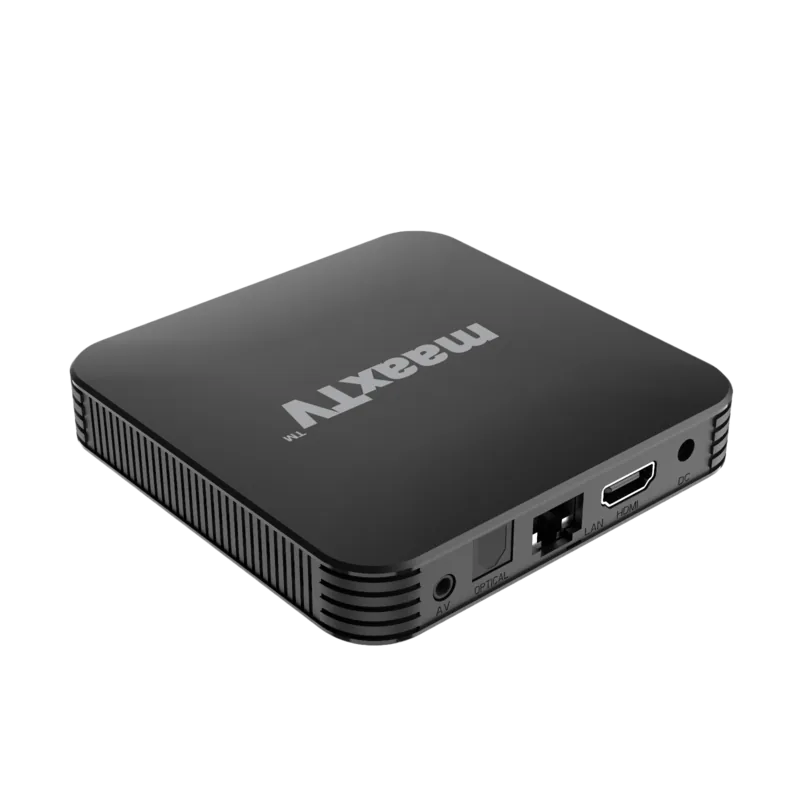
5. Connect the optical output to a external sound system
6. Connect the power supply
7. Turn on the device using the power button
WARRANTY
Find all Warranty & Return Terms accessing http://www.maaxtv.com/termof
use/ .
TERMS & POLICIES
Before using your MaaxTV , please read all the terms and the privacy
policy located at http://www.maaxtv.com/termofuse/ . All terms,
notices and policies are, collectively, the “Agreements”. By using your
MaaxTV , you agree to be bound by the terms of the Agreements.
FR
CONTENU
A. Dispositif MaaxTV
B. RCU
C. Adaptateur secteur électrique
D. Câble HDMI
E. Guide de démarrage rapide
CONNEXION
1. Insérer 2 piles AAA pour la télécommande
2. Brancher
la prise correcte pour votre pays
3. Connectez votre MaaxTV au téléviseur avec le câble HDMI / sortie AV
4. Branchez le câble Ethernet au routeur et à la boîte, ou utiliser l'accès à
internet sans-fil.
5. Si vous avez un système audio externe, connectez la sortie optique.
6. Branchez la source d'alimentation de votre MaaxTV
7. Connectez l'appareil en utilisant le bouton d'alimentation
GARANTIE
Trouver toutes les Garantie et Conditions de Retour concernant MaaxTV
en accédant qu site http://www.maaxtv.com/termofuse/.
TERMES ET CONDITIONS | Avant d'utiliser votre MaaxTV , lisez, s'il
vous plaît, attentivement toutes les informations fournies dans les termes
et politique de confidentialité situé à http://www.maaxtv.com/termofuse/ .
Tous les termes, les avis et les politiques sont, colle
ctivement, les
«Accord».
En utilisant votre MaaxTV , vous acceptez d'être lié par les termes de cet
Accord.
ES
CONTENIDOS
A. Dispositivo MaaxTV
B. Mando a distancia
C. Fuente de alimentación
D. Cable HDMI
E. Guía de instalación rápida
CONEXIÓN
1. Añade 2 pilas AAA al mando a distancia
2. Inserte el enchufe adecuado para su país
3. Conecte MaaxTV al televisor con el cable HDMI/ cable AV
4. Conecte el cable Ethernet al router o utilice un conexión inalámbrica
5. Conecte la salida óptica a un sistema de sonido externo
6. Conecte la fuente de alimentación
7. Encienda el dispositivo usando el botón de arranque
GARANTÍA
Encontrar todos los términos de la garantía y Reenvío en http://www.ma-
axtv.com/termofuse/ .
TÉRMINOS Y CONDICIONES
Antes de usar su MaaxTV , por favor, lea todos los términos y la política
de privacidad en http://www.maaxtv.com/termofuse/ . Todos los
términos
, las notificaciones y las condiciones son, colectivamente, los
"Acuerdos".
Mediante el uso de su MaaxTV , usted acepta la vinculación con los
Condiciones generales de uso .
IT
CONTENUTO
A. Dispositivo MaaxTV
B. Telecomando
C. Alimentatore
D. Cavo HDMI
E. Guida Rapida
COLLEGAMENTI
1. Inserisci 2 batterie AAA nel telecomando
2. Inserisci il tipo di spina corretto per la tua nazione
3. Collega MaaxTV alla TV con un cavo HDMI / AV
4. Collega un cavo ethernet al router oppure utilizza un accesso wireless
5. Collega l’uscita ottica ad un home theater
6. Collega l’alimentatore
7. Accendi il dispositivo utilizzando il pulsante di accensione
GARANZIA
Visita http://www.maaxtv.com/termofuse/ per conoscere tutti i
termini relativi a Garanzia e Recesso.
TERMINI & NORMATIVE
Prima di cominciare ad utilizzare il tuo MaaxTV , leggi tutti i termini e le
normative presenti su http://www.maaxtv.com/termofuse/ . Tutti i
termini, informazioni e normative formano, collettivamente, gli “Accordi”.
Utilizzando il tuo MaaxTV accetti i termini dei sopra menzionati Accordi.
PT
CONTEÚDO
A. MaaxTV
B. Télecomando (RCU)
C. Adaptador elétrico
D. Cabo HDMI
E. Guia de Inicialização Rápida
CONEXÕES
1. Insira as 2 pilhas AAA no télécomando
2. Ligue o adaptador correto para a tomada eletrica do seu país
3. Conecte a sua MaaxTV à TV com o cabo HDMI / saída AV
4. Ligue o cabo Ethernet ao router e à box ou conecte-a à internet através
de WiFi.
5. Se possuir um sistema de audio externo, conecte-o à saída optica.
6. Conecte a fonte de alimentação à sua MaaxTV
7. Ligue o dispositivo, utilizando o botão de alimentação.
GARANTIA
Encontre todas as Garantias et Condições de devolução sobre o produto
MaaxTV acedendo ao website http://www.maaxtv.com/termofuse/.
TERMOS E CONDIÇÕES
Antes de utilisar a sua MaaxTV leia, por favor, atentamente todas as
informações fornecidas e descritas nos termos e na politica de confiden-
cialidade, dispoíveis através do link http://www.maaxtv.com/termofuse
Todos os termos e políticas são, colectivamente, o «Acordo».
Ao utilizar a sua MaaxTV , aceita estar vinculado pelos termos de
utilização do Acordo.
DE
INHALT
A. MaaxTV Gerät
B. Fernbedienung
C. Netzteil
D. HDMI Kabel
E. Schnellstartanleitung
Installationsverfahren
1. Zwei AAA Batterien einlegen
2. Den richtigen Stecker für das Netzteil verwenden
3. Die MaaxTV am Fernseher anschließen mit HDMI Kabel / mit AV Kabel
4. Ethernet Kabel an einen Router anschließen oder Wireless Zugriff
benutzen
5. Sie können den optischen Au
sgang mit einem externen Soundsystem
verbinden
6. Netzteil einstecken
7. Schalten sie das Gerät mit der Power-Taste an.
GARANTIE
Trouver toutes les Garantie et Conditions de Retour concernant MaaxTV
en accédant qu site http://www.maaxtv.com/termofuse/.
ALLGEMEINE GESCHÄFTSBEDINGUNGEN
Bevor sie die MaaxTV benutzen, bitte lesen sie die Geschäftsbedingun-
gen und die Datenschutzbestimmungen unter http://www.maaxtv.
com/termofuse/ . Alle Bedingungen, Hinweise und Geschäftspoliti -
ken sind zusammen die “ Vereinbarung”.
Durch die Nutzung der MaaxTV stimmen sie den Bedingungen der
Vereinbarung zu.

Chat with your MaaxTV LN6000N manual using AI

Get instant AI answers from your MaaxTV LN6000N manual

Ask anything about the MaaxTV LN6000N. Answers come from this manual, with the pages they are based on.

Ask a Question

0/1000

Do you recommend LN6000N?

Yes No
0
User Pic

Sascha Weber

8 months ago

Does this device work without a satellite dish and does it include German television channels?

0
User Pic

Manual.ly

8 months ago

Yes, this unit operates via the internet connection and does not require a satellite dish. Users have confirmed the inclusion of many Arabic channels along with various German broadcasts that might not be explicitly advertised. While the channel selection is broad, reports suggest Turkish content may be limited. Overall, customers agree the price is worth the access to diverse international programming without additional hardware installations.

M: qwen/qwen3.5-flash-20260224

Frequently Asked Questions

A

The box contains the MaaxTV device, a remote control unit, a power adapter, an HDMI cable, and a quick start guide.

Is this answer helpful?

A

Plug the power adapter into the socket and press the power button on the front panel of the device to turn it on.

Is this answer helpful?

A

It features an HDMI audio output and an optical output that can connect to external sound systems.

Is this answer helpful?

A

You can connect using an Ethernet cable to your router or use a wireless access point for Wi-Fi connectivity.

Is this answer helpful?

A

All warranty and return terms are located on the official website in the terms of use section.

Is this answer helpful?

A

Yes, you must insert two AAA batteries into the remote control before using it.

Is this answer helpful?

A

Yes, visit the official support site to access terms, policies, and warranty documentation.

Is this answer helpful?

M: qwen/qwen3.5-flash-20260224

Advantages and Disadvantages

Advantages

  • Multiple connection options including HDMI, AV, and Optical audio output for flexible setup.
  • Simple seven-step physical installation process requiring only basic household items like batteries.
  • Multilingual documentation supports global customers with clear instructions in six languages.
VS

Disadvantages

  • Requires separate purchase of power adapter not always guaranteed included permanently for all regions.
  • No detailed information provided regarding specific streaming app compatibility or software features in guide.
  • Warranty terms require checking external website links rather than printed documentation for full details.
M: qwen/qwen3.5-flash-20260224

Product Specification

Single-Tuner

no

Twin-Tuner

no

Dual-Tuner

no

Triple-Tuner

no

Decoder

HEVC

Video Ports

1x HDMI 2.0 Out

Audio Ports

1x Digital Audio Out (optical)

Additional Ports

1x RJ-45 (10/100/1000Base-T), Card reader (microSD)

Wireless

Wi-Fi (WLAN)

Features

Media Player, Web Services

Special Features

IPTV

Color

black

Dimensions

4.53x0.98x4.29 in (WxHxD)

M: qwen/qwen3.5-flash-20260224

Product Description

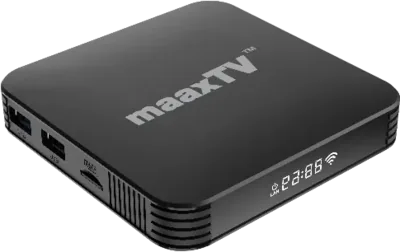
The MaaxTV LN6000N represents a versatile streaming solution designed for modern entertainment needs within the household. This compact device connects seamlessly to your television set, offering a robust set of interfaces to enhance your overall viewing experience significantly. Whether you need high definition audio output or simple connectivity options for older screens, the MaaxTV LN6000N delivers reliable performance in any home environment.

Setup is generally straightforward for most users without deep technical expertise. The process begins with inserting two AAA batteries into the remote control unit for immediate operation. Next, you plug in the power adapter which must be suitable for your region voltage standards. Connecting the device involves using either a high quality HDMI cable or a standard AV output cable depending on model capabilities. Network connectivity allows you to connect an Ethernet cable directly to your router or utilize wireless access for internet access.

Audio enthusiasts should note the optical output feature included on the rear panel. This allows users to connect the device to a dedicated external sound system for superior audio quality during movies. The MaaxTV LN6000N Manual provides clear instructions for these physical connections, ensuring minimal confusion during the initial installation phase. Users should also be aware that the unit is designed in Switzerland and produced in China, indicating international design standards.

Powering the device requires plugging the power supply into the unit and pressing the large power button on the front panel. Once active, the streaming capabilities activate based on your current network status. It is important to read the terms and conditions available online before full use to understand warranty coverage. The support website offers comprehensive details regarding product use.

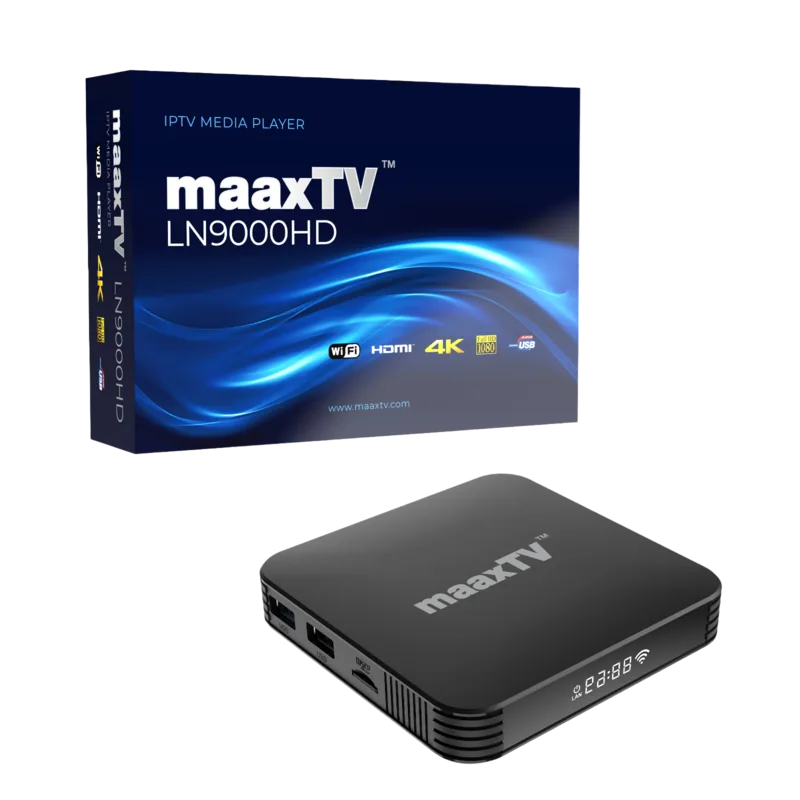
Overall, this device simplifies home entertainment consumption for families. The inclusion of multiple languages in documentation helps with global accessibility. End customers receive the device itself, a remote, power adapter, HDMI cable, and a quick start guide inside the packaging. Troubleshooting is minimized due to the intuitive physical design and clear labeling on all ports.

Warranty information is critical for buyer assurance regarding longevity. All warranty and return terms are accessible via the official website link. This ensures that buyers can easily verify their coverage status without needing to search extensively through support channels. Privacy policies are also included in these terms. By using your MaaxTV, users agree to be bound by these specific terms.

M: qwen/qwen3.5-flash-20260224

© Copyright 2026 Manual.ly