
Longshine LCS-GS8416 Manual
PDF manual · 100 Pages
English



Quick check
Incorrect answer, please try again.
Chat with your Longshine LCS-GS8416 manual using AI
Get instant AI answers from your Longshine LCS-GS8416 manual
Ask anything about the Longshine LCS-GS8416. Answers come from this manual, with the pages they are based on.
Ask a Question
Do you recommend LCS-GS8416?
Yes NoFrequently Asked Questions
The factory default management IP address is 192.168.1.1 and the default username/password is admin/admin. You can access the web GUI by entering http://192.168.1.1 in your browser.
Is this answer helpful?
Yes. The switch supports IPv6 addressing and can operate as a DHCPv6 client. IPv6 auto-configuration can be enabled or you can enter static IPv6 addresses and gateways via the Network > IPv6 Address settings.
Is this answer helpful?
You can restore factory defaults using the front-panel RESET button (press for about three seconds) or via the web GUI under Diagnostics > Factory Default. Restoring defaults will reboot the switch and erase current configuration.
Is this answer helpful?
The switch supports IEEE 802.1Q VLAN tagging with Access, Trunk and Hybrid interface modes, per-port PVID settings, port-to-VLAN membership, voice VLAN/LLDP-MED options and static/IGMP multicast controls for granular Layer 2 segmentation.
Is this answer helpful?
Firmware and configuration files can be upgraded or backed up via TFTP or HTTP from Maintenance > Upgrade Manager or Backup Manager. You may upload a file from your PC (HTTP) or specify a TFTP server IP and filename (TFTP).
Is this answer helpful?
Yes. The switch supports static LAG and LACP with LACP settings, per-LAG load-balancing algorithms (MAC or IP/MAC), up to eight member ports per LAG, and per-LAG port configuration for speed and flow control.
Is this answer helpful?
Security features include storm control (pps/bps), protected ports to isolate endpoints, DoS protections (various attack signatures configurable), access controls for HTTP/HTTPS/Telnet, and SNMP community settings with trap hosts for monitoring.
Is this answer helpful?
Advantages and Disadvantages
Advantages

- 16 gigabit RJ-45 ports with full web-managed Layer 2 features including VLAN, LACP and STP.
- Comprehensive web GUI with diagnostics (ping, cable test), logging and SNMP/LLDP support for easy management.
- QoS, IGMP snooping and jumbo frame support enable multimedia and storage-friendly deployments.
- Energy Efficient Ethernet (IEEE 802.3az) and metal case for durable, power-conscious operation.
- Flexible maintenance: TFTP/HTTP firmware upgrade, configuration backup/restore and local user management.
Disadvantages

- Class A emissions profile means it may cause interference in residential environments without mitigation.
- Limited MAC table (8K) and buffer (524.8 KB) may constrain very large or highly saturated networks.
- Web-based management lacks advanced CLI or controller integration for large-scale enterprise automation.
- Maximum of eight ports per LAG and other per-feature limits may restrict extreme aggregation topologies.
- Documentation and firmware updates may require contacting distributors; product info can become outdated.
Product Specification
Function
Switch
Type
Standalone, Rackmount (via optional mounting bracket)
Network ports
16x RJ-45
Speeds
16x RJ-45 (10/100/1000Base-T)
PoE
N/A
Backplane
32Gb/s, 23.8Mp/s, 10KB Jumboframes, 524Kb Packet buffer, 8K Mac addresses
Officially supported standards
802.1AX, 802.1AB, 802.1D, 802.1p, 802.1Q, 802.1w, 802.3, 802.3az, 802.3u, 802.3x, IGMPv3
Configuration
Web interface
Cooling
passive
Dimensions (WxHxD)
8.50x1.65x5.24in, 1U
Color
black
Special features
Metal housing, Firmware updates possible
Note
For this device, "link aggregation" was officially specified with the obsolete standard IEEE802.3ad. Since 2008, the function is no longer managed by the IEEE "Working Group 3" (IEEE 802.3, CSMA/CD - Ethernet), but by "Working Group 1" (IEEE 802.1, High Level Interface - Internetworking) and technically unchanged defined via IEEE 802.1AX.
Product Description
Longshine GS8400 Desktop Gigabit Smart Switch, 16x RJ-45 Manual
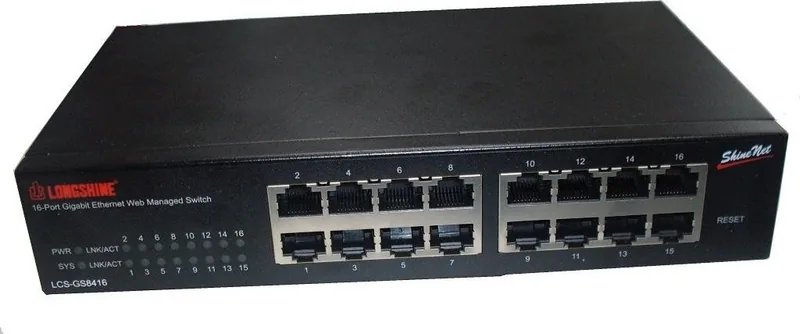
The Longshine GS8400 Desktop Gigabit Smart Switch is a compact, feature-rich 16-port 10/100/1000 Mbps switch designed for small to medium business networks and advanced home setups. It combines gigabit performance with web-based management tools, allowing administrators to configure, monitor and optimize traffic without complex CLI interactions. Auto-MDI/MDI-X, auto-negotiation and diagnostic LEDs simplify installation and troubleshooting, while a metal housing and flexible power input (100–240 VAC) support reliable deployment on a desktop or in a rack.
This smart switch emphasizes Layer 2 management functions: VLANs (IEEE 802.1Q), link aggregation (static and LACP), spanning tree (STP/RSTP/MSTP), IGMP snooping for multicast control and extensive QoS options to prioritize latency-sensitive traffic such as VoIP and video conferencing. Energy Efficient Ethernet (IEEE 802.3az) helps reduce power consumption during low activity.
Administrators access a web-based GUI for tasks like IP and IPv6 configuration, management VLAN selection, SNTP, SNMP, LLDP, and firmware/configuration backup or upgrade. The GUI exposes detailed status pages—system info, per-port counters, bandwidth utilization, LACP and LLDP statistics, IGMP entries and STP metrics—so operators can diagnose issues with built-in ping, IPv6 ping and cable copper tests. Logging can be buffered, stored in flash, or forwarded to remote servers.
Security and traffic protection are robust: DoS mitigation controls, storm control (pps/bps), protected ports to isolate endpoints, flow-control settings and access controls for HTTP/HTTPS and Telnet. MAC address management supports static and dynamic entries with an 8K MAC table and configurable aging. Jumbo frame support and configurable EEE per port extend flexibility for storage or virtualization environments.
Maintenance features include configuration save/restore, factory default, scheduled or on-demand reboots, TFTP/HTTP firmware and configuration upgrade/backup, and local account management. The switch’s hardware specs include 16 Gigabit RJ-45 ports, 8K MAC table, 10K jumbo frame capability, 16MB flash, 128MB DDR2, and a 524.8KB buffer. Operating range is 0–50°C with CE/FCC compliance.
Notes:
- Default management IP: 192.168.1.1; default credentials: admin/admin.
- Supports both IPv4 and IPv6 management and DHCP/DHCPv6 client modes.
- Web GUI exposes granular settings for VLANs, LACP, STP, QoS, IGMP snooping, LLDP and SNMP.
- Backup/upgrade via TFTP or HTTP; logging can be local or remote.
- Factory reset via front-panel RESET (press ~3 seconds).
Search for 67,706 Manuals online


Type-in Brand or Model