
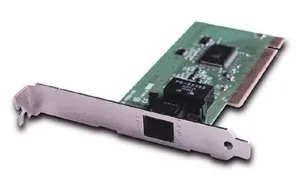
Longshine LCS-8056C Manual
PDF manual · 11 Pages
English



Quick check
Incorrect answer, please try again.
Chat with your Longshine LCS-8056C manual using AI
Get instant AI answers from your Longshine LCS-8056C manual
Ask anything about the Longshine LCS-8056C. Answers come from this manual, with the pages they are based on.
Ask a Question
Do you recommend LCS-8056C?
Yes NoFrequently Asked Questions
The LCS-8056C is a 56K dial-up modem for PSTN lines, used for internet dial-up, fax transmission, remote access, and maintaining connectivity on legacy or specialized systems that lack broadband.
Is this answer helpful?
The bundled drivers explicitly support legacy Windows platforms such as Windows 2000 and Windows XP. Installation on modern OSes may require third-party drivers or manual configuration and is not guaranteed.
Is this answer helpful?
The "OH" LED illuminates while dialing and stays on when connected; the "DATA" LED blinks during data transmission and reception, providing visual confirmation of link and activity.
Is this answer helpful?
Install the card into a free PCI slot, insert the driver CD, run the auto-run installer for your OS, follow the device driver wizard, then configure a dial-up connection through Windows Network Connections with your ISP credentials.
Is this answer helpful?
No. The modem is limited to 56K dial-up speeds and is inadequate for modern broadband applications. It is best used where PSTN access or fax compatibility is specifically required.
Is this answer helpful?
Possibly. Because drivers are aimed at older Windows versions, you may encounter unsigned driver or security prompts and need to confirm or bypass them to complete installation.
Is this answer helpful?
Yes. The LCS-8056C supports standard dial-up modem functions such as fax transmission, making it useful for equipment or workflows that still rely on fax over PSTN.
Is this answer helpful?
Advantages and Disadvantages
Advantages

- Simple, reliable 56K dial-up connectivity for legacy systems and fax machines.
- Clear LED indicators ("OH" for connection, "DATA" for send/receive) for easy status checks.
- PCI interface compatible with many older desktops and industrial machines.
- Straightforward installation using bundled driver CD and Windows network wizard.
- Small footprint and low power usage; useful as a spare or for refurbishing vintage PCs.
Disadvantages

- Limited to 56K speeds—unsuitable for modern broadband needs or heavy data use.
- Drivers target older Windows versions; compatibility with modern OS may be problematic.
- May require accepting unsigned driver warnings during installation on legacy systems.
- Dependence on phone line infrastructure makes it obsolete in many environments.
- No advanced features like VoIP, high-speed modem protocols, or modern security integrations.
Product Specification
Modem
analog
Features
Fax, Remote configuration
Product Description
Longshine LCS-8056C PCI — Reliable Legacy Modem for Basic Connectivity
The Longshine LCS-8056C PCI is a compact, no-frills dial-up modem designed for systems that require legacy PSTN connectivity. Built for easy installation and straightforward operation, this card targets users who need a dependable 56K connection for faxing, remote access, or low-bandwidth internet tasks. Its PCI interface ensures compatibility with many desktops from the era when dial-up remained relevant, making it a practical spare part for refurbishing older machines or maintaining specialized equipment.
Key Features and User Experience
Out of the box, the LCS-8056C emphasizes simplicity. LED indicators provide clear status feedback: an "OH" LED lights during dialing and when connected, and a "DATA" LED blinks while sending or receiving data. The hardware is plug-and-play friendly: insert the card into a PCI slot, plug the telephone line into the modem port, and follow a short driver-install routine. The included driver CD supports legacy Windows platforms such as Windows 2000 and XP, with a guided wizard that walks through device installation and driver confirmation prompts.
Installation typically requires the user to cancel the automatic hardware wizard and run the bundled auto-run installer from the CD. After selecting the appropriate OS driver, the device driver installation proceeds with a few confirmation dialogs. The process is straightforward, though users may need to accept unsigned driver prompts or click through security warnings on older Windows systems.
For establishing internet connectivity, manual dial-up network configuration steps are included: create a new network connection, choose to connect to the internet, set up the connection manually, select dial-up modem, enter ISP name, and configure user credentials. Completing these steps allows the user to dial and connect through familiar Windows Network Connections controls.
Practical Uses
This modem is ideal for legacy office equipment, POS systems, industrial controllers, or low-bandwidth remote sites where broadband is unavailable. It’s also useful for enthusiasts restoring vintage PCs or preserving compatibility with fax-dependent workflows. While not suitable for modern high-speed internet needs, it reliably serves scenarios where traditional telephone-line access is required.
Notes
- Best used with older Windows versions (Windows 2000/XP) due to available drivers.
- Expect to confirm or bypass unsigned driver warnings during installation.
- Not intended for high-speed data transfer—designed for 56K dial-up, fax, and remote access.
Search for 67,706 Manuals online


Type-in Brand or Model
tenetur_dolores
8 months ago
Does this card work with Linux, and is there enough included software to get it running properly?
Manual.ly
8 months ago
Thanks for your question. Based on user reports, the card may not work as expected on Linux setups. For best results, we recommend using a supported operating system listed in the product documentation (typically Windows). Regarding software, some customers found the included package limited. After purchase, you can usually install the required drivers and utilities from the official download page or included links in the manual. Please check the product page and the quick-start guide to confirm the exact driver/software requirements for your OS version. If you tell us your operating system and version, we can point you to the correct download and setup steps.