
Longshine LCS-6321O Manual
PDF manual · 6 Pages
English



Quick check
Incorrect answer, please try again.
Chat with your Longshine LCS-6321O manual using AI
Get instant AI answers from your Longshine LCS-6321O manual
Ask anything about the Longshine LCS-6321O. Answers come from this manual, with the pages they are based on.
Ask a Question
Do you recommend LCS-6321O?
Yes NoFrequently Asked Questions
The LCS-6321O uses a PCI Express x1 interface, designed to fit into any available PCIe x1 slot on a compatible motherboard.
Is this answer helpful?
The card provides two RS-232 serial ports using DB9 male connectors, suitable for connecting modems, scanners, controllers, and other RS-232 devices.
Is this answer helpful?
It supports serial data rates up to 230,400 bps and includes a 16C950-compatible UART with 128-byte deep transmit and receive FIFOs to improve data buffering and reduce CPU overhead.
Is this answer helpful?
Drivers included on the package CD target Windows platforms (Windows 2000, XP/Server 2003, and Vista, both 32-bit and 64-bit). The manual outlines step-by-step driver installation using the Windows Found New Hardware wizard.
Is this answer helpful?
Power off and unplug your PC, remove the case cover, remove a PCIe slot bracket, align and seat the card in a PCIe x1 slot, secure the bracket screw, replace the cover, and reconnect power. Then install drivers via the supplied CD or OS prompts.
Is this answer helpful?
Open Device Manager (System Properties > Device Manager). You should see two PCI Express UART Ports under Ports (COM & LPT) and a PCI Express Multiport Serial Adapter under Multi-port serial adapters if drivers installed correctly.
Is this answer helpful?
The manual documents Windows 2000/XP/2003/Vista support only. For modern Windows versions or Linux, check the vendor website for updated drivers; otherwise third-party drivers or compatibility workarounds may be required.
Is this answer helpful?
Advantages and Disadvantages
Advantages

- Compact PCIe x1 form factor conserves motherboard space while adding serial ports.
- Two RS-232 DB9 ports support legacy peripherals and industrial equipment.
- 16C950-compatible UART and 128-byte FIFOs reduce CPU interrupts and improve throughput.
- Supports serial speeds up to 230,400 bps for most serial device needs.
- Broad Windows driver support (2000, XP/2003, Vista 32/64-bit) with included CD.
Disadvantages

- Limited to two serial ports; may need additional adapters for larger deployments.
- Driver distribution on CD may be inconvenient for systems without optical drives.
- No native Linux or modern Windows 10/11 driver mentioned in original materials.
- PCIe x1 slot required; incompatible with systems lacking available PCIe slots.
- DB9 connectors rely on RS-232 levels, not suitable for TTL serial without adapters.
Product Specification
External
2x serial
Internal
N/A
Interface
PCIe x1
Features
low profile PCB
USB notation
Link
Product Description
Longshine LCS-6321O, 2x serial, PCIe x1 Manual
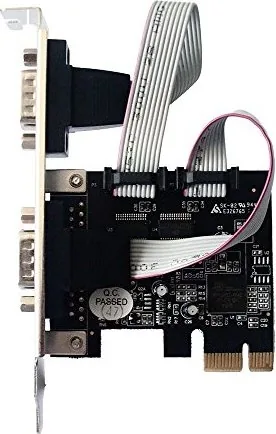
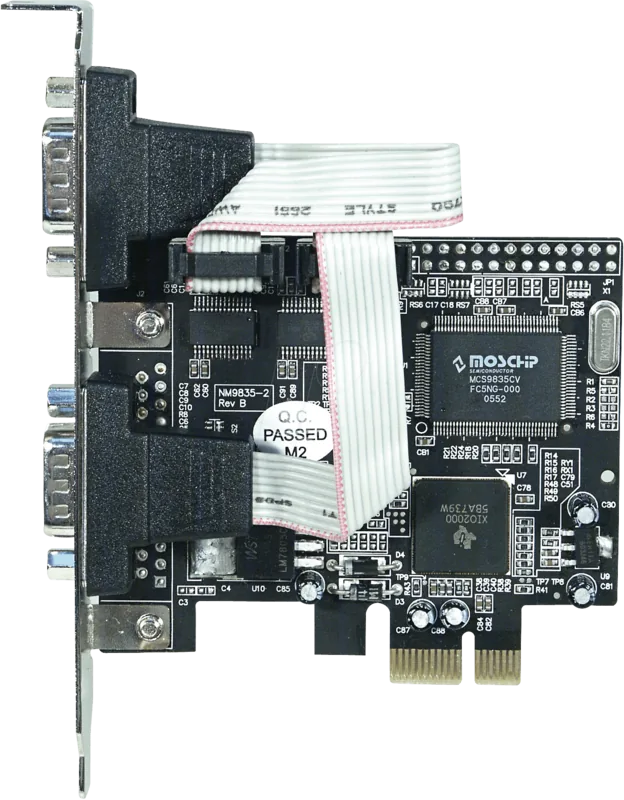
The Longshine LCS-6321O is a compact PCIe x1 serial expansion card providing two reliable RS-232 ports for legacy devices, industrial equipment, and serial peripherals. Built to the PCI Express Base Specification 1.1 and PCI Power Management 1.2, this card integrates a 16C950-compatible UART with 128-byte transmit/receive FIFOs and supports serial data rates up to 230,400 bps. Its dual DB9 male connectors make it straightforward to connect modems, barcode scanners, CNC controllers, and other RS-232-based hardware.
Installation and setup are designed to be user-friendly. The card fits into any available PCIe x1 slot — align, seat, and secure with the slot bracket screw. Driver support covers a range of Windows platforms (Windows 2000, XP/2003, Vista, both 32- and 64-bit variants). Drivers are supplied on a CD; the OS-driven Found New Hardware wizards guide users through automatic or CD-based installation. Once installed, the Device Manager shows two PCI Express UART ports listed under Ports (COM & LPT) and a PCI Express Multiport Serial Adapter under multi-port adapters.
Performance-wise, the LCS-6321O emphasizes stable, low-latency serial communication. The deep FIFOs help reduce CPU interrupts during bursty transfers, and the 16C950-compatible UART ensures broad compatibility with serial communication software and legacy drivers. The card’s PCIe x1 interface offers sufficient bandwidth for typical RS-232 use cases while occupying minimal motherboard real estate.
Typical use cases include industrial automation, point-of-sale systems, legacy instrumentation, and embedded systems that need reliable serial connectivity. The plug-and-play driver process for common Windows versions simplifies deployment in both desktop and industrial PC environments. The package typically includes the PCIe serial card, a driver CD, and a user manual, covering board layout, hardware installation steps, and OS-specific driver instructions.
Notes:
- Ensure the system is powered off and unplugged before installing the card to avoid hardware damage.
- Verify an available PCIe x1 slot and secure the bracket screw after seating the card.
- If the OS does not auto-install, use the provided driver CD and follow the Found New Hardware prompts.
Quick technical highlights
- PCI Express x1 interface
- 2x DB9 male RS-232 ports
- 16C950-compatible UART with 128-byte TX/RX FIFOs
- Up to 230,400 bps serial transfer rate
- Windows 2000/XP/2003/Vista (32/64-bit) driver support
Search for 67,706 Manuals online


Type-in Brand or Model