
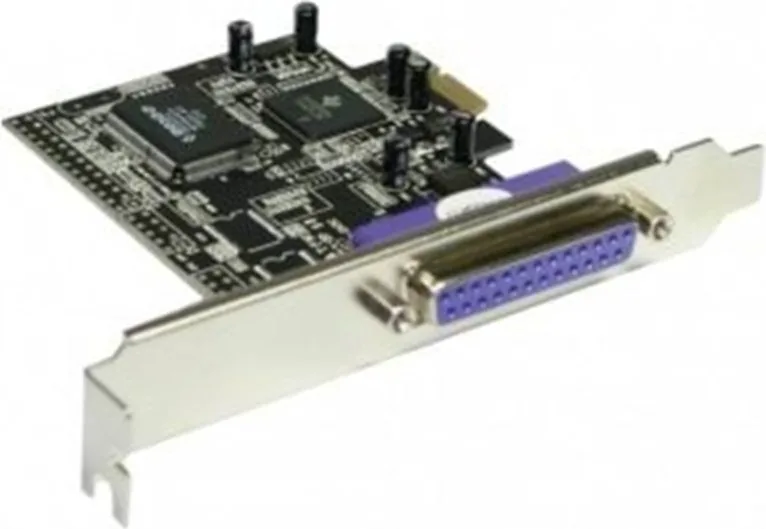
Longshine LCS-6319 Manual
PDF manual · 9 Pages
English



Quick check
Incorrect answer, please try again.
Chat with your Longshine LCS-6319 manual using AI
Get instant AI answers from your Longshine LCS-6319 manual
Ask anything about the Longshine LCS-6319. Answers come from this manual, with the pages they are based on.
Ask a Question
Do you recommend LCS-6319?
Yes NoFrequently Asked Questions
It is a PCIe x1 adapter that adds one legacy parallel port to a computer. It is mainly used for printers, industrial devices, and other equipment that still depends on parallel communication.
Is this answer helpful?
The card supports SPP, EPP, and ECP modes. This helps it work with a wide range of older parallel devices that may require different communication standards.
Is this answer helpful?
The listed support includes Windows 2000, Windows XP, and Windows Server 2003. It is best suited to older systems where parallel-device compatibility is still needed.
Is this answer helpful?
Open Device Manager and look under Ports (COM & LPT) for the parallel port entry. The adapter should also appear under multifunction adapters if installation was successful.
Is this answer helpful?
Yes. In Device Manager, open the port settings and select an unused LPT number if your connected device needs a specific port assignment to function properly.
Is this answer helpful?
First check the driver installation, confirm the card is seated properly, and verify the LPT port setting. Some older peripherals only work when assigned a specific port number.
Is this answer helpful?
Advantages and Disadvantages
Advantages

- Adds one parallel port to PCIe x1 systems, making older peripherals usable on newer hardware.
- Supports SPP, EPP, and ECP modes for broad compatibility with legacy parallel devices.
- Installation is straightforward and includes driver guidance for supported Windows versions.
- Useful for printers, industrial tools, and specialized equipment that still depend on LPT connectivity.
Disadvantages

- Only provides a single parallel port, which may be limiting in multi-device setups.
- Driver support is aimed at older Windows releases rather than modern operating systems.
- Some devices may need manual LPT port changes before they work correctly.
- It is designed for compatibility, not high-speed data transfer or modern connectivity standards.
Product Specification
External
1x parallel (EPP/ECP)
Internal
N/A
Interface
PCIe x1
Chipset
Oxford OXPCIe952
USB designation
Link
Product Description
Longshine LCS-6319: Practical Parallel Connectivity for PCIe Systems
The Longshine LCS-6319 is a straightforward way to bring a classic 25-pin parallel port into a modern PCI Express environment. For anyone still using legacy printers, industrial controllers, label devices, or specialized measuring tools, this adapter offers a dependable bridge between older hardware and newer PCs.
Built for a PCIe x1 slot, the card keeps installation compact while still delivering the familiar parallel interface many businesses and technicians rely on. It supports Standard Parallel Port (SPP), Enhanced Parallel Port (EPP), and Enhanced Capability Port (ECP), giving users flexibility across a wide range of legacy devices. With data transfer speeds of up to 1.5MB/s, it is designed more for stable compatibility than raw performance, which is exactly what many parallel peripherals need.
One of the strongest points of the LCS-6319 is its practical approach to setup. The process begins with a simple hardware installation: power down the system, insert the card into an available PCIe slot, secure it, and then install the driver from the included media. The supported operating systems include Windows 2000, Windows XP, and Windows Server 2003, which makes this card especially relevant for older workstations and purpose-built systems still in active use.
After installation, the device can be verified through Windows Device Manager, where the parallel port entry should appear under Ports and the adapter should also be visible under multifunction devices. If a connected peripheral requires a specific LPT assignment, the port number can be adjusted manually in the port settings. That small detail can be critical for older hardware that expects a particular configuration.
Why it still matters
In a world dominated by USB and wireless connections, a parallel card may seem niche, but it solves a real problem. Many professional tools and legacy peripherals were built around parallel communication and continue to function reliably only with a true LPT interface. The LCS-6319 helps preserve that compatibility without forcing users to replace perfectly good equipment.
Notes
- Best suited for legacy devices that need a real parallel interface.
- Check the device’s required LPT address before changing port settings.
- Driver support is focused on older Windows platforms.
- Ideal for system upgrades where parallel support must be retained.
Search for 67,706 Manuals online


Type-in Brand or Model
Nina Hoffmann
10 months ago
Is the product really good quality, or is it just cheap?
Manual.ly
10 months ago
Based on customer feedback, the product offers consistently strong quality despite the low price. Reviewers repeatedly mention that the overall build and results are on par with, or better than, what you would typically expect for the cost. If you want extra peace of mind, check the product details on the page (materials, specifications, and intended use) and make sure it matches your requirements. If anything does not meet expectations, contact our support so we can help with warranty or replacement options where applicable.