
Longshine GS7100 Manual
PDF manual · 36 Pages
English



Quick check
Incorrect answer, please try again.
Chat with your Longshine GS7100 manual using AI
Get instant AI answers from your Longshine GS7100 manual
Ask anything about the Longshine GS7100. Answers come from this manual, with the pages they are based on.
Ask a Question
Do you recommend GS7100?
Yes NoFrequently Asked Questions
Each RJ-45 port supports 10/100/1000 Mbps auto-negotiation (NWay). The switch auto-detects speed and duplex; 1000 Mbps is supported in full-duplex mode.
Is this answer helpful?
No. The GS7100 is plug-and-play. It requires only power and Ethernet cables—no management software or configuration is needed for basic operation.
Is this answer helpful?
Yes. All ports support auto MDI/MDI-X, so you can use a straight-through cable to connect another switch or hub; the port will automatically handle crossover.
Is this answer helpful?
Yes. The GS7100 supports jumbo frames (model-dependent up to 12K bytes). Jumbo frames reduce protocol overhead for large transfers, improving throughput and lowering CPU usage on hosts during bulk data transfers.
Is this answer helpful?
Use Cat5/Cat5e UTP/STP for 100 Mbps and 1000 Mbps up to 100 meters. For 10 Mbps links Cat3/4/5 UTP/STP can be used up to 100 meters.
Is this answer helpful?
It’s best for small offices, home labs, or edge deployments needing reliable unmanaged gigabit ports. Larger or more complex enterprise networks typically require managed switches with VLANs, QoS, higher MAC table sizes, and advanced features.
Is this answer helpful?
The switch uses an external 12V DC power adapter (model-dependent current rating). It typically meets CE and FCC Class B EMI/EMC standards and carries manufacturer conformity declarations.
Is this answer helpful?
Advantages and Disadvantages
Advantages

- 8 gigabit RJ-45 ports with 10/100/1000 auto-negotiation for dedicated per-port bandwidth.
- Plug-and-play design with auto MDI/MDI-X removes need for crossover cables or configuration.
- Store-and-forward switching reduces latency and filters runt/CRC error packets for stability.
- Supports full-duplex at 1000 Mbps and jumbo frames (up to 12K) for improved bulk transfer efficiency.
- Front-panel LEDs provide clear link speed and activity diagnostics; CE and FCC Class B certified.
Disadvantages

- Unmanaged switch—no VLANs, QoS, or advanced configuration for complex network control.
- Limited buffering and MAC table size compared to enterprise switches may affect large networks.
- External 12V DC power adapter may be less convenient than internal PSUs in some deployments.
- 1000 Mbps operation requires Cat5/Cat5e cabling and full-duplex support on connected devices.
- No PoE support—requires separate power for endpoints like access points or VoIP phones.
Product Specification
Function
Switch
Type
Standalone, Wall mount (via mounting bracket)
Network ports
8x RJ-45 (rear)
Speeds
8x RJ-45 (10/100/1000Base-T)
PoE
N/A
Backplane
16Gb/s, 11.9Mp/s, 9KB Jumboframes, 1Mb packet buffer, 4K Mac addresses
Officially supported standards
802.3, 802.3ab, 802.3u, 802.3x
Configuration
unmanaged
Cooling
passive
Dimensions (WxHxD)
6.10x0.98x3.35 in
Color
white, black
Special features
Metal housing, external power supply
Product Description
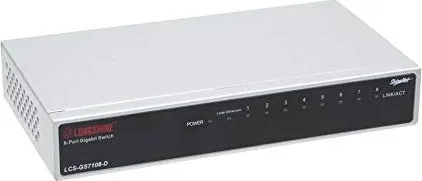
Longshine GS7100 Desktop Gigabit Switch, 8x RJ-45 Manual
The Longshine GS7100 Desktop Gigabit Switch is an 8-port, plug-and-play network switch designed to bring reliable gigabit connectivity to small offices, home labs, and micro-segmented networks. Each RJ-45 port supports 10/100/1000 Mbps auto-negotiation (NWay) and auto MDI/MDI-X, allowing straightforward connections to computers, other switches, or uplinks without worrying about crossover cables. The device operates in store-and-forward mode to reduce latency and filter out runt and CRC error packets, promoting stable and efficient traffic handling for multimedia, imaging, and bandwidth-hungry applications.
Compact and easy to deploy, the GS7100 requires no configuration software: power it up, connect devices with standard Cat5/Cat5e cables, and benefit from dedicated per-port bandwidth—avoiding the congestion typical of shared 10/100 Mbps segments. Full-duplex operation doubles effective throughput where supported, while jumbo frame support (up to 12K bytes on many models) helps reduce CPU overhead and improve bulk-data transfers for storage or streaming tasks.
Status LEDs on the front panel provide clear diagnostics: power, per-port link speed (10/100/1000M), and activity indicators help quickly identify connection states and troubleshooting points. The switch meets CE and FCC Class B emissions standards and ships with an external 12V DC power adapter plus wall-mount hardware for flexible placement.
Technical highlights include IEEE 802.3/802.3u/802.3ab/802.3x compliance, auto-sensing duplex and speed (1000 Mbps in full-duplex), a MAC address table (several thousand entries depending on model), modest memory buffering, and low power consumption. Its solid EMI/EMC certifications make it suitable for commercial deployments while remaining simple enough for non-expert installation.
Notes:
- Ideal for small networks needing reliable wired gigabit ports without management overhead.
- Supports auto MDI/MDI-X so any port can be used as an uplink without special cabling.
- Use Cat5/Cat5e cabling for 1000 Mbps links up to 100 meters; Cat3/4/5 supports 10 Mbps where required.
Pros and cons below summarize the main strengths and limitations of the Longshine GS7100 Desktop Gigabit Switch, 8x RJ-45 Manual.
Search for 67,706 Manuals online


Type-in Brand or Model