
Lindy USB to 4 Port Serial 42858 Manual
PDF manual · 2 Pages
English



Quick check
Incorrect answer, please try again.
Chat with your Lindy USB to 4 Port Serial 42858 manual using AI
Get instant AI answers from your Lindy USB to 4 Port Serial 42858 manual
Ask anything about the Lindy USB to 4 Port Serial 42858. Answers come from this manual, with the pages they are based on.
Ask a Question
Do you recommend USB to 4 Port Serial 42858?
Yes NoFrequently Asked Questions
It converts one USB connection into four RS-232 serial ports, letting you connect multiple legacy serial devices to a modern computer.
Is this answer helpful?
It is designed for standard RS-232 equipment such as modems, barcode readers, label printers, EPOS devices, PDAs, and ISDN terminal adapters.
Is this answer helpful?
Usually no. It is typically powered by the USB bus, but an optional 5V DC power supply can be used if additional power is needed.
Is this answer helpful?
No. Installation is generally straightforward, with drivers provided on the included CD and device detection handled through the operating system.
Is this answer helpful?
The adapter supports Windows 98SE, ME, 2000, XP, and Linux drivers are available from FTDI.
Is this answer helpful?
The reset buttons help the system detect a newly connected serial device on a port, especially when you swap one device for another.
Is this answer helpful?
Advantages and Disadvantages
Advantages

- Adds four RS-232 ports from a single USB connection, making it easy to expand serial connectivity for older devices.
- Bus-powered design reduces cable clutter and usually removes the need for an external power supply.
- FTDI chipset helps provide stable, widely compatible serial communication.
- Reset buttons on each port simplify device replacement and re-detection.
Disadvantages

- Best suited for legacy RS-232 equipment, so it is not useful for modern USB-only peripherals.
- Driver setup may require manual steps on older Windows systems.
- Performance depends on proper cable quality and may be affected by poor shielding.
- Some setups may need an optional external 5V power supply for reliable operation.
Product Specification
Type
Adapter
Connector
USB-A 2.0
Port
4x RS-232
Manufacturer's Warranty
2 years
USB Notation
Link
Product Description
Lindy USB 2.0 to 4x Serial Adapter: Simple Serial Expansion for Modern PCs
A practical bridge between USB and legacy RS-232 devices
The Lindy USB 2.0 to 4x Serial Adapter Manual highlights a compact and reliable way to add four RS-232 ports to a computer through a single USB connection. For anyone still working with modems, barcode scanners, label printers, EPOS systems, PDA docks, or ISDN terminal adapters, this adapter brings older serial equipment back into everyday use without opening the PC case or changing hardware settings.
Built for flexibility
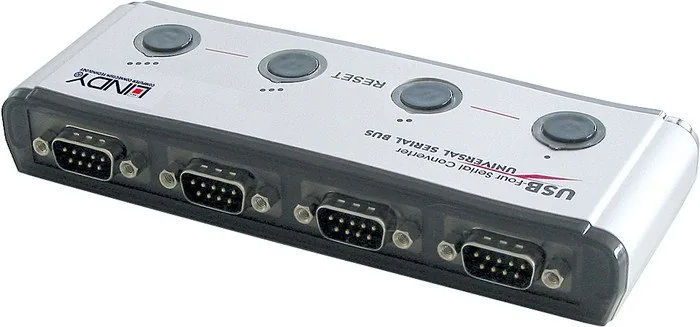
One of the strongest points of this adapter is its straightforward design. It offers four separate 9-pin male serial connectors, allowing multiple devices to be connected at once. The unit is especially useful for notebooks and desktops that no longer include built-in COM ports, giving users a clean external alternative to installing an internal serial card. Its compact form also makes it convenient for mobile setups and workstations with limited space.
Easy setup and dependable operation
The adapter is designed to keep installation simple. It works through USB 1.1 and is compatible with USB 2.0 Full Speed, while the FTDI chipset helps support stable communication with common RS-232 devices. In most cases, the adapter can be powered directly through the USB bus, reducing cable clutter and eliminating the need for an external supply. If extra power is needed, an optional 5V DC input is available.
Practical features for real-world use
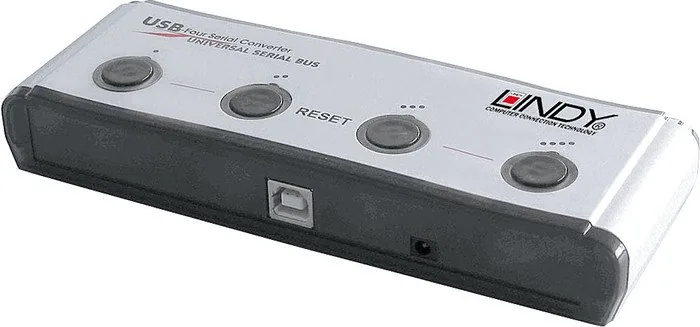
A reset button for each serial port makes it easier to reconnect devices when switching between equipment. That can be especially helpful in environments where devices are frequently changed or tested. The adapter supports common Windows versions from 98SE through XP, and Linux users can obtain drivers from FTDI, making it a versatile choice for mixed systems.
Notes
For best results, use quality shielded cables to maintain signal integrity and compliance. If the converter is connected through a USB hub, a self-powered hub is recommended when bus power alone is not sufficient. The adapter is a strong fit for legacy hardware users who need a simple, external, multi-port serial solution without complex configuration.
Search for 67,706 Manuals online


Type-in Brand or Model