
Lindy USB-C SD and microSD 43185 Manual
PDF manual · 2 Pages
English



Quick check
Incorrect answer, please try again.
Chat with your Lindy USB-C SD and microSD 43185 manual using AI
Get instant AI answers from your Lindy USB-C SD and microSD 43185 manual
Ask anything about the Lindy USB-C SD and microSD 43185. Answers come from this manual, with the pages they are based on.
Ask a Question
Do you recommend USB-C SD and microSD 43185?
Yes NoFrequently Asked Questions
It supports SD, SDHC, SDXC, microSD, and related formats like mini SD and MMC variants when used with a compatible adapter. It is mainly designed for common SD-family memory cards.
Is this answer helpful?
No external power is needed because it is bus-powered through USB. It is also designed for plug-and-play use, so most systems will recognize it automatically without manual driver installation.
Is this answer helpful?
It works best with computers that have a USB-C port. Since it is built for USB Type-C connectivity, a modern laptop or desktop with USB-C is the ideal match.
Is this answer helpful?
It supports USB 3.1 Gen 1 / USB 3.0 speeds up to 5 Gbps. Real-world speed depends on the card itself and on whether your computer uses a compatible USB 3.0 or 3.1 Gen 1 port.
Is this answer helpful?
Some of those formats are supported, but certain card types require an adapter. The adapter is not included, so you may need to provide one separately if you plan to use legacy cards.
Is this answer helpful?
Yes. Its compact form, USB-powered operation, and dual-slot setup make it convenient for both travel and desk use. It is a practical option for quick transfers in everyday workflows.
Is this answer helpful?
Advantages and Disadvantages
Advantages

- Dual SD and microSD slots simplify everyday card transfers.
- USB 3.1 Gen 1 / USB 3.0 support enables fast 5 Gbps data movement.
- Bus-powered design removes the need for an external power adapter.
- Backwards compatibility helps it work with older USB systems too.
Disadvantages

- Mini SD and some MMC formats need a separate adapter.
- Top transfer speeds depend on a USB 3.0 or USB 3.1 Gen 1 connection.
- It is focused on SD-family cards, not a universal all-format reader.
- USB-C computer support is required for direct use.
Product Specification
Type
Card reader
Form factor
1x external wired (connection cable not detachable)
Host connection
1x USB-C 3.0 (connector via cable, 5Gb/s, 15cm cable length)
Card slots
1x microSD, 1x SD Card
Supported media
1x microSD (microSD), 1x SD Card (SD Card)
Power supply
Power supply only via host connection
Chipset
Realtek RTS5306 (Card reader)
Dimensions
1.50x0.39x1.34in (WxHxD)
Weight
0.11 lb
Housing color
white
Compatibility
universal
Manufacturer warranty
two years
USB notation
Link
Product Description
Lindy Dual-Slot Card Reader, USB-C 3.0 Plug Manual
A practical companion for fast everyday transfers
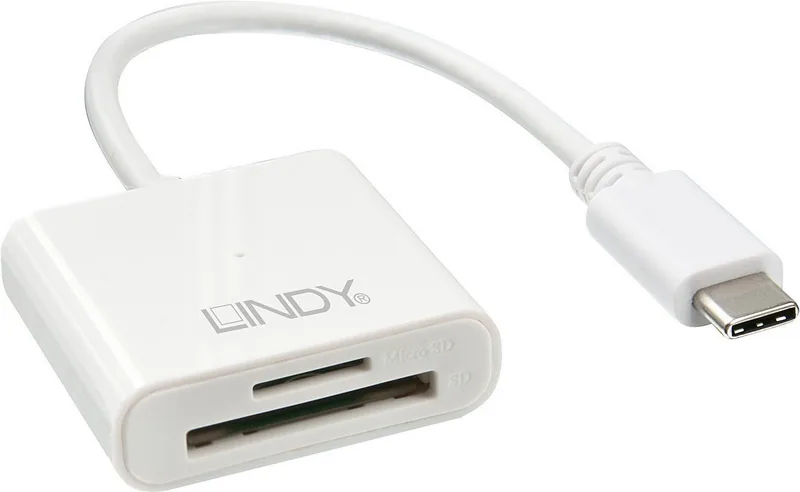
The Lindy Dual-Slot Card Reader, USB-C 3.0 Plug Manual describes a compact card reader designed to make moving photos, videos, and files from memory cards to a computer simple and efficient. Built around a USB-C connection, it fits naturally into modern laptops and desktops that use the Type-C standard, while also keeping backwards compatibility with older USB generations for flexible use.
What makes it useful
At the heart of this reader is a dual-slot layout: one slot for SD cards and another for microSD cards. That means users can work with common storage formats without carrying multiple adapters or separate readers. It supports a wide range of card families, including SD, SDHC, SDXC, microSD, and several legacy formats through adapters. For photographers, content creators, and everyday users, that kind of compatibility is a real convenience.
The reader supports USB 3.1 Gen 1 / USB 3.0 speeds up to 5 Gbps, which helps reduce waiting time when copying large media files. It is also bus-powered, so there is no need for a separate power supply. Just plug it into a USB-C port, insert the card, and start transferring. The plug-and-play approach makes it especially appealing for home and office setups where simplicity matters.
Everyday performance and workflow
This card reader is best understood as a straightforward tool rather than a flashy accessory. Its strength lies in reliability, ease of use, and broad card support. If you regularly move files from cameras, drones, or mobile devices, the dual-slot design can streamline your workflow. It is also a sensible choice for users who want one reader that works with both standard SD cards and the smaller microSD format often used in phones and compact devices.
While the reader is compatible with older USB standards, the fastest results come from a USB 3.0 or USB 3.1 Gen 1 connection. That makes it a good match for newer computers, especially those that already rely on USB-C as a main connection point.
Notes
- Best performance is achieved on USB 3.0 / USB 3.1 Gen 1 ports.
- Some card types require an adapter, which is not included.
- Ideal for users who want a compact, no-fuss card reader for daily transfers.
Search for 67,732 Manuals online


Type-in Brand or Model