
Lindy USB-C Multi-Port 43278 Manual
PDF manual · 9 Pages
English



Quick check
Incorrect answer, please try again.
Chat with your Lindy USB-C Multi-Port 43278 manual using AI
Get instant AI answers from your Lindy USB-C Multi-Port 43278 manual
Ask anything about the Lindy USB-C Multi-Port 43278. Answers come from this manual, with the pages they are based on.
Ask a Question
Do you recommend USB-C Multi-Port 43278?
Yes NoFrequently Asked Questions
The device is compatible with USB Type C equipped computers. It works with Macbook and notebooks. Ensure the computer supports DisplayPort Alternate Mode for video functionality. It also works with Windows operating systems automatically.
Is this answer helpful?
Yes, the HDMI output supports resolutions up to 3840 by 2160 pixels at 30Hz. This allows for crisp 4K visuals. If both HDMI and VGA are used, the resolution drops to 1920 by 1080.
Is this answer helpful?
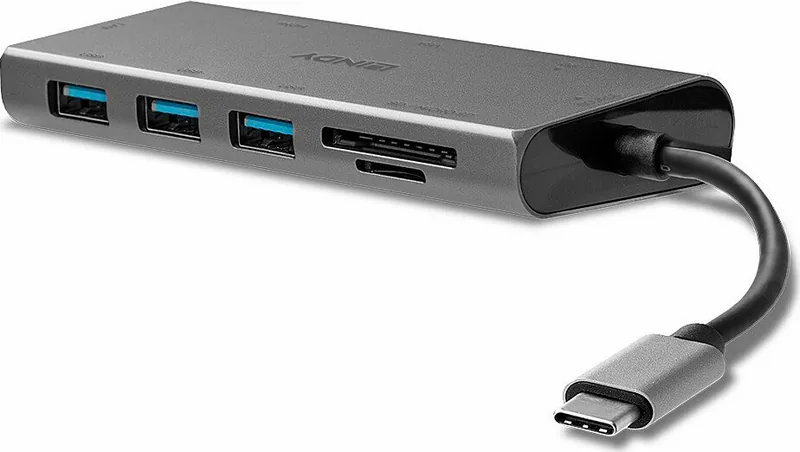
There are three USB Type 3.1 Gen 1 Type A female ports. They support SuperSpeed data transfer rates. You can connect keyboards, mice, and external hard drives simultaneously.
Is this answer helpful?
Yes, the device has a USB Type C Power Delivery input port. It supports up to 100 Watts of power. This allows you to charge your device while connecting other peripherals.
Is this answer helpful?
No, drivers are not required. The computer will automatically download drivers from the internet. Installation is plug and play for standard features like data and video.
Is this answer helpful?
This product benefits from a two-year warranty from the Lindy Group. It also includes free lifetime technical support. Retain the proof of purchase for potential future claims.
Is this answer helpful?
The converter supports standard SD and microSD cards. The slots allow for quick access to media storage. This is useful for transferring photos or files directly from cameras or phones.
Is this answer helpful?
Advantages and Disadvantages
Advantages

- Offers multiple interfaces including HDMI, VGA, and three USB ports for versatile connectivity.
- Supports power delivery up to 100 watts to charge laptops while in use.
- Includes Gigabit Ethernet RJ45 port for stable and fast network connections.
- Feature SD and microSD card slots for convenient access to storage media.
Disadvantages

- Video functionality requires host computer to support DisplayPort Alternate Mode specifically.
- Simultaneous HDMI and VGA usage reduces resolution to 1920 by 1080 maximum.
- USB Type C female port is for charging only and does not transfer data.
- Required cables for HDMI, VGA, and network are not included with the unit.
Product Specification
Type
LAN Adapter, USB Hub, Card Reader, Video Adapter
Form Factor
1x external wired (connection cable not detachable)
Connection
1x USB-C 3.0 (plug via cable, 5Gb/s, USB-C with DisplayPort 1.2, USB PD 3.0)
Ports
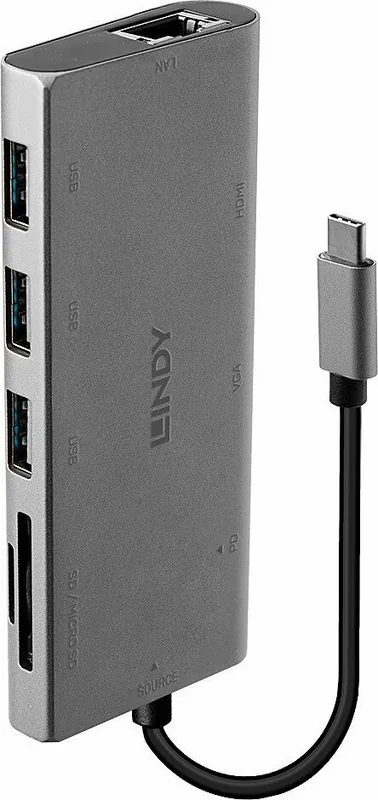
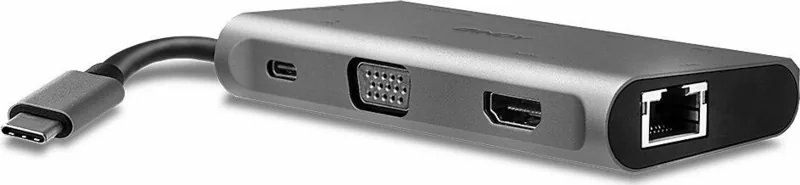
1x RJ-45, 3x USB-A 3.0 (port), 1x microSD, 1x SD Card, 1x HDMI (port), 1x VGA (port)
Transfer
1x RJ-45 (10/100/1000Base-T), 3x USB-A 3.0 (port, 5Gb/s), 1x microSD (microSD), 1x SD Card (SD Card), 1x HDMI (port, max. 3840x2160@30Hz), 1x VGA (port)
Power Supply
Power also via connection, main supply (1x USB-C port USB PD 3.0, max. 100W, Passthrough 100W), external power adapter possible but not included
Chipset
Realtek RTL8153 (LAN Adapter, RJ-45), Genesys Logic GL3510 (USB Hub, USB 3.0), EP9632G
Dimensions
7.09x0.67x1.93 inches (WxHxD)
Case Color
gray
Compatibility
universal
Features
Metal case, VLAN, Wake on LAN, HDCP 2.2
Warranty
two years
USB Notation
Link
Product Description
Revolutionize Your Workspace with the Lindy 43278
In the modern digital landscape, connectivity is paramount for professionals who rely on portable computing. The Lindy 43278 stands out as a robust solution for laptops that lack sufficient ports for modern tasks. This device transforms a single USB Type C connection into a comprehensive docking station. Imagine expanding your workstation instantly with just one cable plugged in. It eliminates the need for multiple adapters cluttering your desk or bag.
Versatile Connectivity Options
The core of the Lindy 43278 lies in its multitude of interfaces for daily use. Users gain access to HDMI and VGA outputs for video projection to larger screens. HDMI supports resolutions up to 3840 by 2160 pixels at 30Hz. This ensures crisp visuals on modern 4K displays. The VGA port supports 1920 by 1080 resolution at 60Hz for legacy monitors. It is important to note that DisplayPort Alternate Mode is required for video functionality on the host computer. If used simultaneously, it acts as a splitter with reduced resolution.
High Speed Data Transfer
Data moves efficiently through this converter to maintain performance standards. Three USB Type 3.1 Gen 1 ports offer SuperSpeed capabilities for peripherals. You can connect keyboards, mice, or external hard drives simultaneously without latency. The standard speed reaches 5 Gbps for fast file transfers. This ensures compatible legacy devices also function without issues. Windows or Mac operating systems will recognize the device automatically upon connection.
Network and Storage Access
Networking needs are thoroughly met via the integrated RJ45 port. Gigabit Ethernet ensures stable internet connections for remote work from anywhere. Storage access is handled by SD and microSD card slots conveniently located on the unit. These allow for quick file transfers from cameras or phones directly to your drive. You never need to dig out card readers again during a busy workflow.
Power Delivery and Charging
Charging your device remains a priority during extensive use. The built-in power delivery port supports up to 100 watts total power. You can keep your laptop charged while using other peripherals simultaneously without interruption. This is ideal for MacBook users or similar energy-hungry devices needing energy. Installation is straightforward without extra drivers to install. Simply connect and go to start working.
Summary Notes
This hub maximizes the functionality of a single port efficiently without complexity. It combines video, data, network, and power into one compact unit. The two-year warranty and lifetime support add value to the purchase. Whether at home or in the office, this tool simplifies your tech setup. It provides the freedom to work anywhere with full capability and speed. Every purchase comes with benefits from the Lindy Group manufacturer. They ensure trouble free, reliable operation for all customers globally. Please retain this information for future reference regarding usage. Please ensure your computer supports USB 3.1 Type C for best results. It is a great tool for business.
Search for 67,732 Manuals online


Type-in Brand or Model