
Lindy USB 3.1 Hub & Gigabit Ethernet 43176 Manual
PDF manual · 2 Pages
English



Quick check
Incorrect answer, please try again.
Chat with your Lindy USB 3.1 Hub & Gigabit Ethernet 43176 manual using AI
Get instant AI answers from your Lindy USB 3.1 Hub & Gigabit Ethernet 43176 manual
Ask anything about the Lindy USB 3.1 Hub & Gigabit Ethernet 43176. Answers come from this manual, with the pages they are based on.
Ask a Question
Do you recommend USB 3.1 Hub & Gigabit Ethernet 43176?
Yes NoFrequently Asked Questions
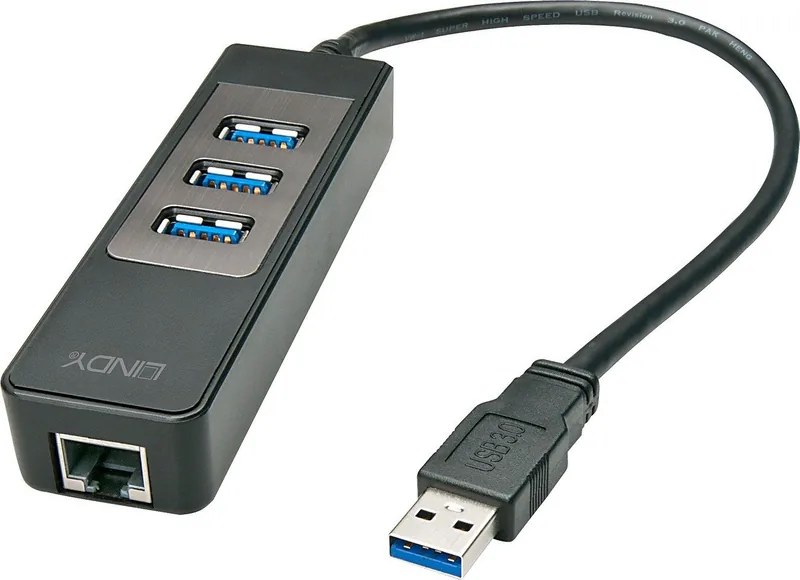
It expands one USB-A port into three USB-A ports and a Gigabit Ethernet connection. That makes it useful for laptops and tablets that need both wired networking and extra peripheral connections in one compact accessory.
Is this answer helpful?
Yes. The Ethernet adapter requires the correct driver before first use. After installing the driver from the included CD or the manufacturer website, you can connect the device to a network using a standard Ethernet cable.
Is this answer helpful?
You can connect up to three USB-A peripherals at the same time through the hub section. Typical examples include a mouse, keyboard, flash drive, printer, or card reader.
Is this answer helpful?
The Gigabit Ethernet interface supports 10/100/1000 Mbps networking. That gives you a stable wired connection for work tasks, streaming, downloads, and other data-heavy activities.
Is this answer helpful?
Yes. It is especially useful for ultrabooks and similar devices because they often have limited ports and may not include a wired LAN port. This adapter adds both Ethernet and USB expansion in a single unit.
Is this answer helpful?
Yes. The adapter is intended for USB Type-A equipped computers, and shielded cables are recommended for compliance and performance. It is also best to install the Ethernet driver before connecting to a network.
Is this answer helpful?
Advantages and Disadvantages
Advantages

- Adds Gigabit Ethernet and 3 USB-A ports through one USB-A connection, reducing the need for separate adapters.
- USB 3.1 Gen 1 / USB 3.0 support up to 5 Gbps helps keep peripherals responsive and data transfers efficient.
- Useful for ultrabooks and tablets with limited built-in connectivity, especially in home or office setups.
- Supports common networking standards and full/half duplex operation for reliable wired connections.
Disadvantages

- Ethernet use depends on driver installation before first use, so it is not fully plug-and-play.
- Designed for USB Type-A systems, so it is less suitable for USB-C-only laptops without extra hardware.
- Requires shielded cables for proper compliance and performance, which adds a small setup constraint.
- Only one upstream USB-A plug is available, so expansion is limited by the host port.
Product Specification
Type
LAN adapter, USB hub
Design
1x external wired (connection cable not detachable)
Interface
1x USB-A 3.0 (plug via cable, 5Gb/s)
Ports
1x RJ-45, 3x USB-A 3.0 (socket)
Transfer rates
1x RJ-45 (10/1000/1000Base-T), 3x USB-A 3.0 (socket, 5Gb/s)
Power supply
Power supply only via interface (max. 900 mA)
Chipset
Asix AX88179 (LAN adapter, RJ-45), VIA/VLI VL813 (USB hub, USB 3.0)
Dimensions
1.57x0.79x4.33in (WxHxD)
Housing color
gray, silver
Compatibility
universal
Features
VLAN, Wake on LAN
Manufacturer warranty
two years
USB notation
Link
Product Description
Lindy 43176 RJ-45, USB-A 3.0 Plug Manual
A Compact Hub-and-Network Upgrade for Everyday Work
The Lindy 43176 is a practical two-in-one accessory that combines a USB 3.1 Gen 1 / USB 3.0 hub with a Gigabit Ethernet adapter. It is made for users who want to turn one USB-A port into a more capable workstation connection, especially on ultrabooks, compact laptops, and tablets that often lack enough ports or an integrated wired LAN jack.
At its core, the device adds both speed and flexibility. The RJ-45 interface delivers stable 10/100/1000 Mbps wired networking, which is ideal for video calls, large downloads, office file sharing, and any task where wireless performance may be inconsistent. At the same time, the three USB-A downstream ports let you connect extra peripherals such as a mouse, keyboard, storage drive, printer, or card reader without constantly swapping cables. With USB 3.1 Gen 1 support up to 5 Gbps, the hub section is designed to keep data moving efficiently.
Setup is simple, but the Ethernet function does require driver installation before first use. Once the correct driver is installed from the included CD or the manufacturer website, the adapter can be connected to a network with a standard Ethernet cable. After that, the USB hub can be used right away by plugging devices into the available USB-A sockets. This makes the adapter a practical choice for users who want a straightforward expansion solution rather than a larger dock with extra complexity.
The Lindy 43176 also stands out for its compatibility and compliance focus. It supports common IEEE networking standards, full and half duplex operation, and is intended for USB Type-A equipped computers. The product is built for home and office use and aligns with CE, FCC, and RoHS expectations. As with many networking accessories, shielded cables are recommended to maintain reliable performance and compliance.
Notes
- Best suited for systems that still use USB Type-A.
- Install the Ethernet driver before connecting to the network.
- Use shielded cables for safer, cleaner operation.
Search for 67,732 Manuals online


Type-in Brand or Model