
Lindy HDMI 4K 38167 Manual
PDF manual · 12 Pages
English



Quick check
Incorrect answer, please try again.
Chat with your Lindy HDMI 4K 38167 manual using AI
Get instant AI answers from your Lindy HDMI 4K 38167 manual
Ask anything about the Lindy HDMI 4K 38167. Answers come from this manual, with the pages they are based on.
Ask a Question
Do you recommend HDMI 4K 38167?
Yes NoFrequently Asked Questions
It separates audio from an HDMI signal and sends video to a display while routing sound to external speakers, an AV receiver, or a sound bar. This helps improve audio without changing the main video connection.
Is this answer helpful?
The unit provides HDMI pass-through, 3.5 mm analogue audio, and SPDIF digital outputs via optical and coaxial connections. This makes it easy to match different audio systems.
Is this answer helpful?
Yes. The extractor passes the HDMI video onward to a display while sending audio to the connected sound equipment. All supported outputs can work simultaneously during playback.
Is this answer helpful?
No. Analogue output is intended for LPCM audio only. Dolby and DTS formats are sent through the digital outputs, such as optical or coaxial.
Is this answer helpful?
EDID management controls how the source device negotiates resolution and audio format. It can help improve compatibility, lock in a preferred output mode, or simplify mixed AV installations.
Is this answer helpful?
It supports HDMI 1.4 and HDCP 1.4, HDTV resolutions up to 4K 4096/3840x2160p30, 3D video, and audio formats including LPCM, Dolby Digital, Dolby Digital Plus, Dolby TrueHD, DTS, and DTS-HD.
Is this answer helpful?
Advantages and Disadvantages
Advantages

- Extracts audio while keeping HDMI video pass-through active.
- Offers analogue, optical, and coaxial outputs for flexible setups.
- Supports EDID management for better device compatibility.
- Handles 4K, 3D, and a wide range of audio formats.
Disadvantages

- Analogue output works only with LPCM audio.
- 4K support is limited to 30Hz, not higher refresh rates.
- Requires external USB power to operate.
- EDID switch settings may take a restart to apply correctly.
Product Specification
Type
Audio Extractor
Product Description
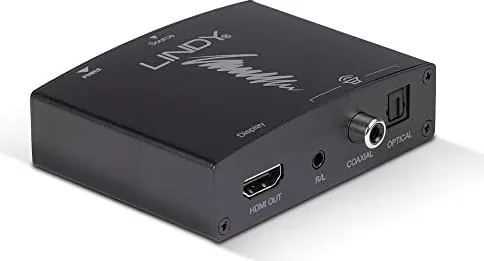
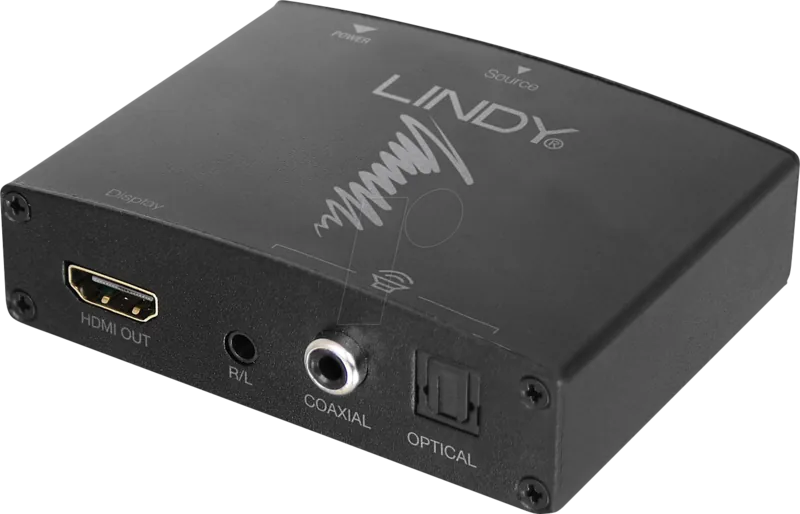
Lindy HDMI 4K Audio Extractor
The Lindy HDMI 4K Audio Extractor is a practical way to separate audio from an HDMI source without interrupting the video path. It sends the picture onward to a TV, monitor, or projector while redirecting sound to external audio gear such as an AV receiver, sound bar, or powered speakers. For anyone building a cleaner home theater or a simple presentation setup, it adds flexibility without making the system complicated.
What stands out is the mix of connection options. The unit supports HDMI audio pass-through, plus optical, coaxial, and 3.5 mm analogue outputs, so it can fit both newer and older audio systems. That makes it useful in mixed-environment installs where one device may need digital surround sound while another works best with basic stereo. The Lindy HDMI 4K Audio Extractor Manual also highlights EDID management, which helps the source and display agree on the right signal format for smoother operation.
Compatibility is another strength. The extractor supports HDMI 1.4 and HDCP 1.4, common HDTV resolutions up to 4K 4096/3840x2160p30, and 3D video modes. On the audio side, it handles LPCM, Dolby Digital, Dolby Digital Plus, Dolby TrueHD, DTS, and DTS-HD. In practice, that means it can work with simple streaming devices, game consoles, media players, and more advanced AV setups with equal ease.
Setup is straightforward: connect the HDMI source, the display, and the audio system, then power the unit using the included USB DC cable. LED indicators make it easy to confirm when power is present and when a valid HDMI signal is being received. Once active, the extractor can output audio to multiple interfaces at the same time, giving users more freedom to choose how they listen.
For blog readers comparing compact AV accessories, this product feels like a smart middle ground between convenience and control. It helps eliminate weak display speakers, keeps video routing simple, and offers enough flexibility to support many everyday installation needs. Whether the goal is better movie sound, a neater conference setup, or a more reliable audio path, it delivers a focused solution.
Notes
- Analogue output is limited to LPCM sources.
- Dolby and DTS formats are handled through digital outputs.
- EDID switches can change the source’s available audio and video options.
- Best placed between the source and display, or before a splitter in multi-display setups.
Search for 67,706 Manuals online


Type-in Brand or Model
neque23
9 months ago
Does this device actually work reliably and do what it is supposed to?
Manual.ly
9 months ago
Yes. Customer feedback consistently describes it as a great device that works as intended. If you notice any issues, please check the basics first: correct power/setup, using the right accessories (if applicable), and following the included instructions. If something is still not working properly, contact support with your order details so we can help troubleshoot or arrange a replacement if needed.