
Lindy DST-Pro 5K XT 43349 Manual
PDF manual · 20 Pages
English



Quick check
Incorrect answer, please try again.
Chat with your Lindy DST-Pro 5K XT 43349 manual using AI
Get instant AI answers from your Lindy DST-Pro 5K XT 43349 manual
Ask anything about the Lindy DST-Pro 5K XT 43349. Answers come from this manual, with the pages they are based on.
Ask a Question
Do you recommend DST-Pro 5K XT 43349?
Yes NoFrequently Asked Questions
It is a USB-C docking station that expands a laptop or tablet into a more complete workstation. It connects displays, USB devices, Ethernet, audio gear, and memory cards through one compact hub.
Is this answer helpful?
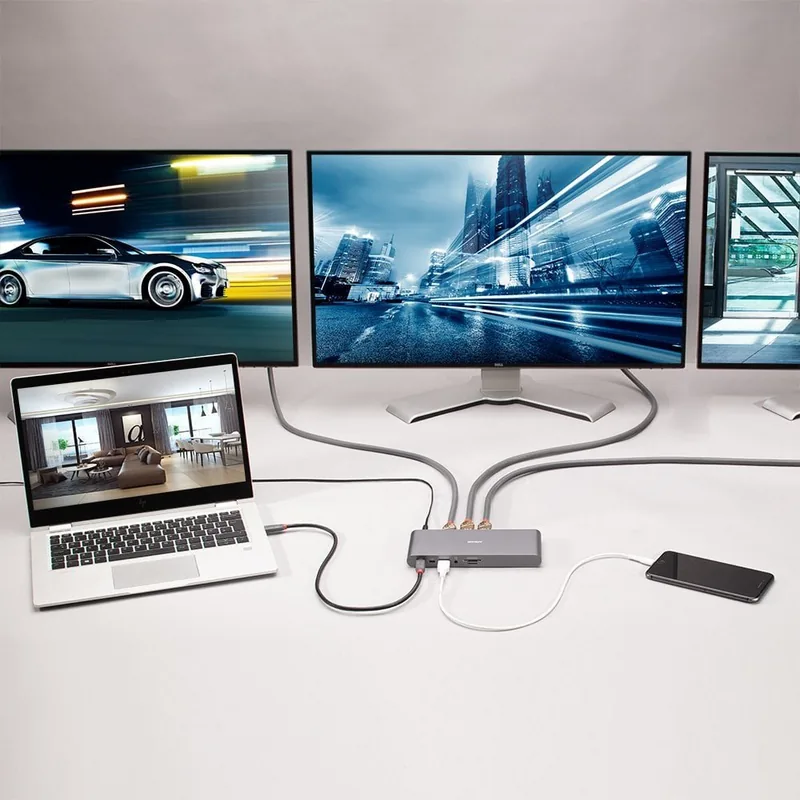
Yes. It can connect HDMI and DisplayPort displays, and the setup supports up to three monitors depending on resolution and connection type. Single-screen performance offers the highest resolution options.
Is this answer helpful?
Yes. With USB Power Delivery, it can supply up to 100W to a compatible laptop when paired with a suitable USB-C PD charger. The dock itself also needs its included power supply.
Is this answer helpful?
It works with computers that have USB-C or Thunderbolt 3/4 ports and support DisplayPort Alternate Mode. That requirement is important because video output depends on it.
Is this answer helpful?
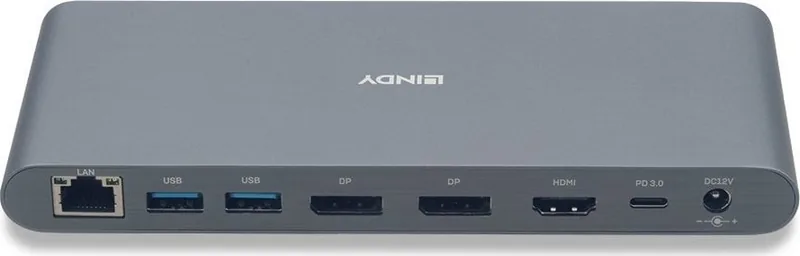
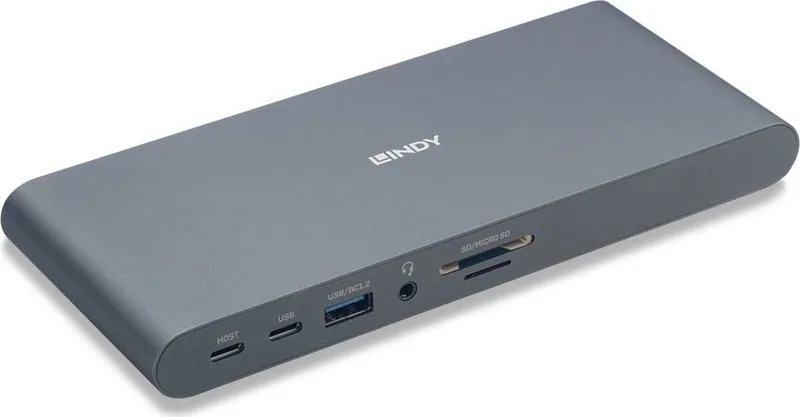
It includes USB Type A and Type C ports, Gigabit Ethernet, HDMI, DisplayPort, SD and microSD slots, an audio combo port, and a USB-C Power Delivery port.
Is this answer helpful?
Yes. It is especially useful for desk setups, hot-desk environments, and hybrid work. It reduces cable clutter and makes it easier to connect everyday peripherals quickly.
Is this answer helpful?
Advantages and Disadvantages
Advantages

- One USB-C cable can handle displays, data, audio, Ethernet, and charging.
- Supports high-resolution output, including 5K on DisplayPort for single-screen setups.
- Built-in 5Gbps hub, card readers, and combo audio reduce the need for extra adapters.
- 100W USB Power Delivery helps power and charge compatible laptops efficiently.
Disadvantages

- Requires a host device with DisplayPort Alternate Mode to work properly.
- The dock needs external power, so it is not a purely cable-free solution.
- Three-display setups reduce the maximum available resolution compared with single-screen use.
- Designed for indoor use only, so it is not suitable for outdoor environments.
Product Specification
Type
LAN adapter, USB hub, Video adapter, Card reader
Form factor
1x external wired
Connection
1x USB-C 3.0 (Port, 5Gb/s, USB-C with DisplayPort, USB PD 3.0), 1x USB-C 3.0 (Plug via cable, 5Gb/s, 19.69in cable length)
Connectivity
1x RJ-45, 1x USB-C 3.0 (Port), 3x USB-A 3.0 (Port), 2x HDMI 2.0 (Port), 1x DisplayPort 1.4 (Port), 1x microSD, 1x SD Card, 1x Jack (Port, 3.5mm)
Transfer
1x RJ-45 (10/100/1000Base-T), 1x USB-C 3.0 (Port, 5Gb/s), 1x USB-A 3.0 (Port, 5Gb/s, USB BC 1.2 5V/1.5A/7.5W), 2x USB-A 3.0 (Port, 5Gb/s), 1x HDMI 2.0 (Port, max. 1x 3840x2160@60Hz or 2x 3840x2160@60Hz or 3x 3840x2160@30Hz), 2x DisplayPort 1.4 (Port, max. 1x 5120x2880@60Hz or 2x 5120x2880@60Hz or 3x 3840x2160@60Hz), 1x microSD (microSD), 1x SD Card (SD Card), 1x Jack (Port, 3.5mm)
Power supply
Power supply not via connection, Power connector (Barrel jack 12V/2A/24W, USB-C 20V/5A/100W), external power supply required and included (1x Barrel plug 12V/2A/24W)
Chipset
VIA/VLI VL103R (Video adapter, USB 3.0), Realtek RTL8153B (LAN adapter, RJ-45), Genesys Logic GL3224 (Card reader, USB 3.0)
Dimensions
7.09x0.71x3.03in (WxHxD)
Weight
0.97 lb
Housing color
grey
Compatibility
universal
Features
HDCP 2.2
Manufacturer warranty
two years
USB notation
Link
Product Description
Lindy DST-Pro 5K XT USB-C 3.0 Socket Manual
The Lindy DST-Pro 5K XT USB-C 3.0 socket is a practical docking solution built for people who want a cleaner, faster workspace without giving up connectivity. In a single connection, it turns a USB-C laptop or tablet into a full desktop-style setup with displays, storage, networking, audio, and charging all available at once. For hot desks, hybrid offices, and mobile professionals, that simplicity is the real selling point.
At the center of the Lindy DST-Pro 5K XT USB-C 3.0 socket Manual concept is versatility. The dock supports HDMI and DisplayPort output, so users can connect up to three monitors depending on the setup and resolution requirements. It also includes a 4-port USB hub with both Type A and Type C connections, Gigabit Ethernet for stable wired networking, and SD/microSD card slots for quick media transfers. Add the audio combo port, and you have a compact hub that replaces a crowded desk full of adapters.
Performance is another strong point. The dock supports USB 3.2 Gen 1 speeds up to 5Gbps, while USB Power Delivery can provide up to 100W to compatible laptops when used with the right charger. The included 24W power supply is needed for the dock itself, helping ensure reliable operation when multiple peripherals are connected. It is designed for USB-C systems with DisplayPort Alternate Mode and works with many USB-C and Thunderbolt 3/4 devices.
Resolution support is impressive for a device of this class. A single DisplayPort display can reach 5120x2880 at 60Hz, while HDMI supports up to 3840x2160 at 60Hz. That makes the dock suitable for creative work, productivity, and general multitasking. Even in multi-display mode, it remains a useful space-saving upgrade for modern workstations.
Notes
- Requires a USB-C host with DisplayPort Alternate Mode.
- Full functionality depends on the included power supply and compatible laptop charger.
- Designed for indoor use and should be kept in a well-ventilated area.
- Ideal for users who value one-cable convenience and a tidy desk.
Search for 67,732 Manuals online


Type-in Brand or Model