
Lindy Cat.5 USB 1.1 42805 Manual
PDF manual · 2 Pages
English



Quick check
Incorrect answer, please try again.
Chat with your Lindy Cat.5 USB 1.1 42805 manual using AI
Get instant AI answers from your Lindy Cat.5 USB 1.1 42805 manual
Ask anything about the Lindy Cat.5 USB 1.1 42805. Answers come from this manual, with the pages they are based on.
Ask a Question
Do you recommend Cat.5 USB 1.1 42805?
Yes NoFrequently Asked Questions
The maximum cable length is 50 meters using standard Cat.5 UTP or STP cables.
Is this answer helpful?
It is designed for USB 1.1 specifications and guarantees 12 Mbps Full Speed. It may not support higher USB 2.0 speeds.
Is this answer helpful?
No, the Cat.5 network cable is not included in the product package and must be purchased separately.
Is this answer helpful?
The maximum number of hubs is five including the extender. No extra hubs are allowed when using a 50m cable.
Is this answer helpful?
The product includes a two-year manufacturer warranty from Lindy Electronics and free lifetime technical support.
Is this answer helpful?
No, the extender does not support the USB 50 microamp maximum Suspend Mode current limit.
Is this answer helpful?
The operational temperature range is zero to forty degrees Celsius. Storage is minus forty to eighty-five degrees.
Is this answer helpful?
Advantages and Disadvantages
Advantages

- Extends USB distance up to 50m with Cat.5 cabling
- Guaranteed Full Speed 12 Mbps data transfer rate
- Includes two-year warranty and lifetime support
- Compatible with standard UTP or STP network wires
- Works with Low Speed devices up to 100m
Disadvantages

- Does not support USB 2.0 or higher speeds
- Network cable not included in the product package
- Cannot use additional hubs when cable is 50m
- High current devices need their own power supply
- Does not meet full USB specification requirements
Product Specification
Type
USB Extender over RJ-45 (164.04 ft)
Ports
1x USB-A 1.1 (Plug, Transmitter), 1x USB-B 1.1 (Jack, Receiver)
Color
Silver
Warning
Network cable not included!
USB Designation
Link
Product Description
Lindy USB-Extender Overview
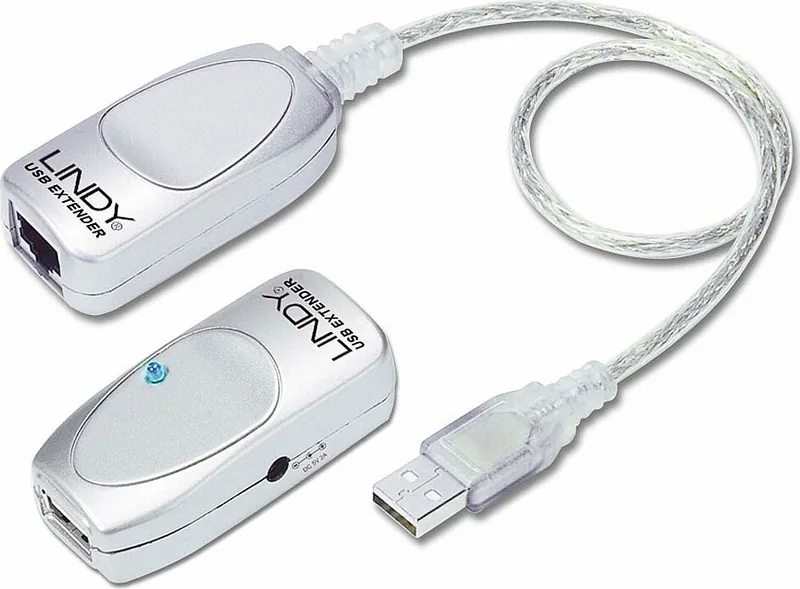
Discover the reliability and functionality of the Lindy USB-Extender via RJ-45, USB 1.1, active, up to 50m. This active extension cable system addresses the common limitation of the five-meter USB standard. By utilizing Cat.5 networking infrastructure, users can bridge distances of up to fifty meters between a host computer and a peripheral device. This solution is ideal for scenarios where mounting points are distant from the system tower. The local unit features a standard male USB Type A connector for the host environment. The remote unit contains the female counterpart for the device attachment. This kit is manufactured by Lindy Electronics with the model number 42805. The manufacturer is based in Mannheim and Stockton-on-Tees.
Performance Specifications
The product guarantees Full Speed data transfer rates of 12 Mbps over the specified length. Although USB 1.1 is older technology, it remains relevant for input devices and low-bandwidth tools. Some low-speed peripherals like mice might extend to 100 meters, but verification is required per device. The system counts signal degradation against hub equivalents. Twenty meters equals two hubs, thirty meters equals three hubs, and fifty meters equals five hubs. The total hub count from computer to device cannot exceed five. This calculation ensures signal clarity and prevents data loss during transmission.
Installation Guidelines and Constraints
When deploying the full fifty-meter cable length, no additional active extension cables can be introduced into the chain. Connecting high current devices such as external hard drives or modems requires an independent power supply. The extender itself draws approximately twenty milliamperes during operation. It does not meet the maximum Suspend Mode current limit of 50 microamperes. Users should connect to an exclusive USB port to prevent bus malfunction. The device does not fully meet all USB specifications and may not register on the bus correctly if limits are ignored. Failure to follow this may disrupt the USB bus functionality entirely. Please consider these limitations carefully before deployment.
Environmental and Regulatory Data
Operational temperatures range from zero to forty degrees Celsius. Storage temperatures span from minus forty to eighty-five degrees Celsius. The equipment complies with FCC Class B digital device limits. It is manufactured under RoHS compliance standards. WEEE regulations apply in the EU for disposal. Batteries must be separated from the unit before recycling. A two-year manufacturer warranty covers this product. Lifetime technical support is available free of charge from Lindy Electronics. The company operates in Germany and the United Kingdom. Please refer to national laws for electronic waste.
Conclusion
This extender simplifies cabling management while extending reach. Proper adherence to the hub count rules ensures stability. Remember to check device compatibility for long-distance low-speed operations. Keep the cable straight and undamaged for best results. Avoid exposing the unit to extreme static electricity. Read the information carefully to ensure correct usage and retain it for future reference. The goal is trouble-free operation for years. Always use standard network cables up to 50 meters. Do not use extensions beyond the five hub limit. The standard network cable is not included in the package.
Search for 67,732 Manuals online


Type-in Brand or Model